Nodes with Multiple Occurrences
This topic explains how MapForce processes nodes that can have multiple occurrences. Throughout this section, we refer to these nodes as sequences. MapForce applies the following rules to sequences:
•If a source sequence is connected to a target node, MapForce iterates over the sequence and generates one target node occurrence for each source node occurrence. •If a filter is applied, MapForce evaluates the filter condition for each item in the sequence and maps only the items for which the condition evaluates to true. •If a source sequence is empty, no corresponding target nodes are generated. |
Exceptions
The following exceptions apply to the sequence-processing rules.
Exception 1
If the target item is an XML root element, it is always created only once. If you connect a source sequence to the root element, multiple root elements cannot be generated, which may result in an XML document that does not conform to the schema. If attributes of the root element are also connected, XML serialization fails at runtime. Therefore, avoid connecting sequences to the root XML element.
Exception 2
If the target item can contain only a single value, only one value is written to the target. Examples of such items are XML attributes, database fields, and simple-output components.
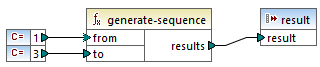
For example, the mapping below uses the generate-sequence function to generate a sequence of three integers (1, 2, 3). Since the simple-output component accepts only a single value, only the first integer is written to the output. The remaining values are ignored.
Exception 3
If the source schema specifies that an item can occur only once, but the source data contains multiple occurrences, MapForce may use only the first occurrence. To disable this behavior, clear the check box Enable input processing optimizations based on min/maxOccurs in the component settings.
Connecting sequences with function inputs
If sequences are connected to more than one function input, the mapping generates the Cartesian product of the input sequences. This means that every item in one sequence is combined with every item in each of the other sequences. This can result in unexpected data structures, performance issues, or unintended calculation results.
When you use a function with multiple inputs, connect a sequence to only one input. Connect all remaining inputs to single-value items.
If a function receives an empty sequence as input, it returns an empty result and produces no corresponding output.
Sample files
You can use the following mappings to test sequences:
•MapForceExamples\ArticlePricing.mfd
•MapForceExamples\ExcelColumnsToRecords.mfd
•MapForceExamples\ExcelWith2Dimensions.mfd
•MapForceExamples\FindHighestTemperatures.mfd
•MapForceExamples\OfficeAddressFromLines.mfd