Run Taxonomy Package Manager
In Altova's desktop products, you can access Taxonomy Package Manager via its GUI or CLI at any time. In Altova's server products, you can access the GUI during the installation procedure and the CLI at any time.
Graphical User Interface
You can access the GUI of Taxonomy Package Manager in any of the following ways:
•During the installation of MapForce: Towards the end of the installation procedure, select the check box Invoke Altova Taxonomy Package Manager to open the Taxonomy Package Manager GUI straight away. This will enable you to install packages during the installation process of your Altova application.
•After the installation of MapForce: After your application has been installed, you can access the Taxonomy Package Manager GUI at any time, via the menu command Tools | Taxonomy Package Manager.
After the Taxonomy Package Manager GUI (screenshot below) has been opened, already installed taxonomies will be shown selected. If you want to install an additional taxonomy, select it. If you want to uninstall an already installed taxonomy, deselect it. After you have made your selections and/or deselections, you are ready to apply your changes. The packages that will be installed or uninstalled will be highlighted and a message about the upcoming changes will be posted to the Messages pane at the bottom of the Taxonomy Package Manager window (see screenshot).
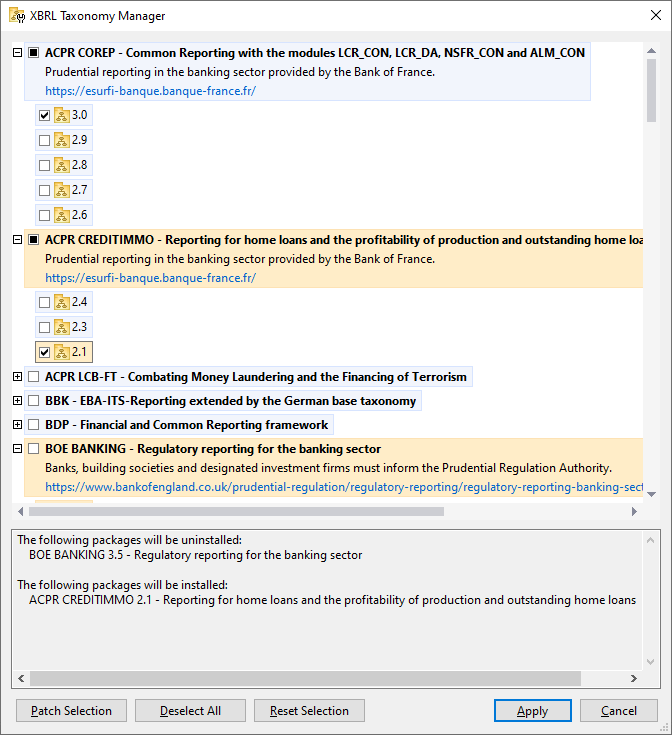
When you click Apply, the selected packages will be installed.
Note: If, during validation of an XBRL document, packages are found to be missing, then you are prompted to install the missing packages. When you click Install, the progress of the installation is displayed in a simplified Taxonomy Package Manager dialog. If there is an error (for example, a connection error), then an error message will be displayed in the dialog. In this case, fix the error and then click the Advanced button, check the taxonomy selection, and retry with Apply.
Command line interface
You can run Taxonomy Package Manager from a command line interface by sending commands to its executable file, taxonomypackagemanager.exe.
The taxonomypackagemanager.exe file is located in the following folder:
•On Windows: C:\ProgramData\Altova\SharedBetweenVersions
•On Linux (server applications only): %INSTALLDIR%/bin, where %INSTALLDIR% is the program's installation directory.
You can then use any of the commands listed in the CLI command reference section.
To display help for the commands, run the following:
•On Windows: taxonomypackagemanager.exe --help
•On Linux (Altova server applications only): sudo ./taxonomypackagemanager --help