to-regex
Creates a BSON regular expression (as a bson:regex) from a search pattern and a string of matching rules (options).
Languages
Built-in
Parameters
Name | Type | Description |
|---|---|---|
pattern | xs:string | A UTF-8 string that defines the regular expression pattern used for matching. |
options | xs:string | A string of flags that determines matching behavior. These characters should be provided in alphabetical order (e.g., 'im' instead of 'mi') to ensure consistent BSON representation. |
Options
The following options are supported:
•i (Case-insensitive): Matches both upper- and lowercase letters (e.g., A matches a).
•m (Multiline): Makes anchors ^ and $ match the start and end of each line, rather than the start and end of the entire string.
•s (Dotall): Allows the dot (.) character to match everything, including newline characters.
•u (Unicode): Enables Unicode support for shorthand character classes like \w (word characters) and \d (digits).
•x (Verbose): Ignores whitespace within the pattern and allows for comments (starting with #), which makes complex patterns easier to read.
Example
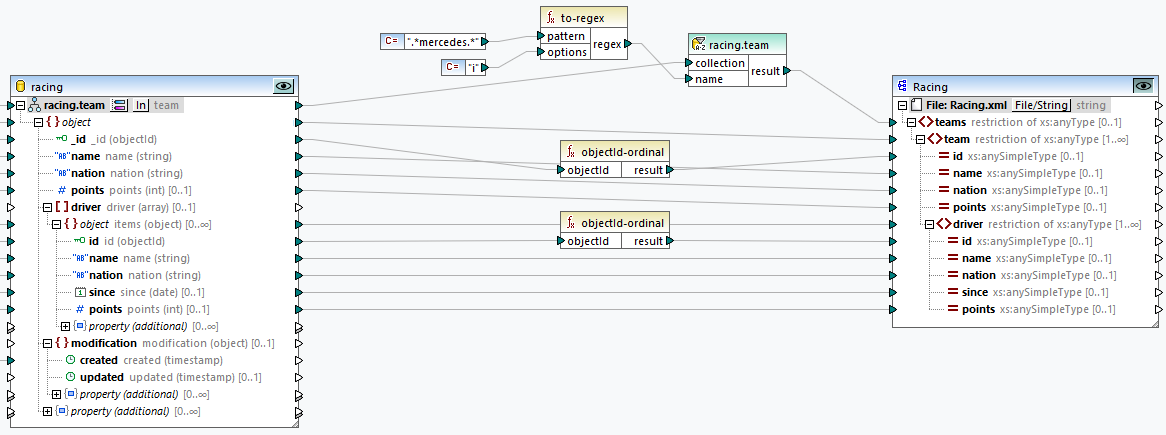
This example shows how to use the to-regex function to filter MongoDB data (see screenshot below). Our goal is to filter information about racing teams and output only those teams with "Mercedes" in their names:
1.First, we set the SQL/NoSQL WHERE/ORDER component as follows:
oFilter:
{
"name" : @name
}
oThe name parameter is defined as a regex type because it receives the BSON regular expression from the to-regex function.
oThe filtered results are set to be sorted by the name field in ascending order.
2.Second, we add the to-regex function and define its parameters:
oPattern: .*mercedes.*, where .* matches any character zero or more times.
oOptions: i, which means the search is case-insensitive.
3.Third, we connect the result of the to-regex function to the name parameter of the SQL/NoSQL WHERE/ORDER component to execute the search.
As a result, we get the following output:
<teams> <team id="305" name="Aston Martin Aramco Mercedes" nation="UK" points="94"> <driver id="109" name="Fernando Alonso" nation="ES" since="2024-01-01T00:00:00" points="58"></driver> <driver id="110" name="Lance Stroll" nation="CA" since="2024-01-01T00:00:00" points="36"></driver> </team> <team id="301" name="McLaren Mercedes" nation="UK" points="666"> <driver id="101" name="Lando Norris" nation="UK" since="2024-01-01T00:00:00" points="282"></driver> <driver id="102" name="Oscar Piastri" nation="AU" since="2024-01-01T00:00:00" points="384"></driver> </team> <team id="304" name="Mercedes" nation="DE" points="468"> <driver id="107" name="Lewis Hamilton" nation="UK" since="2024-01-01T00:00:00" points="240"></driver> <driver id="108" name="George Russell" nation="UK" since="2024-01-01T00:00:00" points="228"></driver> </team> <team id="309" name="Williams Mercedes" nation="UK" points="17"> <driver id="117" name="Alexander Albon" nation="TH" since="2024-01-01T00:00:00" points="12"></driver> <driver id="118" name="Logan Sargeant" nation="US" since="2024-01-01T00:00:00" points="5"></driver> </team> </teams> |