Context and Processing Order
Context determines what source data and intermediate results are available to the current target node and its descendants.
MapForce establishes the current context starting at the target root node. This is where mapping execution begins. After processing the target root node, MapForce progresses down the target hierarchy, evaluating each node and its descendants. For each target node, MapForce traces the connections back to the source component(s), including any intermediate processing components such as functions and filters.
When a target node is evaluated, MapForce establishes a context that inherits the source nodes and intermediate results available in the parent context. Sibling target nodes are evaluated independently of one another, but each inherits the source data available in the parent context. For details about parent context, see Parent Context.
For more information about the fundamental rules of mapping execution, see Basic Rules and Strategies.
Processing order in multiple targets
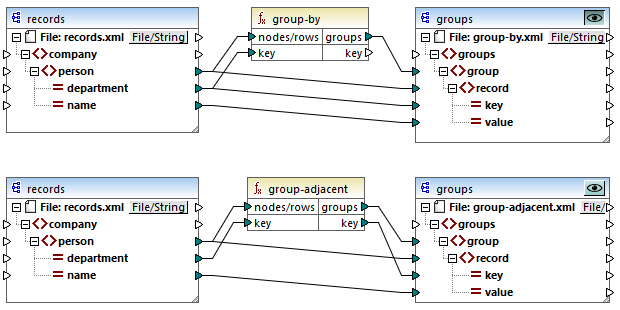
When a mapping has multiple target components, you can preview the output of only one component at a time. In order to do this, click the  Preview button of a target component of interest (screenshot below).
Processing order in MapForce Server and generated code
In other execution environments (MapForce Server and generated code), target components are executed sequentially, and the output of each component is produced.
By default, target components are processed from top to bottom and from left to right. You can influence this order by changing the position of target components in the mapping window.
Chained mappings
Repositioning the intermediate or final target component of a single chained mapping has no effect on the processing order. For more information about chained mappings, see Tutorial: Chained Mapping.
Example
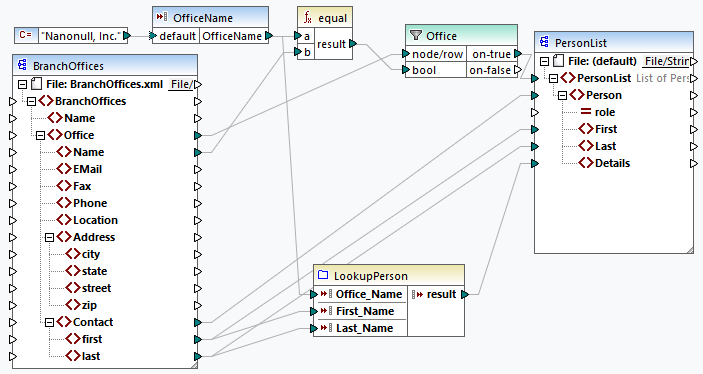
To put the principles described above into practice, we will discuss the mapping shown below (MapForceExamples\PersonListByBranchOffice.mfd). The main objective of the mapping is to obtain a list of employees with their details from a particular office.
Source and target structures
In our example, the mapping contains a source XML component and a target XML component. In addition, there is a simple-input component that also acts as a source and supplies the name of the office in whose employees we are interested. The mapping also features various data-processing components such as a filter and some functions.

<BranchOffices xmlns:xsi="http://www.w3.org/2001/XMLSchema-instance" xsi:noNamespaceSchemaLocation="BranchOffices.xsd"> <Name>Nanonull</Name> <Office> <Name>Nanonull, Inc.</Name> <EMail>office@nanonull.com</EMail> <Fax>+1 (321) 555 5155 - 9</Fax> <Phone>+1 (321) 555 5155</Phone> <Address> <city>Vereno</city> <state>CA</state> <street>119 Oakstreet, Suite 4876</street> <zip>29213</zip> </Address> <Contact> <first>Vernon</first> <last>Callaby</last> </Contact> <Contact>...</Contact> <Contact>...</Contact> <Contact>...</Contact> <...> </Office> <Office> <Name>Nanonull Partners, Inc.</Name> <EMail>nextoffice@nanonull.com</EMail> <Fax>+1 (927) 555 1845</Fax> <Phone>+1 (927) 555 0094</Phone> <Address> <city>Brenton</city> <state>MA</state> <street>9865 Millenium Center, Suite 456</street> <zip>5985</zip> </Address> <Contact> <first>Steve</first> <last>Meier</last> </Contact> <Contact>...</Contact> <Contact>...</Contact> <...> </Office> </BranchOffices> |
Context and processing order
Processing begins at the target root node called PersonList. We can trace the connection back via the filter and the equal function to the source element called Office. As MapForce proceeds from the root node to its descendants, each target node is evaluated in the context established by its parent node.
Single office as context for the target
Because the connection from the Office element to the PersonList element passes through a filter, only the data that satisfies the Boolean condition is mapped to the target. This condition is satisfied only once because there is only one office called Nanonull, Inc. in the source XML file. Consequently, the connection from the PersonList element through the filter to the Office element defines a single office as the context for the entire target document. This means that all further connections to the descendants of the root element will have access only to the data of the Nanonull, Inc. office, and data from any other office will be excluded from the current context.
One Person for each Contact
The next connection is between the Contact and Person elements. According to the main mapping rule, this connection will create one target Person for each source Contact. On each iteration, this connection establishes the current Contact for the connections to the children of the Person element. Therefore, the child connections (first to First, last to Last) will select the first and last names of the current Contact element and write them to the target.
User-defined function
The mapping also includes a user-defined function called LookupPerson. The user-defined function is also executed in the context of each Person because of the parent connection between Contact and Person. Each time a new Person element is created on the target side, the function is called to populate the Details element of the Person element.
The function takes three input parameters: the office name, the first name, and the last name. Internally, the function concatenates the values received as arguments and produces a single value.
For more information about how the LookupPerson function is configured, see Look-Up Implementation.
If parents are not connected
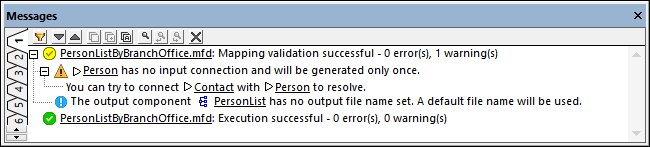
If the connection between the Contact and Person elements is not established, the first and last elements in the source file will be evaluated in the context of the Office element. Because there is only one office satisfying the filter condition, the mapping will create only one target Person element and populate it with all the first and last elements of all the contacts from Nanonull, Inc.
In such cases, MapForce displays a warning in the Messages window (screenshot below) and suggests connecting the parent nodes to resolve the issue.
For more information about context, see Parent Context and Priority Context.