Priority Context
Priority context lets you influence which input of a function establishes the current context during mapping execution. Depending on the mapping structure, you can set a priority context to change the order in which values are processed and influence which source data remains available in the current context.
To set priority context for a function, right-click an input connector of the function and select Priority Context from the context menu. The input connector designated as the priority context becomes encircled.
Case 1: Controlling the order of generated combinations (sequences)
When multiple function inputs receive sequences, priority context determines the order in which the output combinations are generated.
Processing without priority context
In the mapping below, the concat function receives two inputs. Each function input is a sequence generated by the generate-sequence function. If sequences are connected to more than one function input, the mapping generates the Cartesian product of the input sequences.
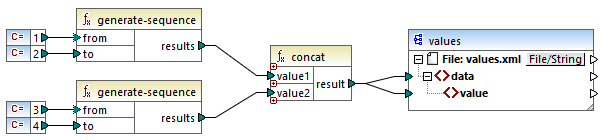
By default, MapForce processes the first function input before the second. As a result, MapForce combines the values as follows:
<data> |
Processing with priority context
The mapping below shows that the priority context has been set on the second input connector of the concat function. This means that MapForce processes the second input sequence first.
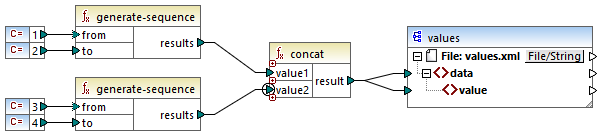
Thus, priority context changes only the order in which combinations are generated. It does not change the combinations themselves. The output is shown below.
<data> |
Case 2: Controlling the current context when combining data from multiple sources
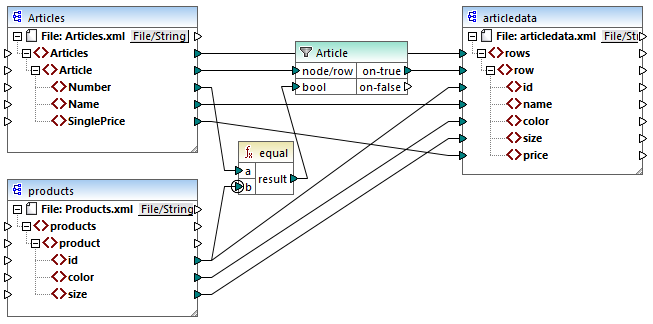
The aim of the mapping below is to copy data from Articles.xml into a new XML file with a different schema, articledata.xml. The mapping looks up the details of each article in Products.xml and maps them to the corresponding article record.
The contents of Articles.xml and Products.xml are shown below.
<Articles> <Number>1</Number> <Name>T-Shirt</Name> <SinglePrice>25</SinglePrice> </Article> <Article> <Number>2</Number> <Name>Socks</Name> <SinglePrice>2.30</SinglePrice> </Article> <Article> <Number>3</Number> <Name>Jacket</Name> <SinglePrice>57.50</SinglePrice> </Article> |
Articles.xml
<products> <id>1</id> <color>red</color> <size>10</size> </product> <product> <id>2</id> <color>blue</color> <size>20</size> </product> |
Products.xml
Each record in Articles.xml has a Number, and each record in Products.xml has an id. The equal function checks if the article number and the product ID are the same. The result is then supplied as input to the filter. If true, the values of the Name, SinglePrice, id, color, and size elements are copied to the target.
The priority context is defined on the second input parameter of the equal function. This translates to the following mapping logic:
•For each product, MapForce establishes the current product as the context for the equal function.
•Because priority is given to the data supplied from Products.xml, a new target row is created for each product that satisfies the filter condition.
•For each Article, MapForce evaluates the equal function in the current product context. If the filter condition is true, the corresponding article and product details are mapped to the target.
•Because the Articles and rows elements are connected, the mapping traces the connection back to a specific article with each iteration and copies only this article's details to the target.
The output is shown below.
<rows> <row> |
No priority context
Without the priority context set on the equal function, MapForce processes the mapping as follows:
•For each Article, MapForce establishes the current article as the context for the equal function.
•Each product is evaluated in the context of the current Article.
•The filter compares the current Article with each product. If the filter condition is true, a target row is created.
•Because the product element is not connected to any target node, MapForce cannot read the details of a specific product and instead brings each product into the current context. As a consequence, each target row contains the id, size and color elements of all the products (in Products.xml) that satisfy the filter condition.
The output is shown below:
<rows> <row> |
Using a variable instead of priority context
Instead of priority context, you can use an intermediate variable (the component with the compute-when node below) to bring each article and product that match the filter's condition into the same context. Variables enable you to store data temporarily and change the context as necessary.
We have modified our mapping by adding a variable that has the same schema as the target component (see screenshot below).
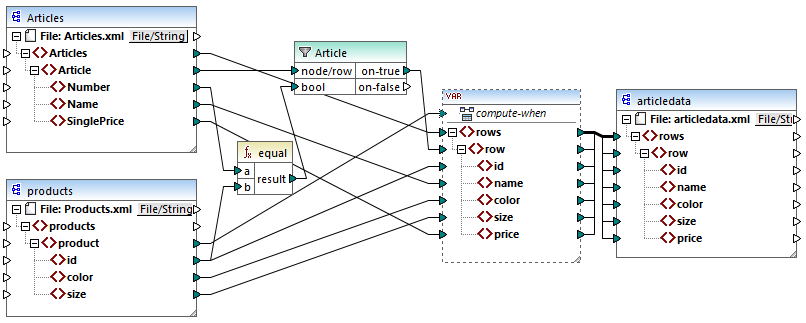
The logic of the modified mapping is as follows:
•Execution starts at the target root node.
•Before copying data to the target, the mapping collects data into the variable.
•The connection between the product element and the compute-when node causes the variable to be computed in the context of each product.
•The filter condition is thus checked in the context of each product. If the condition is true, the variable is populated with the corresponding data from both source files. Then this data is passed on to the target.