WHERE and ORDER BY Clauses
This topic explains how to use WHERE and ORDER BY clauses to filter and sort database data, respectively. WHERE and ORDER BY clauses must be entered in the SQL/NoSQL-WHERE/ORDER Properties dialog.
WHERE
To write a WHERE clause, use the syntax of the corresponding database's SQL dialect. For example, you can use operators, wildcards, as well as subqueries and aggregate functions in subqueries. To create a parameter that you can pass from the mapping, enter a colon character (:) followed by the parameter's name.
ORDER BY
To write an ORDER BY clause, specify one or more fields to sort by and optionally add an ASC or DESC keyword. If you do not specify a keyword, data is sorted in ascending order by default.
When you finish writing your clauses and click OK, MapForce checks the statement for syntax errors.
Operators
The table below lists some typical operators that can be used in the WHERE clause:
Operator | Description |
|---|---|
= | Equal to |
<> | Not equal to |
< | Less than |
> | Greater than |
>= | Greater than or equal to |
<= | Less than or equal to |
IN | Matches a value against a specified list of values |
LIKE | Matches a value against a specified pattern |
BETWEEN | Checks whether a value falls within a specified range |
Use the % (percentage) wildcard to represent any number of characters in a pattern. For example, to retrieve all records ending in "r" from a field called lastname, use the following expression:
lastname LIKE "%r" |
When you work with databases that support storing and querying XML data (for example, IBM DB2, Oracle, and SQL Server), you can use XML functions and keywords applicable to that particular database. For example:
xmlexists('$c/Client/Address[zip>"55116"]' passing USER.CLIENTS.CONTACTINFO AS "c") |
See also Example: Extracting Data from IBM DB2 XML Type Columns.
Optionally, if you want to sort the retrieved data set by a particular field, add an ORDER BY clause in the corresponding text box of the dialog SQL/NoSQL-WHERE/ORDER Properties. To sort by multiple fields, separate the field names by commas. To change the sort order, use the ASC and DESC keywords. For example, the following ORDER BY clause retrieves records ordered by lastname and firstname, both in descending order:
lastname DESC, firstname DESC |
Selecting distinct rows from a database
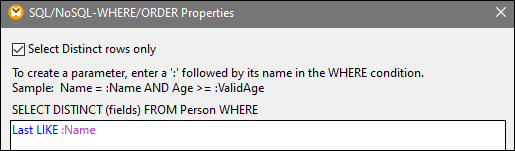
A query can return duplicate rows, depending on the selected fields and the underlying data. To have the database return only unique rows, select the Select Distinct rows only check box in the WHERE/ORDER component (screenshot below). This adds the DISTINCT clause to the SELECT statement and causes the database server to filter out duplicate rows.
Filtering data in Azure CosmosDB (Enterprise Edition)
If the name of a container in your CosmosDB has special characters (e.g., +, -, @, etc.) or is a keyword, this name will be unusable in queries, and you will get a syntax error from the database. To avoid potential issues, MapForce uses the following syntax for CosmosBD queries:
SELECT * FROM ROOT AS c WHERE c.<field> ORDER BY c.<field>
The ROOT keyword in the FROM clause references the current container you are querying. Since the ROOT keyword cannot be used to address fields in WHERE and ORDER BY clauses, the container is given the alias name c that is assigned to the container by means of the AS keyword. Assigning the alias name to the container makes it possible to filter and sort the container's contents.
Note that in the WHERE/ORDER dialog, all field references must be prefixed with the container alias name c (see example below).
SELECT * FROM ROOT AS c WHERE c.age > 20 ORDER BY c.name
Examples
Example 1
The following WHERE clause is specified for the users table of the Nanonull.sqlite database. It retrieves records where the last_name values are greater than M according to the database's string comparison rules.
last_name > "M" |

Example 2
The following WHERE clause creates a parameter Name. This parameter appears in the WHERE/ORDER component in the mapping.
last_name LIKE :Name |

The constant M% supplies the value of Name. The % wildcard represents any number of characters. This causes the mapping to retrieve all last names starting with the letter M.
Example 3
The following WHERE clause creates two parameters, min and max, to which the values of quantity are compared. The min and max values are supplied by two constants in the mapping.
quantity > :min AND quantity < :max |

The condition above does not include records where quantity is equal to the value of min or max. To include the boundary values (10 and 100), use the BETWEEN operator:
quantity BETWEEN :min AND :max |