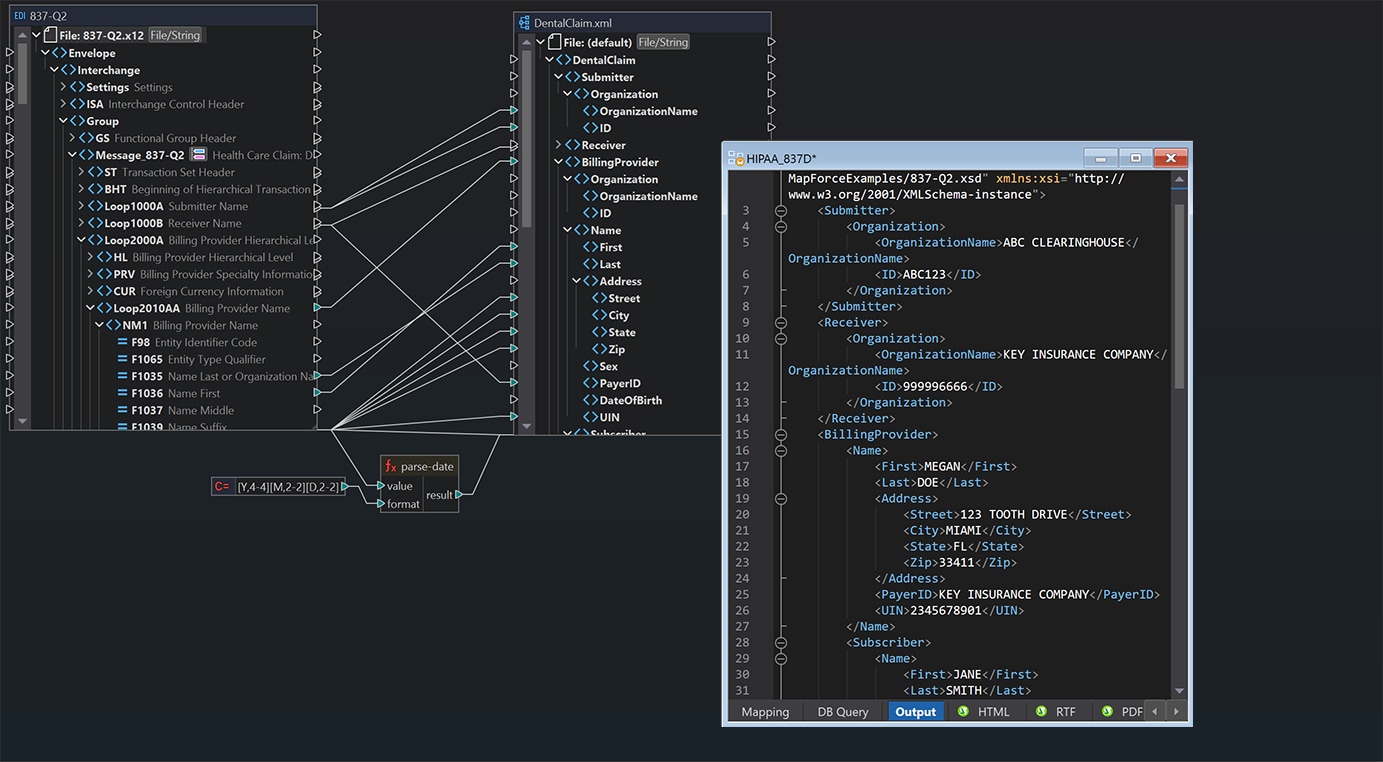
MapForce converts HIPAA X12 healthcare transactions (835 remittances, 837 claims, 834 enrollment, 270/271 eligibility) and HL7 v2.x and v3 messages into Excel, CSV, XML, JSON, or a database, using visual drag-and-drop mapping. It runs on your own machine, so protected health information never leaves it, and each conversion is saved as a mapping you can re-run.
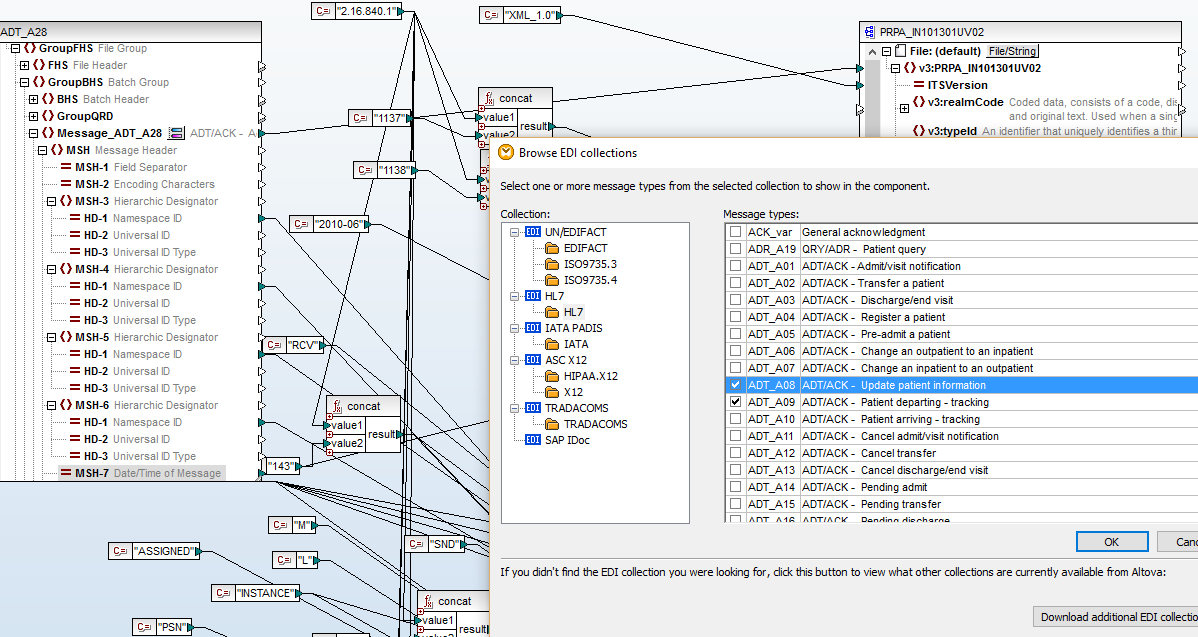
Full support for a wide range of EDI formats in MapForce allows you to use any of the hundreds of messages and transaction sets covered by these standards in your mapping design. You can even map from EDI to EDI, to, for example, convert HL7 files to an X12 format or update your legacy HL7 v2.x messages to version 3.
You can even use the optional Altova AI Assistant to automatically generate the connections from your source and target structures. This is exactly where Altova AI in MapForce helps most. It understands the meaning behind opaque EDI transaction identifiers, proposes the right connections, and lets you accept them one at a time — without making you translate the spec first.
| Set | What it is | The job people need done |
|---|---|---|
| 835 | Health Care Claim Payment/Advice — the electronic remittance advice (ERA) | Read what a payer actually paid, and why the rest was denied or adjusted. Convert to Excel or load into a database for denial analysis. |
| 837 | Health Care Claim — 837P professional, 837I institutional, 837D dental | Generate claims from a practice-management database, or convert submitted claims to a readable format for audit and reconciliation. |
| 834 | Benefit Enrollment and Maintenance | Move enrollment rosters between an employer, a broker and a payer, or reconcile a roster against an internal member table. |
| 270/271 | Eligibility, Coverage or Benefit Inquiry and Response | Turn batch eligibility responses into a spreadsheet the front desk can actually use. |
| 276/277 | Health Care Claim Status Request and Response | Track outstanding claims in bulk instead of one portal lookup at a time. |
| 278 | Health Care Services Review — prior authorization | Convert authorization requests and responses to and from internal systems. |
| 820 | Payroll Deducted and Other Group Premium Payment | Reconcile premium payments against enrollment. |
| 997 / 999 | Functional and Implementation Acknowledgment | Confirm a submitted file was received and syntactically accepted. |
If you have been handed an 835 or an 837 and told to make sense of it, the honest answer is that you do not read an X12 file — you convert it. The format was designed for one computer to transmit to another, not for a person to open. A single claim is spread across a dozen segments in nested loops, values are codes rather than words, and there are no column headers anywhere in the file.
So "reading an 835" in practice means turning it into something with rows and columns: a spreadsheet you can sort and filter, or a database table you can query. That conversion is what MapForce does, and doing it as a saved mapping rather than a one-off means the next file — next week, next payer — comes out in the same shape.
EDI to Excel or CSV
The most common request, and usually the urgent one. A billing manager needs denials by reason code, or a finance team needs payments reconciled against expected amounts. Flatten the transaction into rows and hand over a spreadsheet.
EDI into a database
The version that scales. Load 835s into claim and adjustment tables week after week and the denial analysis becomes a query rather than a project. Same for eligibility responses and enrollment rosters.
Database to 837
The reverse direction. Generate compliant claim files from a practice-management or billing database, with the mapping enforcing the structure every time.
EDI to EDI, for payer variants
Different payers accept the same transaction set with different companion-guide expectations. Map from one variant to another rather than maintaining separate export routines.
HL7 messages to and from structured data
MapForce supports HL7 v2.x and v3 as a source or target, so clinical messages can be mapped into databases, XML, JSON or spreadsheets alongside the X12 financial transactions — including between HL7 versions, which is the common job when a legacy v2.x interface has to feed a v3-based system.
MapForce includes built-in support for HL7 v2.x and HL7 v3 as either the source or the target of a mapping. Messages can be mapped into a database, into XML or JSON, into a spreadsheet, or from one HL7 version into another — v2.x to v3 being the mapping most often asked for, since v3 is XML-based and v2.x is not.
FHIR is a separate HL7 specification from the v2.x and v3 messages listed above. MapForce does not include a dedicated FHIR component, but FHIR resources are represented as JSON or XML, and MapForce maps any JSON or XML vocabulary from its schema — so a FHIR resource can serve as a mapping source or target the same way any other schema-defined format can.
A claim file that's structurally wrong doesn't fail quietly — it comes back rejected, and the payment slips a cycle. These features exist to catch that before the file leaves your office, and to handle the fact that no two payers populate a transaction set quite the same way:
X12 identifiers are terse by design. CLP, CAS, SVC and the loops they sit in carry precise business meaning, but nothing in the name tells you what that meaning is. Traditionally you cannot connect a single field until you have cross-referenced the implementation guide — which makes every healthcare EDI mapping dependent on someone who already knows the format.
Altova AI understands what those identifiers mean and proposes the connections for you. Suggestions are created as a first draft you review: accept or decline each one, then commit the ones you want. If a pass leaves fields open, you can ask again for just those fields rather than finishing them by hand.
It suggests transformation functions as well as connections, so code lookups and value conversions are part of the draft rather than work left over afterward. What you end up with is a standard MapForce mapping — one you can inspect, refine, and compile for MapForce Server like any other.
Altova AI for MapForce is available as an add-on subscription.
MapForce is desktop software. An 835 or an 837 is read from your own disk and written back to it. There's no upload, no third-party service holding the file, no vendor to add to a data inventory for a conversion. For a billing office weighing whether to paste a remittance file into a web converter, that is the whole question.
For automated conversions, MapForce Server executes the same mapping on infrastructure you control.
MapForce is a data mapping and conversion tool, not a clearinghouse and not a practice-management system. It does not submit claims to payers, hold a trading-partner connection, or manage the revenue cycle. It converts, validates and generates the files those systems exchange, and automates that conversion so it runs without a person.
“It's not often one encounters a solid software company in the EDI space but Altova with [their] support has truly impressed us.”
An 835 is the Health Care Claim Payment/Advice transaction, also called the electronic remittance advice or ERA. A payer sends it to a provider to report what was paid on submitted claims, what was adjusted, and what the patient owes.
It is a file of coded segments rather than a document, so it is normally converted into a spreadsheet or a database table before anyone reads it.
Yes. Map any supported X12 transaction — 835, 837, 834, 270/271 and others — to an Excel or CSV target by connecting the segment fields to columns.
Because the mapping is saved as a file, the same conversion runs again on next week’s files without being rebuilt.
MapForce reads and writes HIPAA X12 transaction sets and validates them against the standard, which is the translation function. It is not a clearinghouse and does not transmit files to payers.
Use it alongside your existing submission route, and automate the conversion with MapForce Server where it needs to run without a person.
MapForce supports HL7 v2.x and HL7 v3 as the source or target of a mapping.
Messages can be mapped to databases, XML, JSON or spreadsheets, or from one HL7 version to another. Mapping v2.x to v3 is the conversion most often needed, since v3 is XML-based and v2.x is not.
FHIR is a separate HL7 specification from the v2.x and v3 messages MapForce supports. There is no dedicated FHIR component in MapForce.
FHIR resources are represented as JSON or XML, and MapForce maps any JSON or XML vocabulary from its schema, so a FHIR resource can serve as a mapping source or target the same way any other schema-defined format can.
Yes. MapForce uses an editable EDI configuration file format, so transactions can be added or adjusted to match how a particular payer populates a transaction set.
Altova AI helps here too: because it analyzes your actual file, its suggested connections reflect how that payer populates the transaction in practice rather than what the standard permits in theory.
Yes. Altova AI analyzes your source and target structures, decodes cryptic X12 labels, and proposes both the connections and the transformation functions between them. You accept or decline each suggestion individually, or apply them all at once.
Altova AI is a subscription purchased in addition to your MapForce license and requires a Support and Maintenance Package.
Yes. Compile the mapping for MapForce Server and schedule it with FlowForce Server so files convert on arrival or on a fixed schedule.
A whole folder of files can be processed in a single run, which is how most billing teams end up using it.