Support for differencing in MapForce makes it easy to see exactly what changed between two versions of the same mapping project. When you initiate a comparison, MapForce displays the differences visually, directly in the graphical mapping environment. New or removed connections, modified data processing functions, and changed components all stand out at a glance.
Color coding makes it easy to understand every change:
- Green: Added in new version
- Red: Removed from new version
- Yellow: Changed properties
- Pink: Changes to node's descendants
When you hover over a change in the Mapping Difference pane, MapForce highlights it in the mapping, and vice versa.
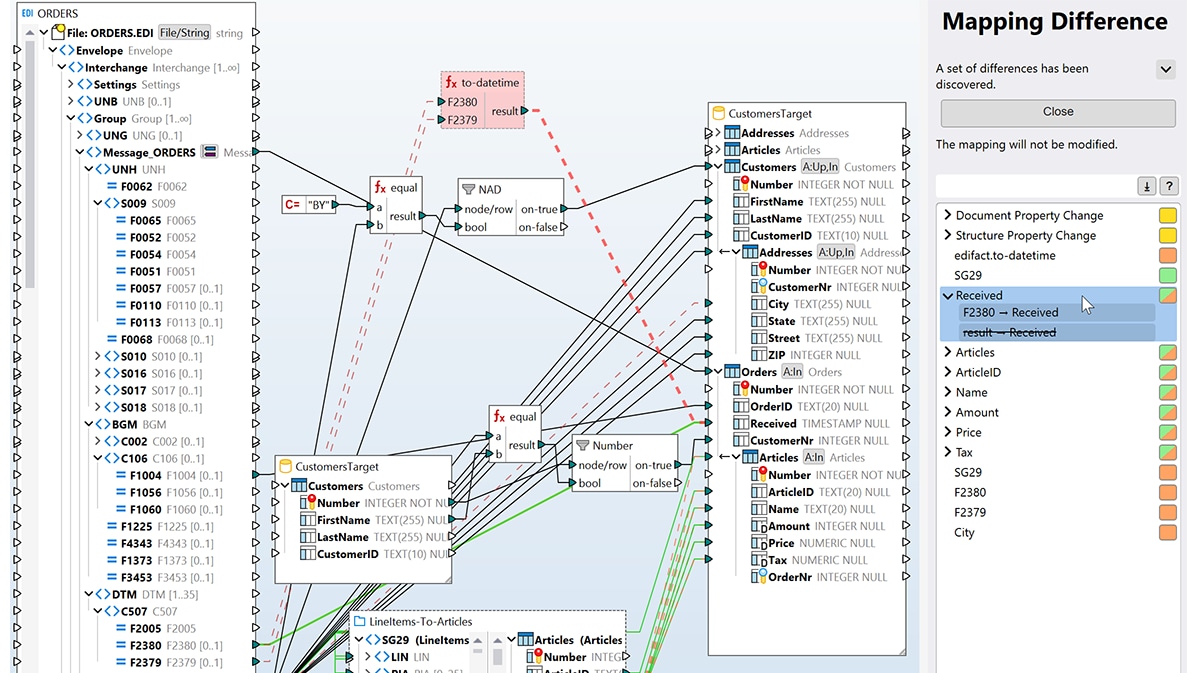
Because you review changes in the same visual form you designed them in, you can quickly:
- Review a colleague's edits before they go into production
- Confirm a change did what you intended
- Pinpoint when and where a mapping started producing different results
You can also export the comparison as an XML diff report for documentation or further processing.


