Moving data from one database to another is one of the most common jobs in data management, whether you're consolidating systems after a merger, retiring a legacy platform, standardizing on a single database vendor, or moving a desktop database into a server database. Altova MapForce is a database migration tool that handles these conversions through a visual, drag-and-drop interface, with no migration scripts to write by hand.
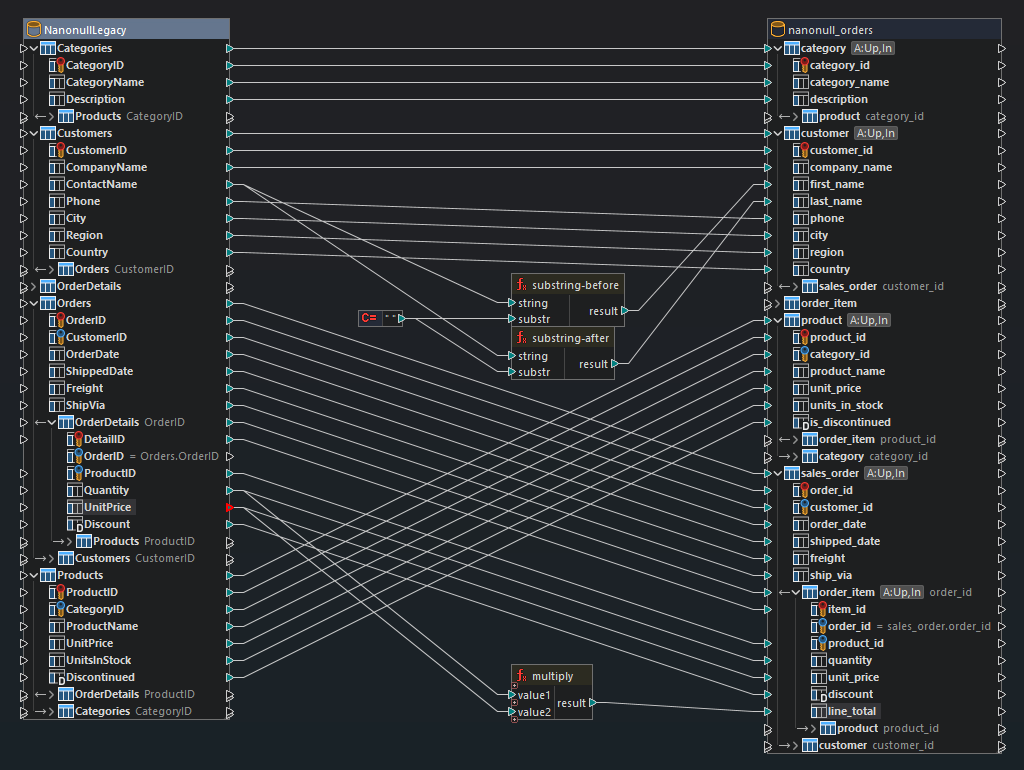
MapForce connects to your source and target databases, reads both schemas automatically, and lets you define the migration rules by drawing connections between the tables and columns on each side. Because the source and target are mapped explicitly, you are not limited to identical schemas: you can rename columns, split or combine fields, convert data types, filter rows, and reshape the target structure as part of the same migration.
Supported relational databases:
Supported NoSQL Databases:
Any supported database can act as the source, the target, or both. This means the same tool covers every source-to-target combination in the list above, rather than a single fixed migration path.
It's easy to define a DB migration project using visual, drag-and-drop data mapping tools in MapForce. You can even start with Altova AI to get suggested connections after loading your source and target structures.
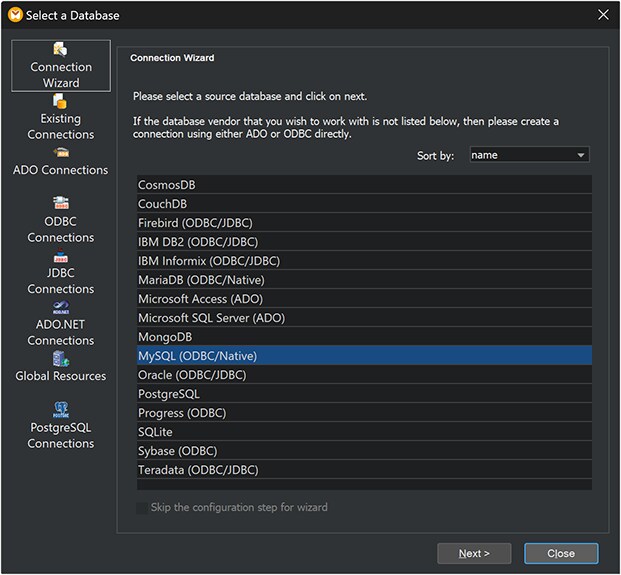
1. Connect to the source database. The Database Connection Wizard walks through the connection. SQLite connections are supported as native, direct connections to the database file, with no separate drivers required. Other databases connect natively or through standard interfaces including ODBC, JDBC, ADO, and ADO.NET.
2. Connect to the target database. MapForce loads the target schema the same way and displays the available tables, views, and relationships.
3. Map the tables and columns. Drag connecting lines from source to target, or start with Altova AI. MapForce recognizes table relationships automatically, so related tables carry their structure into the mapping.
4. Transform the data as needed. Insert filters, conditions, and data processing functions between source and target to convert types, reformat values, concatenate or split fields, and exclude rows you don't want to migrate.
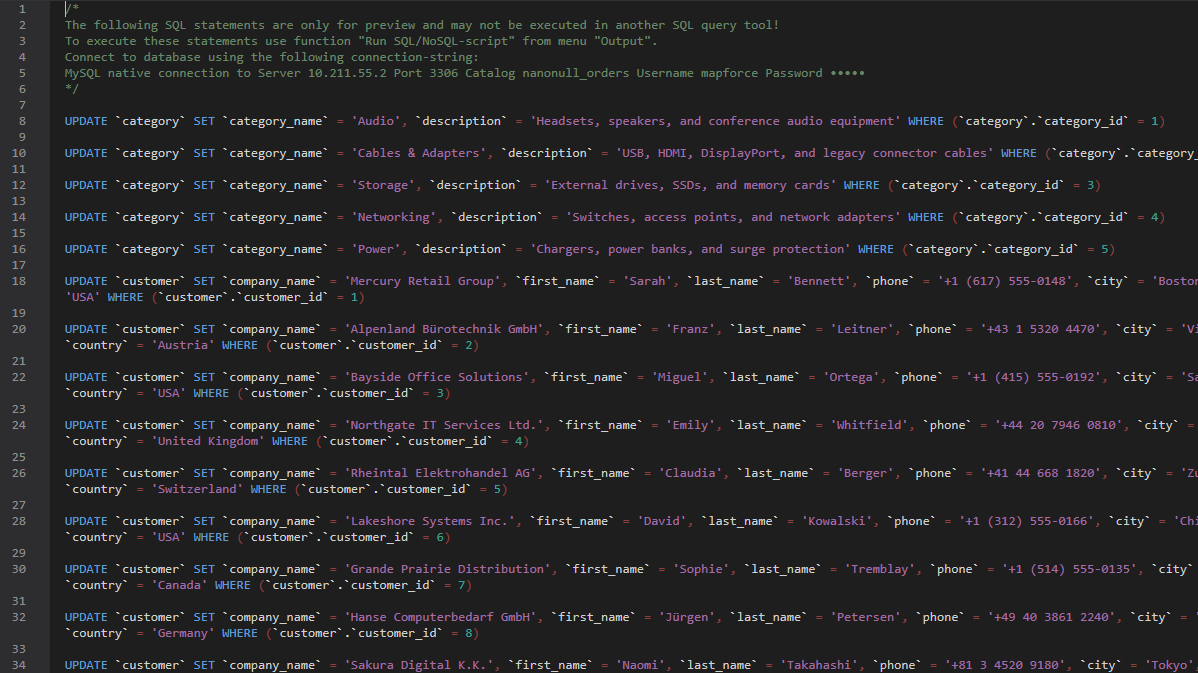
5. Preview and run. The built-in MapForce Engine lets you preview the SQL scripts — SELECT, INSERT, UPDATE, and DELETE statements — on the Output tab before executing them against the target database.
Several of the most frequently required database-to-database migration tasks are described below. The same approach applies to any other combination of supported databases.
Organizations moving off Oracle to PostgreSQL need to move table data across two engines that name and type their columns differently. Using the Database Connection Wizard, MapForce connects to Oracle through JDBC or ODBC and to PostgreSQL through a native connection or a driver-based connection. It loads both schemas into the mapping pane, where you can drag and drop (or invoke Altova AI) to connect Oracle tables to their PostgreSQL counterparts.
It's just as easy to drag and drop data processing functions to convert values between Oracle and PostgreSQL data types, reshape date and timestamp formats, and handle NULL values in a NULL-aware manner according to the rules of the databases involved. Database key settings let you decide whether primary and foreign key values come from the Oracle source or are generated by PostgreSQL on insert.
Migrating MySQL to PostgreSQL is one of the most common conversions MapForce is used for. Once both database structures are loaded, MapForce interprets each schema, exposes the available tables and views, and recognizes the relationships between them. Complete the migration by dragging connecting lines between the source and target structures and adding data processing functions wherever MySQL and PostgreSQL types or conventions differ.
Because the mapping is saved as a reusable design, the same MySQL to PostgreSQL migration can be re-run whenever the source data changes, for example, during a phased cutover or as a recurring load.
SQLite databases are frequently used for local or embedded storage and later need to move into a shared MySQL server.
SQLite's flexible typing is the main thing to plan for in this migration: values that SQLite stores loosely need to be mapped to explicitly typed MySQL columns. MapForce data processing functions perform that conversion inside the mapping, so correctly typed values are written to the MySQL target.
When migrating from MSSQL to MySQL, MapForce handles the schema differences between the two engines as part of the mapping: column renaming, type conversion, and value formatting are all done graphically rather than in migration scripts. Table actions give you control over how the data is mapped. You can choose INSERT, UPDATE, or DELETE per table, and define which columns MapForce uses to determine whether a target row already exists.
Access databases that have outgrown the desktop are usually migrated to SQL Server. MapForce connects to Microsoft Access and SQL Server through ADO, loads both schemas, and lets you map Access tables and queries onto SQL Server tables.
Access and SQL Server differ in data types, key handling, and naming rules. Mapping the conversion visually makes those differences explicit and lets you correct them once, in the mapping, rather than repeatedly in the data. Database key settings determine whether AutoNumber values from Access are carried over or replaced by SQL Server identity values.
Converting an ACCDB file to SQLite moves an Access database into a lightweight, file-based format that runs anywhere. MapForce reads the Access database through ADO and writes to the SQLite file through a native connection. As with any MapForce migration, the source and target schemas do not have to match. You can flatten, rename, or subset the Access structure when transforming it to SQLite.
MariaDB and MySQL are closely related, but a migration between them still needs data types, keys, and any diverging column definitions accounted for. Where the schemas are identical, the mapping is a straight set of connections; where they differ, the same filters and functions used in any other migration path apply.
MapForce also migrates data out of relational databases into NoSQL DBs including MongoDB, CouchDB, and Microsoft Azure Cosmos DB. Relational rows and their related tables are mapped into document structures visually, so a normalized SQL schema can be reshaped into documents as part of the migration rather than in a separate transformation step.
Most real migrations are not a straight column-for-column mapping. MapForce includes a library of data processing functions for logical comparisons, mathematical computations, string manipulation, and date and time handling, plus filters and conditions that control which rows reach the target.
This means you can migrate a subset of the source data, merge two source columns into one target column, split a single source column across several target columns, look up and substitute values, or apply business rules during the migration, all within the same visual mapping.
Database Key Settings
MapForce database key settings let you customize how primary and foreign key values are added to the target database during a migration. You can provide key values from within MapForce, preserving the identifiers used in the source system, or let the target database system handle auto-value generation.
Define Database Table Actions
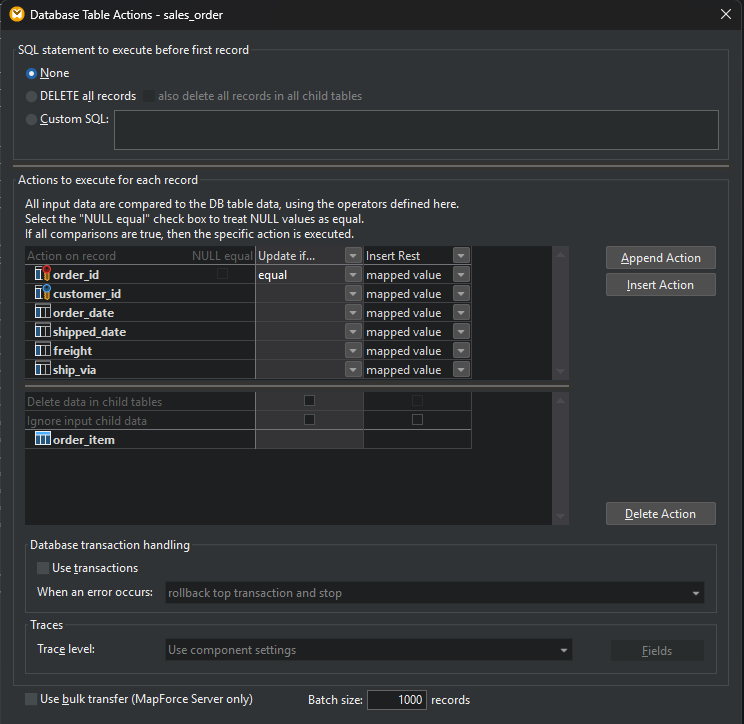
The Database Table Actions dialog controls how data is written to each target table. Select which action (INSERT, UPDATE, DELETE) should be executed and define the columns MapForce uses to match target records. The dialog supports NULL value comparison, so a migration can be configured to compare data in a NULL-aware manner according to the rules of the database involved.
Support for SQL Stored Procedures
MapForce includes support for stored procedures as input or output components, or as function-like calls — supplying input data, executing the procedure, and mapping the output data to other components. Stored procedures can also be used to generate key values during a migration.
Database Output Logging / Tracing
Database output tracing logs all the changes a migration makes when it runs. With tracing on, events such as database insert or update actions, and errors, are written to an XML file you can analyze afterward or process further. Output logging is useful for producing a record of what was migrated.
Database Transaction Error Handling
MapForce offers database transaction handling to roll back the affected part of a database conversion when an error is thrown, and optionally proceed with the rest of the mapping. This keeps a partial failure from leaving the target database in an inconsistent state.
Query Databases Directly
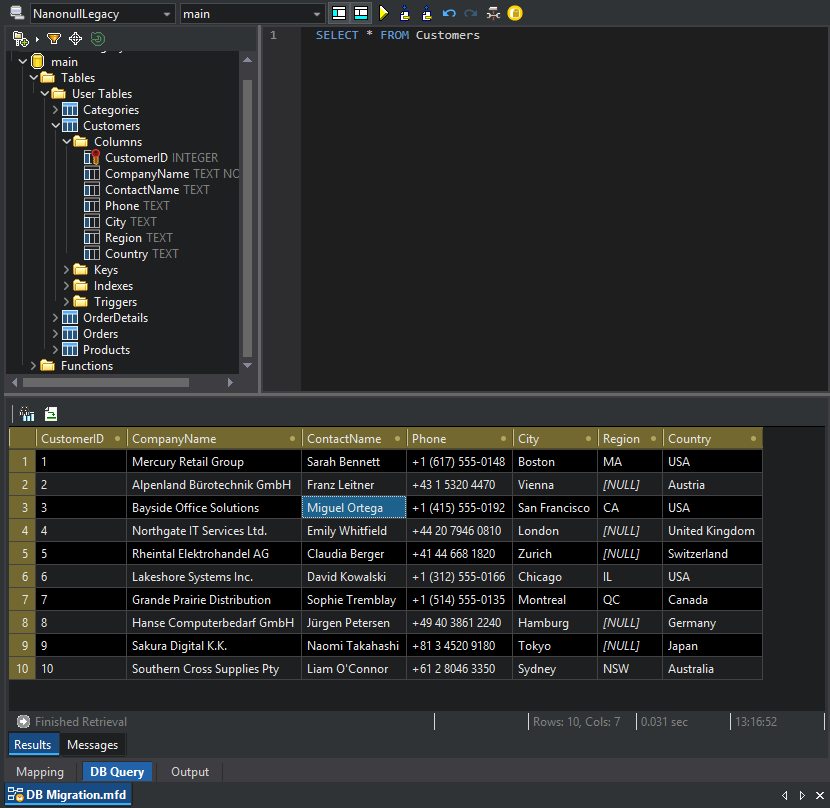
The Database Query tab lets you run SQL against the source or target database from inside MapForce, with a full SQL editor. This is useful for inspecting source data before designing the mapping and for verifying results in the target after the migration runs.
Sort Database Input Components
For migrations that require input data in a particular order, the SQL-WHERE/ORDER component provides additional sorting and filtering options for database input components.
Once a migration mapping is designed and tested in MapForce, Altova MapForce Server provides high-performance automation invoked from the command line, programmatically via an API, or as a job step managed by FlowForce Server based on defined triggers and schedules.
MapForce Server includes parallel processing and multi-threading, bulk SQL insert, and cross-platform support, so large migrations and repeated loads run faster than they would interactively. For a phased migration where the same tables move repeatedly until cutover, this turns a one-time mapping into a repeatable, scheduled operation.