Python
When you use custom Python libraries in MapForce, you may need to specify the path to a Python home directory in the Python section of the Options dialog (see screenshot below).
By default, MapForce attempts to detect a suitable Python installation automatically. For OS-specific information, see the subsections Windows and Linux below.
The custom path added in this dialog box will take priority over any other Python path detected automatically.
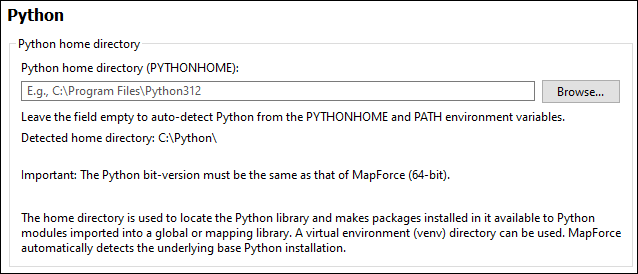
Note the following:
•The MapForce platform (32-bit, 64-bit) must be the same as that of Python.
•You can use a virtual environment (venv) directory. MapForce automatically detects the underlying base Python installation.
•After changing the Python path, you may need to restart MapForce for the new settings to take effect.
Overriding Python home via MapForce Server
If you execute a mapping containing custom Python functions with MapForce Server, you can set a Python home directory using the --py option of the run command. This overrides the automatically detected Python home directory. For details, see the MapForce Server documentation (https://www.altova.com/documentation#mapforceserver).
Windows
On Windows, MapForce searches for a Python installation in the following order:
1.The location specified by the %PYTHONHOME% environment variable.
2.The directories listed in %PATH%, by looking for python.exe or python3.exe.
After finding a Python installation, MapForce also locates the Python dynamic library (DLL). It looks for the DLL in the Python home. If Python is installed in a virtual environment, MapForce checks the Python home specified in pyvenv.cfg.
Linux
On Linux, MapForce searches for a Python installation as follows:
1.MapForce first locates the Python executable. If the $VIRTUAL_ENV environment variable is set, MapForce uses the python3 executable in that virtual environment. Otherwise, it uses python3 and lets the system locate the executable.
2.Then MapForce runs the Python executable to determine the Python home, the location of the Python dynamic library, and the Python executable path. This information is used to initialise Python.