Point-and-click, visual XBRL tagging
The Altova XBRL Tagging solution makes it easy to tag yearly financial statements according to ESEF or US GAAP requirements using intelligent, visual tools.
Point-and-click, visual XBRL tagging
The Altova XBRL Tagging solution makes it easy to tag yearly financial statements according to ESEF or US GAAP requirements using intelligent, visual tools.
Manually tagging financial reports for XBRL compliance can be extremely difficult due to the complexity of XBRL taxonomies, frequent regulatory updates, and the technical nature of the process. Choosing the correct tag from thousands of options requires both accounting expertise and a deep understanding of XBRL structures. On top of that, much of the data to be tagged may appear in footnotes or embedded in narrative sections, making it even harder to identify and apply the right tags by hand.
The Altova XBRL Tagging solution makes this process dramatically easier by letting users apply tags directly to a familiar view of the source document — like a PDF, HTML, or JPEG version of the financial report. To support customers worldwide, it allows tagging reports to comply with ESEF requirements in the European Union and US GAAP in the United States.
Simply upload your organization's yearly financial statement and use the point-and-click interface to tag data or text blocks with XBRL concepts. The XBRL Tagging solution will do the rest, allowing you to generate XBRL reports without needing to manage the underlying technical syntax.
The easy-to-use, no-code interface allows you to:
The Altova XBRL Tagging solution supports tagging annual financial statements according to both ESEF and US GAAP requirements to generate conformant iXBRL filing documents.
Altova XBRL Tagging generates reports compliant with the two most widely used XBRL frameworks in the world, allowing users to work in US GAAP mode or ESEF mode.
Intro to XBRL Tagging
The US GAAP taxonomy is developed by the Financial Accounting Standards Board (FASB) for public companies filing with the U.S. Securities and Exchange Commission (SEC). It enables digital reporting of financial data prepared under U.S. Generally Accepted Accounting Principles. Companies can use the Altova XBRL Tagging solution to prepare filing reports in iXBRL according to US GAAP regulations.
The XBRL Tagging solution includes built in tools for creating US GAAP compliant reports. Here's how easy it is to get started:
Tagging US GAAP XBRL Data
The ESEF (European Single Electronic Format) taxonomy is based on IFRS and mandated by ESMA for annual financial reporting by companies listed on EU-regulated markets.
The XBRL Tagging app makes it easy to meet compliance requirements for submitting financial statements in iXBRL according to the ESEF taxonomy. EU-regulated companies can start their report by uploading the extension taxonomy relevant for their location and business. Here's how it works:
Tagging ESEF XBRL Data
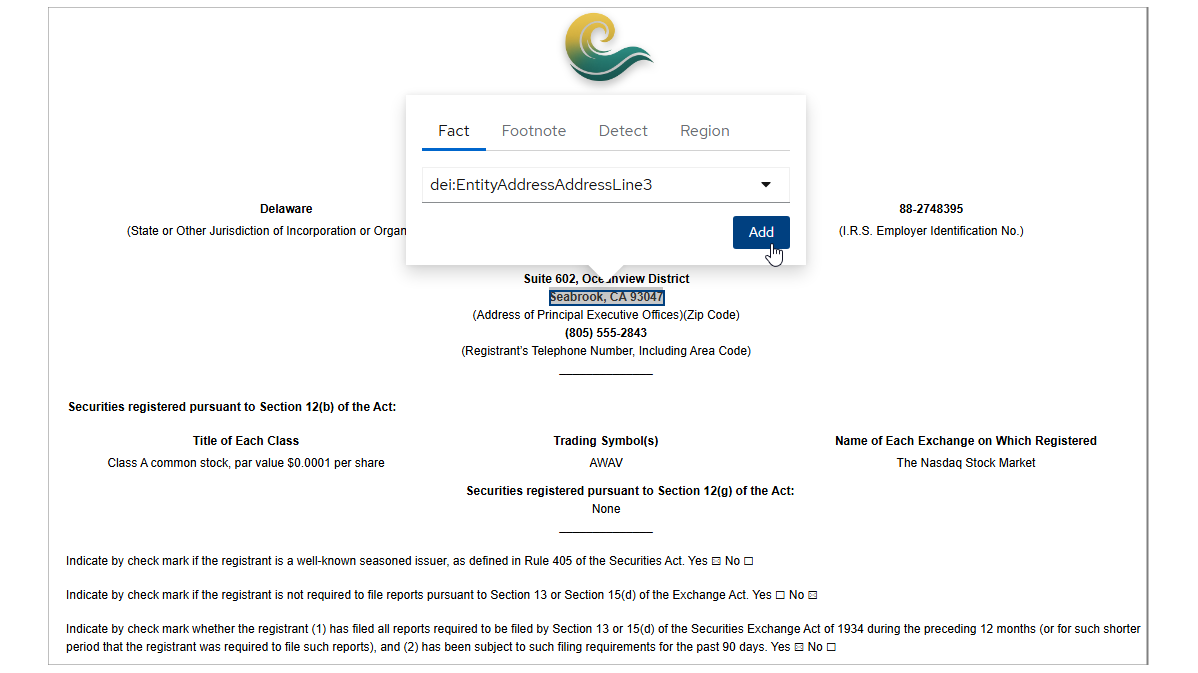
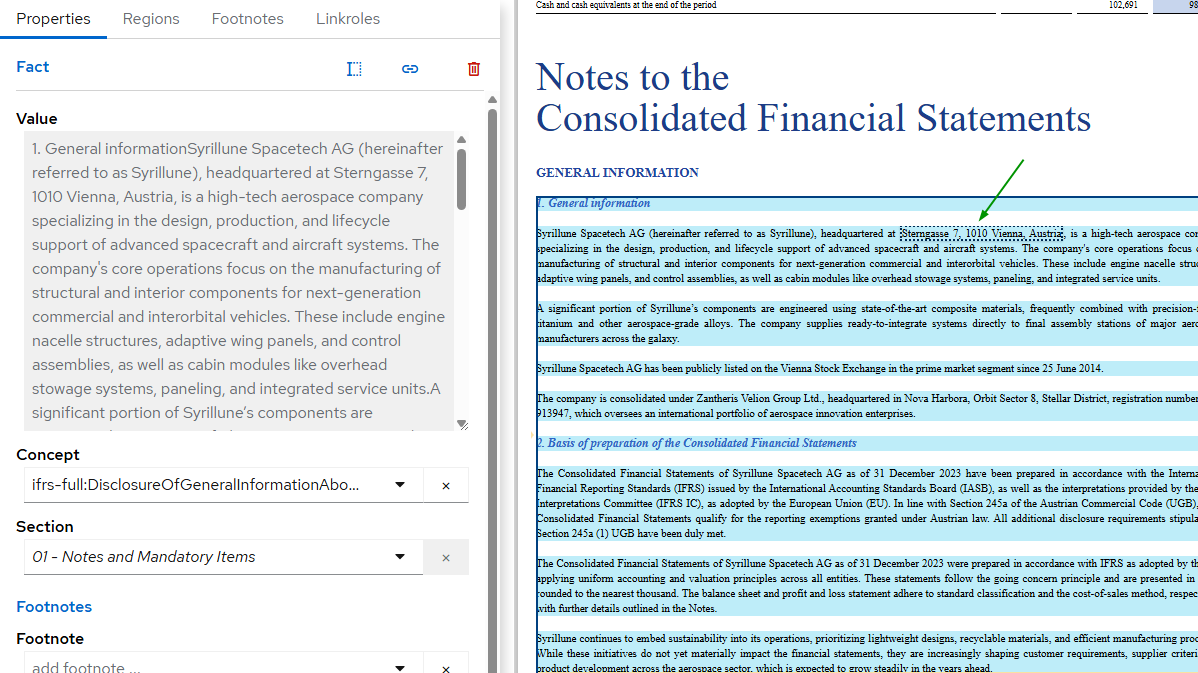
In the narrative sections of reports, there are usually multiple text values and blocks that need to be tagged. The XBRL Tagging app lets you flexibly select regions by highlighting them and then assigning the correct section value in the Properties tab. Facts within the region will automatically inherit the properties of the region. Next, text within the region can be tagged, and text nested within the block (such as the address of the entity’s registered office highlighted below) can also be tagged with the appropriate concept as needed.
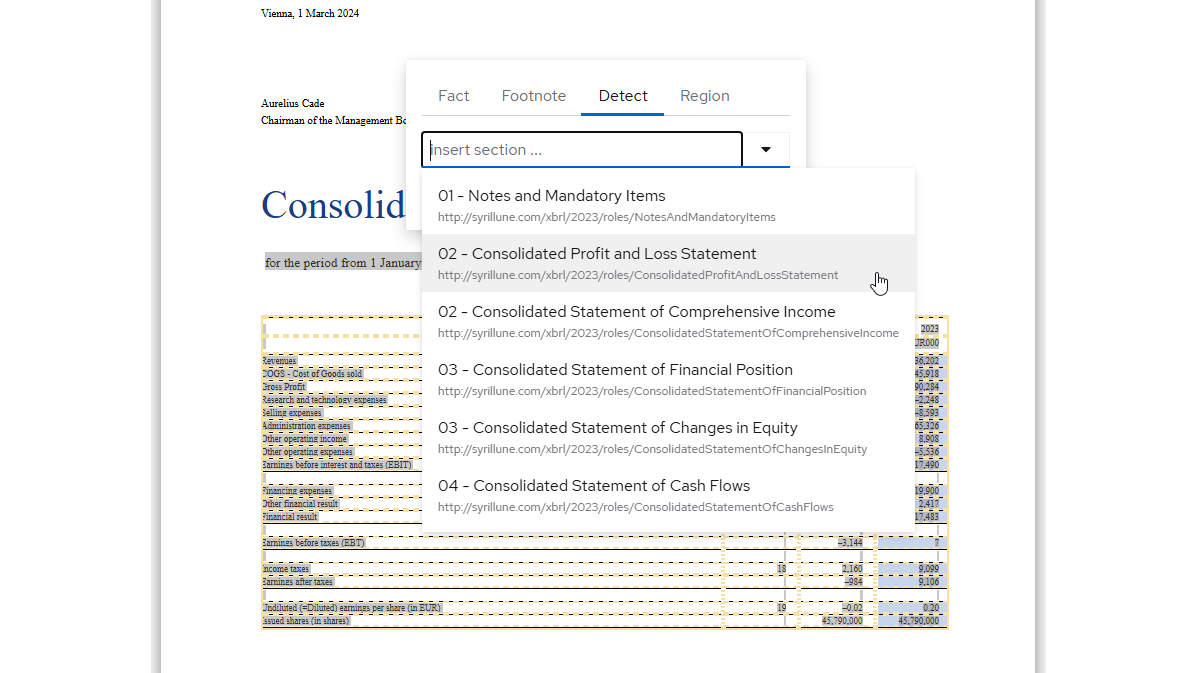
Whether you are tagging ESEF or US GAAP data, automatic table detection makes it easy to get started. Simply click anywhere in a table and select Detect. XBRL Tagging highlights the table, and you can select the corresponding linkrole from the pre-populated list.
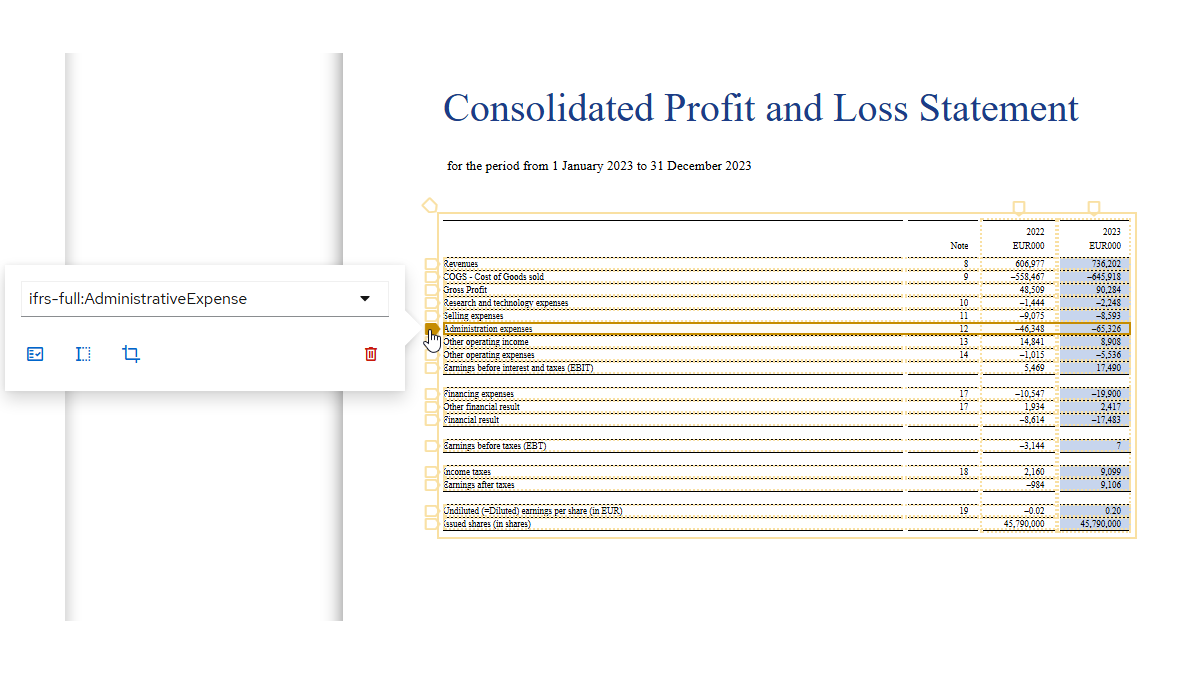
The XBRL Tagging solution automatically detects concepts and periods present in the table, and you can review the accuracy by hovering over any fact.
After a quick review, you can tag all facts in a table at once: Simply hover over the table region and select Add Facts. This saves significant time compared to tagging each fact individually.
Of course, for complex tables that cover, for example, more than one period, facts can be tagged individually as necessary.
After tagging, you can review the properties of any fact in detail in the Properties tab.
Whether your report contains simple tables or highly complex layouts with multiple dimension members, the Altova XBRL Tagging solution streamlines the process with straightforward visual tools that make even the toughest structures easy to tag. The videos above walk your through how to get started.
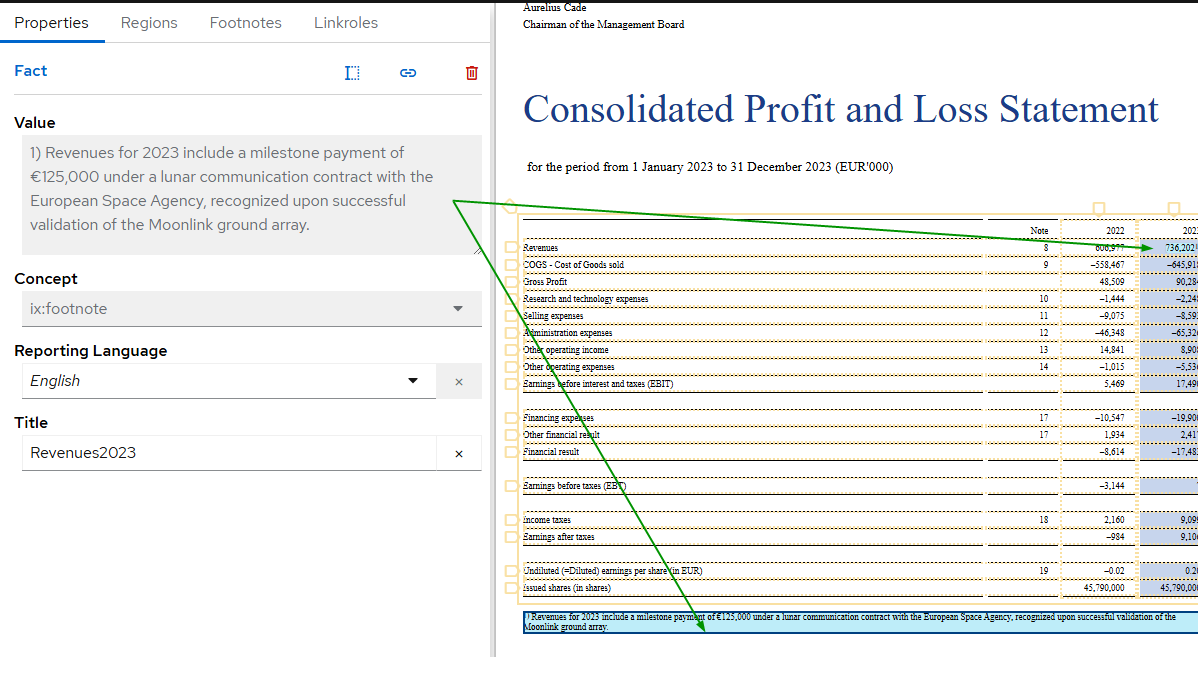
Despite attempts to automate the process, tagging footnotes accurately remains one of the more nuanced and error-prone aspects of XBRL report preparation. The Altova XBRL Tagging solution makes footnote tagging easy with a few quick clicks. Simply select the footnote, give it a descriptive title, and then select the fact it applies to.
Once you upload your untagged financial statement and taxonomy, select a portion of the report to start tagging. Based on your selection, a searchable pop-up menu driven by the underlying taxonomy gives you valid options to tag an individual fact or footnote, select a region to give it common properties, and auto-detect tables.
For auto-detected tables, tags are automatically assigned by the XBRL Tagging solution based on the concept you associate with the table.
As you work, the Details pane on the left-hand side of the visual interface shows the Properties of the tagged fact in the main window, the regions created in the document, footnotes created in the document, and the linkroles defined by the taxonomy. When you tag a fact in the document with a concept, that concept shows up in its Linkrole in the Details pane and is displayed in bold. The Linkroles tab therefore shows which tags have been assigned (bold) and which still need to be assigned, and lets you navigate to a fact by clicking the item in the Details pane. Clicking any item (including properties, regions, and footnotes) takes you to that item in the document and vice versa: clicking in the document highlights the item in the Details pane.
Once your report is tagged, the Altova XBRL tagging solution generates an XBRL report according to the specified US GAAP or ESEF taxonomy. To ensure your filing report is valid, any validation errors are displayed with relevant information in the messages window for easy troubleshooting. When you are finished tagging, click the Export button and the XBRL Tagging solution generates your report in XBRL.
Though XBRL syntax is very complicated, the visual XBRL Tagging solution from Altova makes working with it much easier — even for financial pros without deep technical expertise. The Altova XBRL Tagging solution is a purely visual tool for quickly and precisely tagging financial statements for XBRL reporting. The solution allows you to point and click to work with all the components of an XBRL report, including:
In XBRL reporting, a fact is a piece of reportable data, such as a number or a selection of text, that is tagged with an XBRL concept. An XBRL concept is a precisely defined term (e.g., assets, revenue, number of employees) within a reporting taxonomy that enables computers to understand the meaning of the data being reported. Facts may be numeric (like monetary amounts or percentages) or non-numeric (like entity names or dates).
Properties define characteristics of a fact to place it in context. Common properties include:
A region is the area on a document that contains a fact. For instance, a table cell in a balance sheet containing "Inventory - $500,000" can be tagged as a region and associated with a fact.
Footnotes are additional descriptive information that is associated with facts, commonly used for narrative disclosures or explanatory notes. Footnotes can be linked to one or more facts using XBRL linkbase structures.
A linkrole is a way to specify the type of connection between items in an XBRL taxonomy, enabling consistency and comparability across different reports. Types of linkroles include presentation, calculation, definition, and label.
In XBRL tagging, facts are the core data points being reported. Each fact is identified using a concept, enhanced with properties to add context, and optionally linked to a footnote for further explanation. Regions tie the fact back to its visual location in the source document, helping ensure traceability and review. Meanwhile, linkroles define how these various elements (especially concepts) relate to one another logically — whether by hierarchy, calculation, or grouping.
Though these concepts can be complicated in practice, visual tools in the Altova XBRL Tagging solution make it easy to manage and visualize relationships and tag data accurately.