The Complete Guide to XML Editing
If you work with data, configuration files, web services, financial reports, or structured content, there’s a good chance you’ve encountered XML. Whether you’re building APIs, managing enterprise data, or handling XBRL documents, XML remains one of the most ubiquitous data formats in professional computing. But editing XML effectively is a different story. In this guide, we’ll walk you through what XML editing really means, why it matters in 2026, and how the right tools can transform your workflow.

Why XML Still Matters
This is Part 1 of our 5-part series on XML editing. Check out Part 2 and stay tuned for future installments.
First, let’s address the question: why are we talking about XML in 2026? Hasn’t JSON taken over? The answer is nuanced. While JSON has become dominant for web APIs and lightweight data exchange, XML remains the standard for enterprise integration, financial services, content management, and regulated industries. Here’s where XML truly shines:
Financial Reporting: European agencies, the SEC, and international regulators require XML- and XBRL-based filings for bank, public companies, and other regulated industries.
Enterprise Data Exchange: Large organizations rely on XML for EDI, SOA, and integration platforms.
Web Services: SOAP, XML-RPC, and WS-* standards still power critical business applications.
Configuration Management: Many enterprise systems use XML for configuration, deployment, and metadata.
Content Management: Publishing platforms, e-books, and technical documentation rely on XML schemas like DocBook and DITA.
In other words, if you’re working in enterprise, finance, or large-scale content systems, XML editing skills are more valuable than ever.
Text Editor vs. Dedicated XML Editor
You might be thinking: “Can’t I just use Notepad++, VS Code, or Sublime Text to edit XML?” The honest answer is yes—you can. And for small, simple XML documents, it’s often fine. But there’s a massive gap between “can edit XML” and “can edit XML effectively and safely.”
When you’re working in a plain text editor, you’re essentially flying blind. There’s no way to know if your XML is valid according to its schema or even if it’s well-formed at all. There’s no graphical representation of your data structure. Finding elements in a 10MB XML file means using Ctrl+F and searching manually. Transforming XML requires command-line tools and external XSLT processors. Debugging XSLT means adding logging statements and running the transformation repeatedly. It’s possible, but it’s slow and error-prone.
A dedicated XML editor changes the game. It understands XML structure at a deep level and uses that understanding to help you work faster and make fewer mistakes.
What Makes a Professional XML Editor
Not all XML editors are created equal. Here are the features that separate a professional XML editor from a basic one:
Schema-Aware Editing
The best XML editors read your schema (XSD or DTD) and use that to guide your editing. This means autocomplete suggestions for valid elements, instant validation as you type, and intelligent prompts that prevent you from creating malformed documents. You can’t accidentally add an invalid element without the editor warning you about it.
Text & Visual Views
Different tasks require different perspectives. A professional XML editor offers multiple views: a a text view for precise editing, a grid view for spreadsheet-like data handling and structure visualization, and graphical views for complex structures like XML Schemas and XBRL taxonomies. You can switch between these views as needed, and they all stay in sync with your document.

Graphical Schema Design
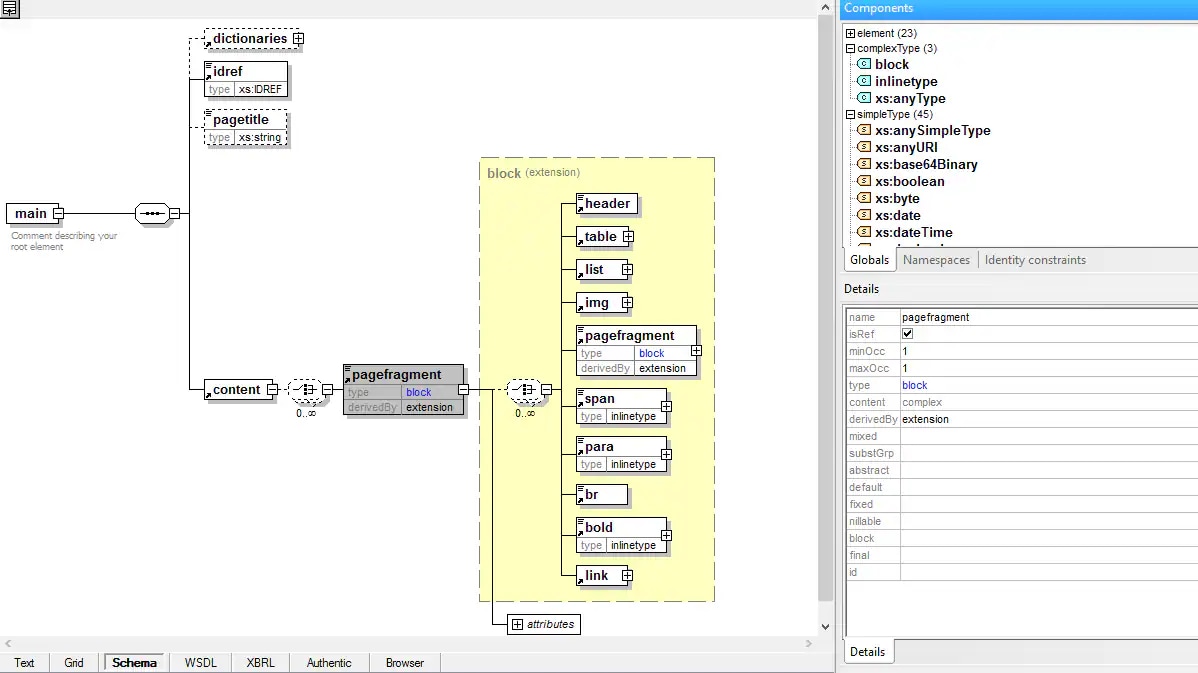
Instead of writing XSDs by hand, a visual XML Schema designer lets you drag-and-drop elements, define complex types, and build relationships visually. The editor then generates valid XSD code (and documentation) for you. It’s like the difference between hand-coding HTML and using a visual web designer: both work, but one is dramatically faster and less error-prone.
XSLT and XQuery Support
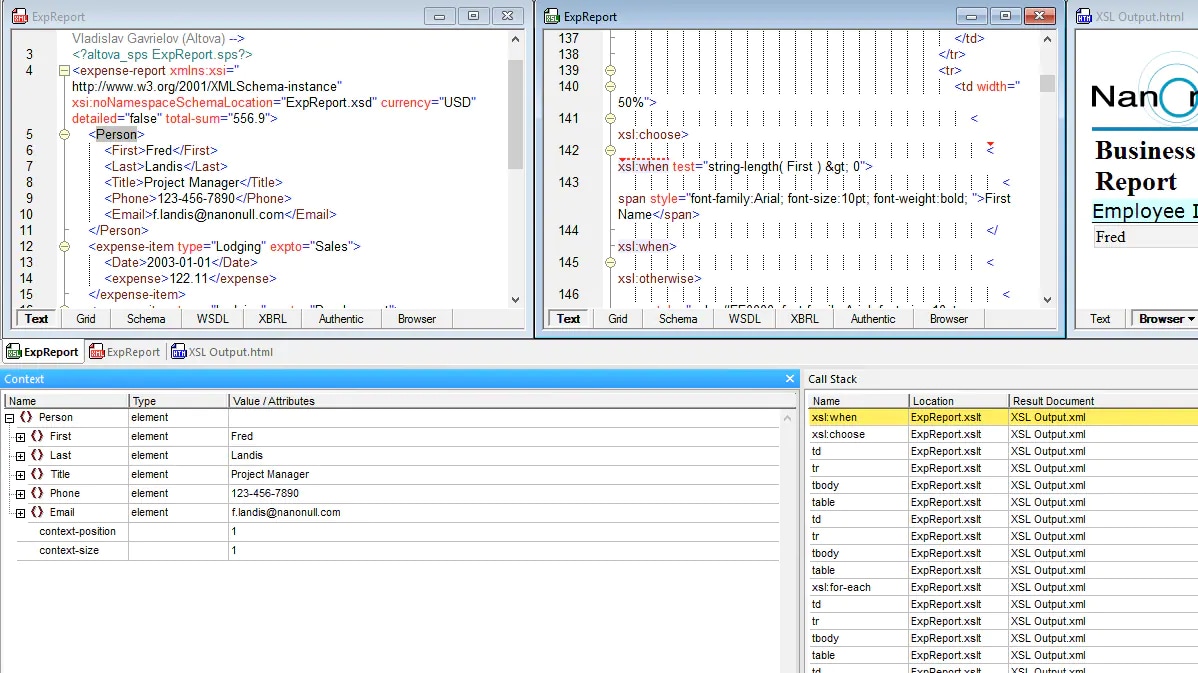
If you’re transforming XML or querying it, you need more than a syntax highlighter. A professional editor includes built-in XPath tools as well as XSLT and XQuery debugging with breakpoints, step-through execution, variable inspection, and profiling. Advanced tools even include XSLT and XQuery back-mapping for precise testing and troubleshooting. This cuts hours off your debugging and optimization work.
Validation and SmartFix
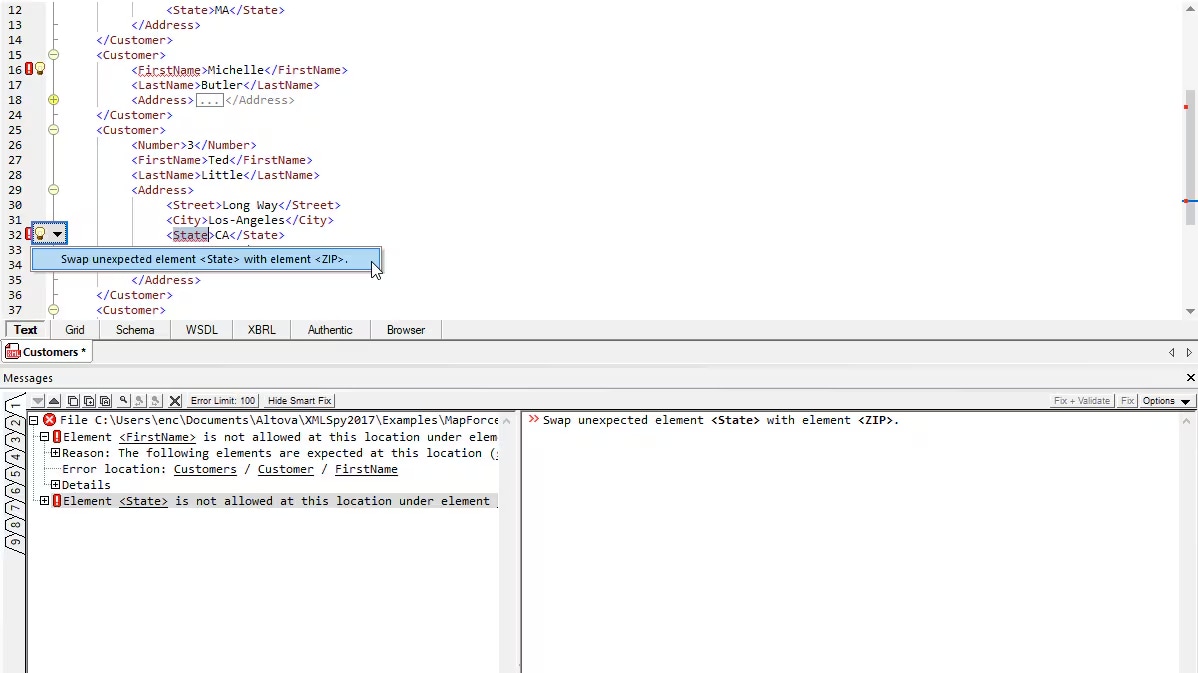
Beyond simple schema-based XML validation, smart editors catch common errors automatically and offer one-click fixes. Missing required elements? The editor suggests them. Invalid nesting? It’s flagged immediately. In large files, this alone saves immense time, especially when working with an unfamiliar schema.
Who Uses XML Editors
XML editing isn’t just for developers. Across enterprises, different roles rely on XML editors for their daily work:
Software Developers: Building APIs, web services, and enterprise integrations.
Data Architects: Designing schemas and managing enterprise data models.
Financial Professionals: Managing taxonomies and validating XBRL filings and financial reports.
QA Engineers: Validating XML test data and configuration files.
IT Operations: Managing configuration, deployment files, and system metadata.
Enterprise Integration Specialists: Working with complex data transformations and system integration.
For all these roles, productivity and accuracy matter tremendously. An XML editor that can prevent errors, suggest corrections, and handle large files efficiently isn’t a luxury—it’s a necessity.
How XMLSpy Addresses These Needs
XMLSpy is purpose-built for professional XML work. It combines all the capabilities we’ve discussed: schema-aware editing, multiple views, graphical schema design, XSLT debugging, and smart validation into a single cohesive IDE. Whether you’re editing a 100-byte snippet or navigating a 500MB file, validating against complex schemas, transforming data with XSLT, or designing schemas from scratch, XMLSpy provides the tools to do it efficiently and accurately.
And, of course, XMLSpy supports the other structured data formats that users are juggling today, including JSON, YAML, and Markdown.
Over 5.6 million users and 91% of Fortune 500 companies trust XMLSpy because it simply works. It handles the technical complexity so you can focus on your actual task.
Getting Started
Interested in experiencing the difference a dedicated XML editor makes? You can try XMLSpy with a free 30-day trial. Download it today and see how much faster your XML work can be.