XML Schema Editing: A Visual Approach
If XML is the language your data speaks, then XML Schema Definition (XSD) is the grammar that defines how that language works. A well-designed schema ensures that documents are valid, enables code generation, powers validation, and provides documentation for anyone working with your data. But designing schemas is notoriously tedious when you’re editing XSD by hand. Let’s explore why visual schema editing makes all the difference.

Why Schema Design Matters
This is Part 2 of our 5-part series on XML editing. Check out Part 1: The Complete Guide to XML Editing and stay tuned for future updates.
Before we talk about tools, let’s clarify why investing time in good schema design is worthwhile. A schema is more than a technical artifact—it’s a contract between your application and its data. A solid schema helps developers:
Ensure data integrity by validating structure and types before processing
Provide human-readable documentation of the data format
Catch errors early in the data pipeline, preventing downstream bugs
Support long-term maintainability as systems evolve
Yet, most developers learn XSD and then try to avoid touching it again. Why? Because editing complex schemas in raw text is like writing HTML by hand in 1995. While it is possible, it’s tedious and often error-prone.
The Pain of Hand-Editing XSD
XSD syntax is dense and verbose. Consider defining a complex type with multiple elements, attributes, and nested groups. In raw text form, it’s already dozens of lines of XML. Now imagine adding a restriction, changing cardinality, or refactoring element relationships. You’re constantly scrolling back and forth, checking indentation, verifying that opening and closing tags match, and hoping you didn’t accidentally break something.
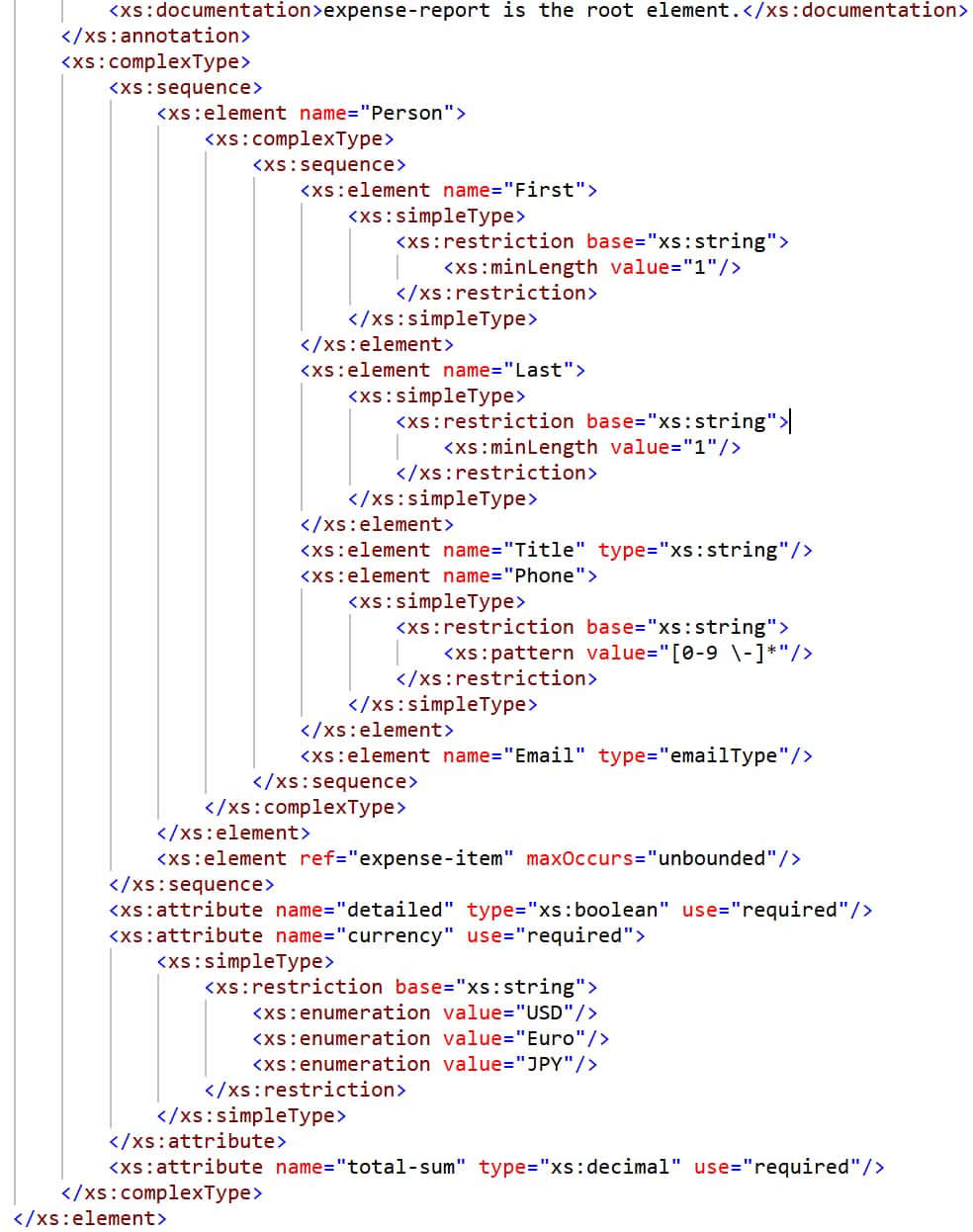
And that’s before you check well-formedness and validation and discover you’ve made a mistake somewhere in 200 lines of XSD code. Finding and fixing that mistake means reading through dense XML again, trying to understand the logical structure beneath the syntax.
A visual editor solves this by letting you see the logical structure directly. This approach displays a diagram that represents the structure of the schema and allows you to drag and drop and/or context menus to update it.
How Graphical Schema Editing Works
Altova pioneered the concept of visual schema editing. The graphical XML Schema editor in Altova XMLSpy translates the abstract XSD syntax into something you can see and manipulate visually. Here’s how it transforms your workflow:
Straightforward Visual Design
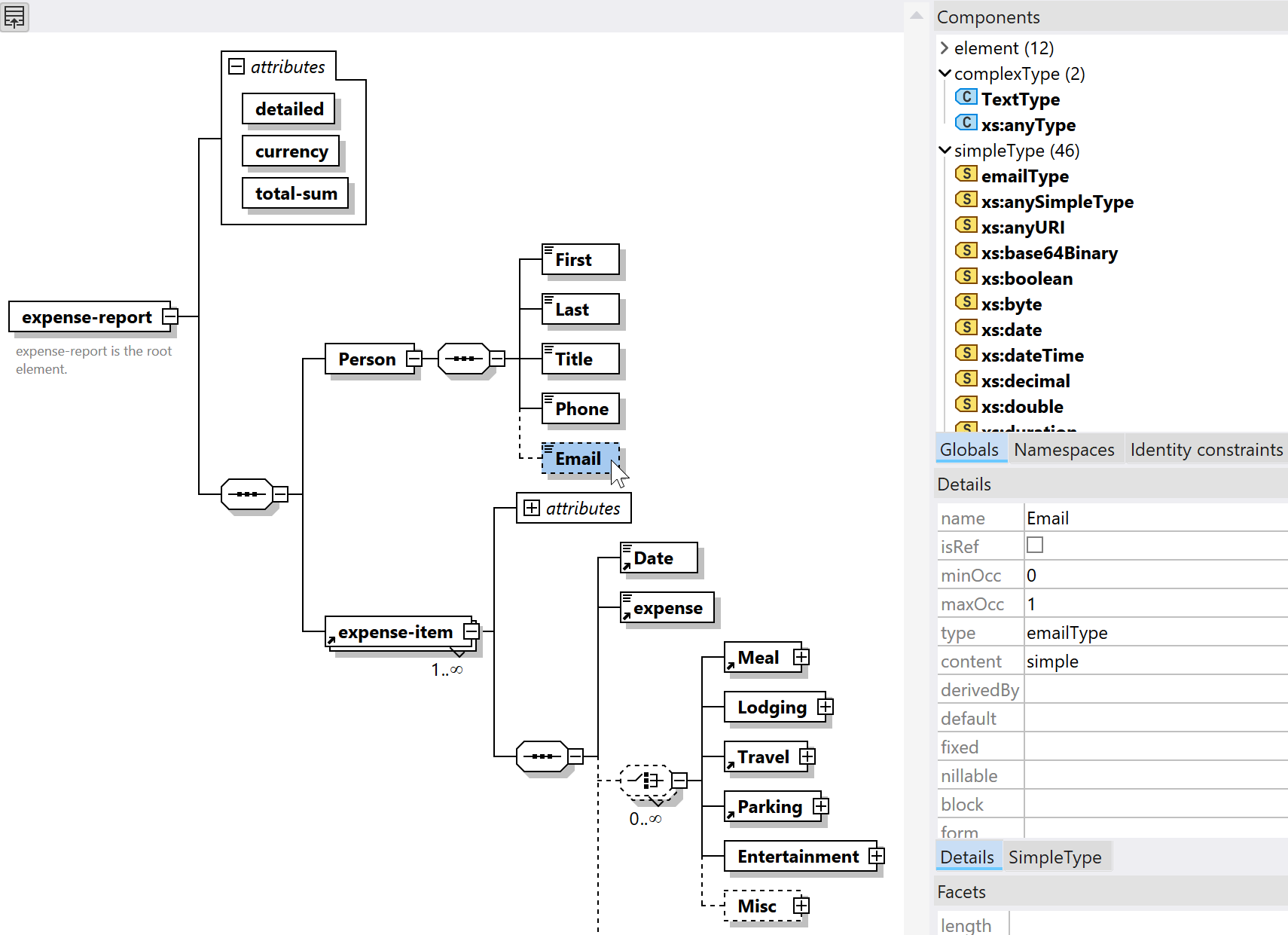
When you work with a schema in the XSD editor, all globally defined components (i.e., elements, complexTypes, attributeGroups, etc.) are organized in a sortable list. Here you can add or delete components and modify their properties using context-sensitive entry helpers, instead of defining all these properties by hand.
Clicking the tree icon for any global component opens the detailed graphical view of its content model in the XSD editor, where you can easily drag and re-arrange elements or select context-sensitive options from the right-click menu and entry-helper windows.
Elements appear as boxes, their relationships as connectors, and constraints as visual annotations. You can see at a glance whether an element contains child elements, what attributes have which data types, and whether elements are optional or required. The visual representation makes the schema structure and hierarchy immediately clear.
Drag-and-Drop Editing
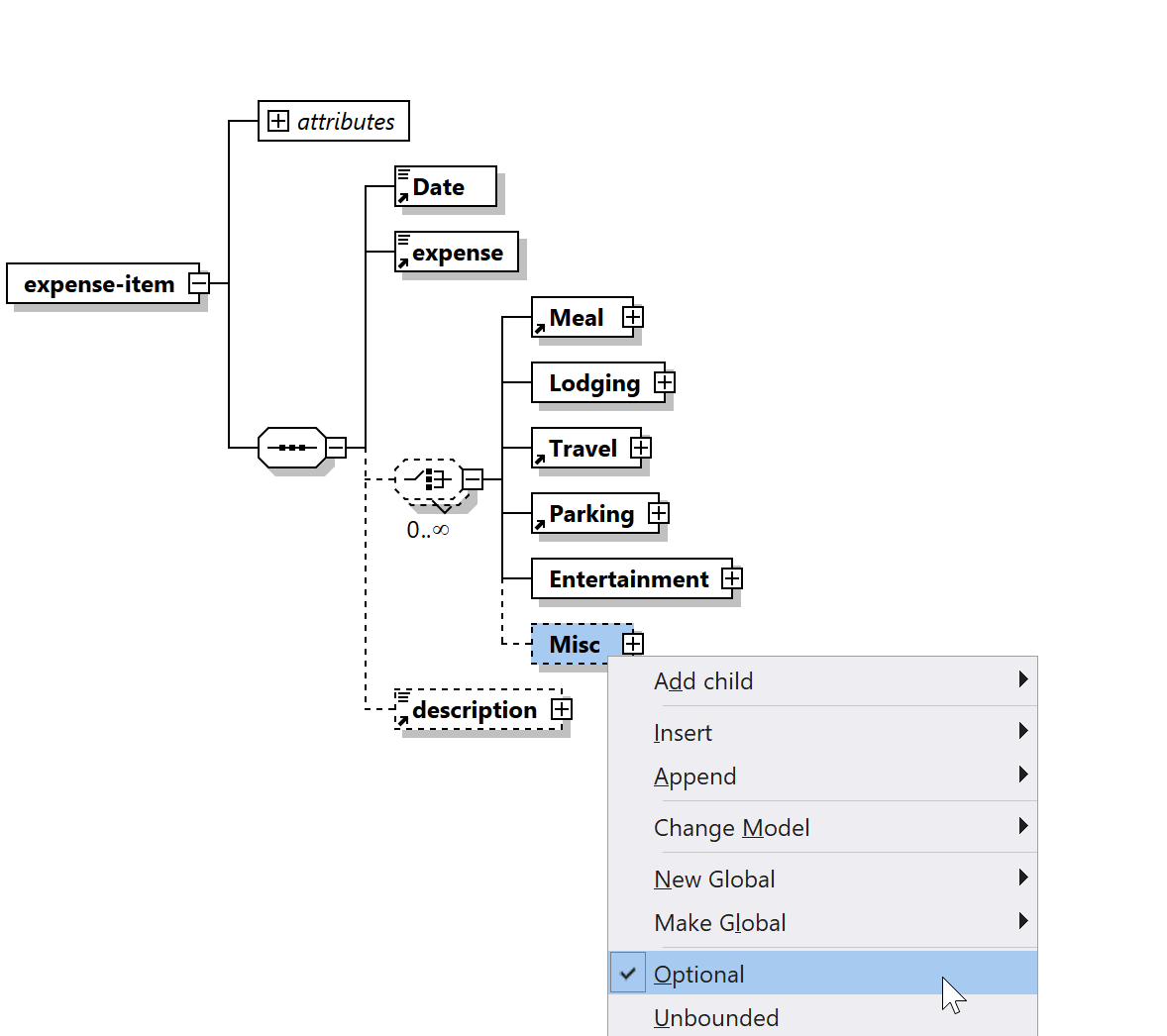
The graphical display makes it easy to drag and re-arrange elements or select context-sensitive options from entry-helpers. The editor enforces XSD constraints, so you can’t accidentally create an invalid schema.
Visual Complex Type Design
Complex types with sequences, choices, and restrictions are notoriously difficult to understand in raw XSD. Visually, they become more straightforward. You see exactly which elements are included, their order, their cardinality (required, optional, repeating), and any restrictions. Modifying them is a matter of selecting the element and changing its properties.
Automatic Code Generation
The real payoff: once your schema is designed graphically, you can generate code. Need a Java class, a C# class, or C++ structures that correspond to your schema? The editor generates them automatically, preserving all constraints and relationships. This bridges the gap between your schema and your application code.
Schema Generation from Instances, Databases, and Other Formats
Sometimes you’re not designing a schema from scratch. Maybe you have a sample XML file and you want to infer a schema from it. Or you have a relational database and you want a schema that maps to its structure. Or, maybe you’re starting with a JSON Schema. XMLSpy handles all these scenarios.
Instance-based schema generation works by analyzing an XML document and reverse-engineering the schema that would validate it. This is incredibly useful for quickly creating a starter schema, especially when you’re inheriting legacy XML formats. You can then refine the generated schema visually.
Database-driven XML Schema generation is equally powerful for enterprises with existing relational data. XMLSpy can connect to your database, analyze the structure, and generate an XSD that maps to your tables and columns. This enables you to treat your relational data as XML, opening up transformation, integration, and reporting possibilities.
JSON Schema conversion bridges the gap when your starting point is a JSON-based definition. XMLSpy can generate an XSD directly from a JSON Schema, so if your team — or an API you're integrating with — already defines data structures in JSON Schema, you don't have to rebuild that work from scratch. Convert it to XSD, refine it in the visual editor, and you're ready to validate XML against it.
Schema Design Best Practices
Visual schema editing doesn’t just make design faster; it encourages better design. Here are some best practices that become easier with a visual editor:
Use element and attribute groups to reduce repetition and improve maintainability
Define reusable complex types and use type inheritance for similar structures
Use clear naming conventions so your schema is self-documenting
Apply sensible cardinality constraints (minOccurs, maxOccurs) to prevent invalid documents
Use restrictions and patterns on simple types to enforce data validity at the schema level
With visual editing and intelligent context menus, these practices become natural parts of your design process, not additional overhead.
The Downstream Benefits
A well-designed schema pays dividends throughout your data pipeline. First, it enables data validation: any XML that conforms to the schema is guaranteed to have the expected structure. Code generation accelerates development, since you’re not hand-writing data classes. Documentation is clear, since the schema itself describes the data format (and in XMLSpy you can generate additional, detailed documentation for communication with other team members). Finally, maintenance is easier, because visual representation makes relationships easy to understand.
XMLSpy’s graphical schema editor brings all these benefits within reach. Whether you’re designing a new schema, reverse-engineering one from existing data, or maintaining a complex enterprise schema, a visual approach saves time and improves quality.
Ready to Design Better Schemas?
Try XMLSpy’s graphical schema designer with a free 30-day trial. See how much faster and more intuitive schema design becomes when you can see what you’re building.