Creating XML from Relational Databases
Sometimes following an example someone else created is a good way to get a quick start on a project. The downside is you might miss a better, more efficient solution. In our recent post on XML in the Cloud, we used DatabaseSpy to connect to a local MySQL database and to the Amazon Relational Database Service in the cloud. We used the Concat( ) function in a SQL SELECT statement to create XML formatted output from non-XML data as shown below.
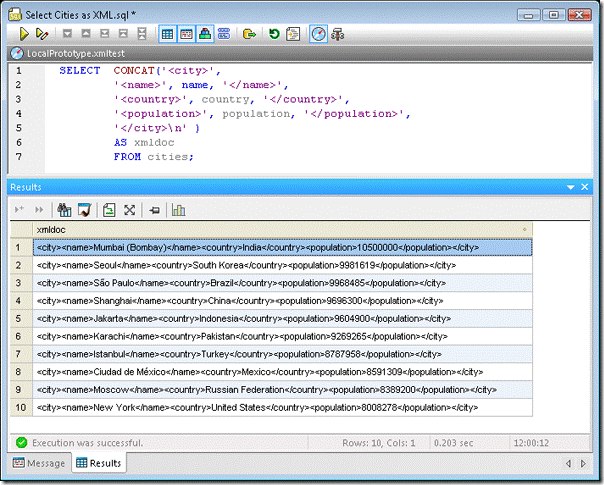
Our SELECT statement was based on an example in the MySQL documentation on XML support. Let’s take a little deeper look at the problem this statement tries to address. You can copy a DatabaseSpy Results table like the one displayed above and paste it into an editing window in XMLSpy, but the Results table alone does not create a well-formed XML document. To be well formed according to the W3C definition, an XML document must contain a root element. All other elements and logical structures must nest within the root. You can also think of the root element as a wrapper around the entire XML content, the same way the element
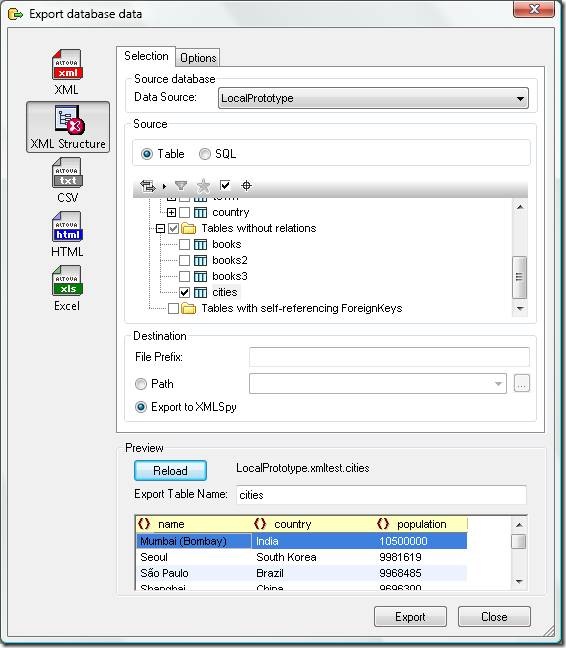
When we click the Export button, DatabaseSpy formats the relational data with XML element names derived from the column names of the table and sends the resulting output directly to XMLSpy. The screenshot below shows a portion of the file in XMLSpy. The Message window at the bottom verifies the file is well formed.
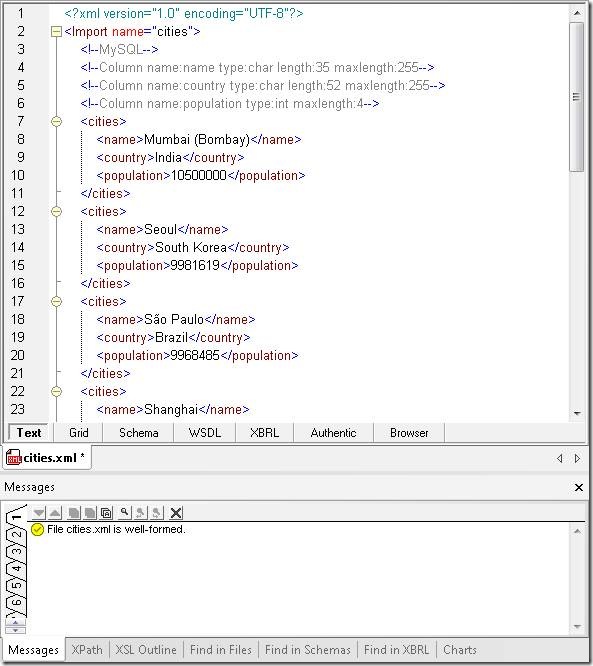
Note that DatabaseSpy supplied the root element
Altova XMLSpy connects directly to all popular databases to work with XML technologies and relational data. XMLSpy lets you easily create an XML Schema from a database structure, or create a database schema from an XML Schema. XMLSpy also includes advanced editors and debuggers for XQuery and XPath for XML stored directly in databases, along with specialized support for XML features in Microsoft SQL Server, IBM DB2, and Oracle databases. As more industries adopt and evolve XML-based standards for information interchange, a common need is to convert data stored in legacy databases to XML. Altova MapForce connects to databases and allows you to map and transform relational data to be compatible with one or more XML Schemas.
You can use your mapping to perform a one-time data conversion, you can save and re-open your mapping to perform another conversion later, or you can instruct MapForce to generate royalty-free source code from your mapping to include in your own project when repeated conversions are required.
If you'd like to see for yourself how well Altova tools can generate well-formatted XML from relational databases, download a free trial of the Altova MissionKit.