Naming Result Tabs
When you execute a script that contains more than one SELECT query, the results of each query are displayed in separate result windows. By default, these windows are called "Result1", "Result2", etc. Using targets, you can specify more meaningful names for query result windows.
Prerequisites •The Show multiple results stacked •Select either "Semicolons" or "SQL Grammar" in the Group statements for execution with drop-down list in the Properties window. Otherwise, the query is still executed, but the results are displayed in unnamed result tabs. |

To name a target result window:
1.Place the cursor anywhere in the SELECT statement. Click the Current statement  button (Shift+Alt+Enter) in the SQL Editor window. This selects the entire statement.
2.Click the Define Target Name  button in the SQL Script toolbar. The text -- target: Result appears above the statement.

3.Change the text "Result" as desired.

4.In the Properties window, make sure that either "Semicolons" or "SQL Grammar" is selected in the Group statements for execution with drop-down list.
5.Click the Execute  button (F5) or Execute for Data Editing
  .
.
The results appear in a Result window that has a tab with the text that you specified as target, e.g., zookeepers.
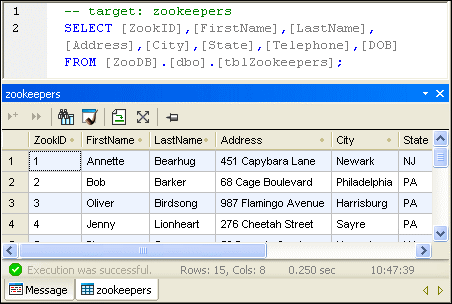
Note the following points about the Result window:
•Deleted rows are indicated by a strike-through.
•Read-only columns are indicated with a shaded background
•If you run the Execute command on the SQL statement, an Editing Mode button is displayed to enable you to edit DB data directly in the Result window. If your table has no keys, try the Execute for Data Editing command instead of Execute.