Migration of the Taxonomy Store
From v2026r2, Taxonomy Package Manager replaces Taxonomy Manager in Altova products. The new Taxonomy Package Manager installs Taxonomy Packages—instead of taxonomies— in your local store and provides a central management interface for taxonomies across Altova's XBRL products. This change has been implemented (i) in response to the increasingly common practice by taxonomy authorities of publishing taxonomies as taxonomy packages and (ii) to streamline Altova's taxonomy management by using the advantages that the taxonomy packages mechanism offers.
This migration topic is relevant to you only if (i) you have previously used an older version (than 2026r2) of any Altova product that supports XBRL and (ii) you have previously installed taxonomies (with the old Taxonomy Manager).
The advantage of migrating is that all the taxonomies you have previously installed will be available immediately after migration as taxonomy packages: for use in your Altova products and for management in the new Taxonomy Package Manager. Migration is carried out by Migration Wizard (see below), which is contained in the installers of Altova XBRL-enabled products from version 2026r2 onwards.
Understanding the switch to taxonomy packages
The main points relating to the switch from the old Taxonomies system to the new Taxonomy Packages system starting with v 2026r2 are given below.
•Taxonomy packages are installed by the new Taxonomy Package Manager in a separate store than the taxonomies installed by the old Taxonomy Manager.
•Taxonomies installed by the old Taxonomy Manager are not recognized by the new Taxonomy Package Manager—and vice versa.
•From v2026r2 onwards, new taxonomy versions released by authorities will be available only in the new Taxonomy Package Manager—and not in the old Taxonomy Manager.
•The old Taxonomy Manager (installed with pre-2026r2 products) and its store of taxonomies can co-exist with the new Taxonomy Package Manager (installed with 2026r2 products and later) and its store of taxonomy packages.
•The old Taxonomy Manager can continue to be used in pre-2026r2 Altova products, but it will not receive any taxonomy update or any new taxonomy after the 2026r2 release.
Migration and Migration Wizard
The first time you install any Altova XBRL-enabled product of version 2026r2 or later, a Migration Wizard (screenshot below) will appear during the installation process.
The Migration Wizard appears when all of the following conditions are fulfilled:
•The installer is for a 2026r2 (or later) version of any Altova product that supports XBRL,
•The taxonomy store that was created by the older Taxonomy Manager is not empty, and
•There does not exist any taxonomy package store created by the new Taxonomy Package Manager.
By default, the Migration Wizard (screenshot below) will migrate all your previously installed taxonomies if the check box is selected. The new taxonomy package store will be created, and the latest versions of packages corresponding to the previously installed taxonomies will be added to the new taxonomy package store. If you do not want to migrate, then uncheck the Migrate currently installed taxonomies check box. In this case the new taxonomy package store will be created, but it will be empty. In both cases (migration and non-migration), the old taxonomy store will not be modified.
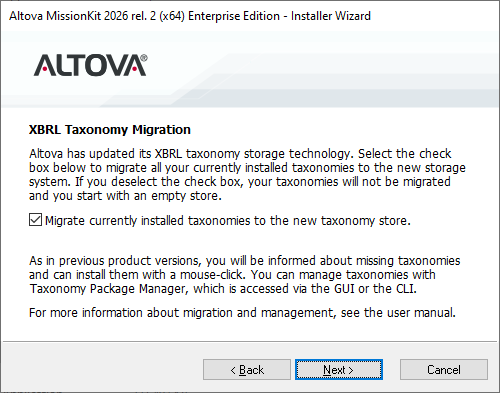
Note that the Migration Wizard will appear only once. It will not appear when another XBRL-enabled product is installed (because an empty or non-empty taxonomy package store will already have been created by the installer of the first XBRL-enabled product). Neither will the Migration Wizard appear when an XBRL-enabled product is re-installed or when a later version of it is installed (also because the taxonomy package store will already exist).
If you choose not to migrate your old taxonomies, then you can install the taxonomy packages you need via Taxonomy Package Manager at a later time. In this case, however, you will need to individually select in Taxonomy Package Manager the packages you want to install.