Toolbars and Status Bar
Placing the cursor over the Toolbars command pops out a submenu (screenshot below), which enables you to turn on and off the display of the different toolbars.
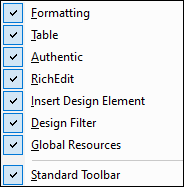
When a toolbar is checked, it is displayed. In the screenshot above all the toolbars are displayed. To toggle on or off the display of a toolbar, click the appropriate toolbar. For a complete description of toolbars, see the section Reference | Toolbars.
Status Bar
The display of the Status Bar, which is located at the bottom of the application window, can be switched on or off by clicking the Status Bar toggle command.