Expression Rules
When you enter parameter values, FlowForce performs real-time syntax checking and data-type validation. To ensure FlowForce expressions are syntactically correct and evaluate as intended, follow these rules:
•Use correct data types.
•Enclose literal strings in single or double quotes.
•Enclose expressions in curly braces when you embed them in a string field.
See the subsections below for more information.
Rule #1: Use correct data types
When you enter an expression into a field, ensure that it matches the field’s data type. The data type is displayed to the right of the field (screenshot below).

Available data types
The available data types are described below.
•string: e.g., 'Hello World!'
•boolean: true()/false()
•number: e.g., 56
•result: Represents the output of an execution step (e.g., MapForce mappings, StyleVision transformation files, shell functions, and others). The result object can track the exit code, error message, stdout, stderr, and a collection of result streams.
oTo access a result value, assign it a name (e.g., output) and pass it to the results expression function. This function converts it to a stream, which can be processed with stream expression functions.
oFor shell commands, call step-result expression functions to process the output. For example, to return the standard output as a stream, use stdout(output). To return the standard error as a stream, use stderr(output).
•stream: Represents large amounts of binary data stored on disk or in memory.
•list: FlowForce supports lists of any of the types mentioned above (all items must have the same data type), including lists of lists. Lists can be created with the list() function.
Examples
Consider the following examples:
Expression | Will be evaluated as... | Explanation |
|---|---|---|
1/4 | 0.25 | Produces a numeric value. |
1+1==2 | true | Produces a Boolean value. |
'apple' | apple | Produces a string value. |
concat('1','2','3') | 123 | Produces a string value that combines the input strings into one. |
1+'apple' | - | Invalid: mismatched data types (number + string) |
{content(stdout(result))} | [...] (string)
| Uses nested functions: stdout() retrieves standard output as a stream; content() converts the stream to a string.
This expression validates successfully only if:
•The value result has been declared previously. •The value result contains the standard output of a shell command. •The expression is embedded into a string field.
|
Rule #2: Enclose strings in single or double quotes
To be treated as a string, an expression must be enclosed in single or double quotes. Otherwise, the expression might produce unintended results or fail validation.
Expression | Will be evaluated as... | Explanation |
|---|---|---|
1+1 | 2 | The value is numeric. |
'1+1' | 1+1 | The value is a string. |
1+1==2 | true | The value is Boolean. |
"a""b" | a"b | To escape the quote character in a string, double it. |
Rule #3: Use curly braces in string fields
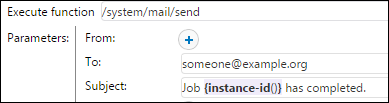
In a string field, FlowForce evaluates the entire field, but only the text enclosed in curly braces {} is interpreted as an expression. In the example below, the curly braces delimit the expression instance-id() from the surrounding literal text.
If a field is of type expression, do not use curly braces. For example, the Expression parameter of the built-in function system/compute is such a field. A correct example for this field is:

Typing curly braces inside an expression field triggers a syntactic error:

To display the { and } characters literally, use double braces ({{ and }}). Consider the following examples:
A string field with the following value... | Will be evaluated as... | Explanation |
|---|---|---|
 | echo Hello, World! | Since the string does not contain an embedded expression, no curly braces are used. The expression is evaluated as is. |
 | - | The string cannot be evaluated because the embedded expression is not syntactically correct. Therefore, FlowForce displays a syntactic error. |
 | echo Hello, World! | The string contains a syntactically correct expression. However, the expression is inside a string field, so the evaluation result is the same as for the expression echo Hello, World!. |
 | echo {'Hello, World!'} | The string does not contain an expression since the escape characters {{ and }} are used. |