read-lines
Reads all lines from the specified file and returns them as a list of strings. The returned strings include the line-end characters (e.g., \n). If you need to remove these before further processing, use the trim() function (example below).
Signature
read-lines(filename as string, encoding as string="UTF-8") -> list of strings |
Parameters
Name | Type | Description |
|---|---|---|
filename | string | Specifies the path to a file. |
encoding | string | Specifies the encoding to use. The default encoding is UTF-8. |
Example
For example, we need to process multiple directories on the computer where FlowForce Server is installed. All directory paths are saved in a text file, one path per line, for example:
C:\FlowForce\Examples\ListDirectories\1 C:\FlowForce\Examples\ListDirectories\2 C:\FlowForce\Examples\ListDirectories\3 |
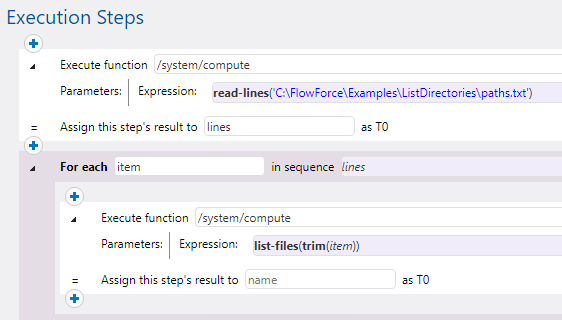
The job illustrated below consists of two steps:
•The first step calls the read-lines function to collect all directory paths from the text file into a list.
•The second step iterates through the list and calls the list-lines function for each path. Each path is trimmed to remove any leading/trailing spaces or newline characters.
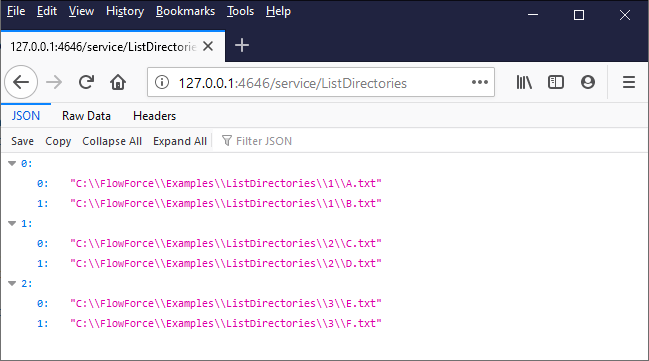
If the job is exposed as a Web service and accessed via a browser at the configured address and port, the browser outputs the contents of each directory as a JSON array, for example: