Overview of Containers
FlowForce Server manages jobs, credentials, step functions, and other configuration objects in a hierarchical structure of containers. A container is similar to a folder on an operating system. Containers can have any of the following: jobs, credentials, functions, and other containers. By setting permissions on a container, you can control who can access the container's contents.
The top-level container in FlowForce Server is the root ( / ) container. By default, the root container has the following predefined FlowForce Server containers.
/public | The /public container is the default location where any FlowForce user can create jobs and credentials. It is by default empty and accessible to any FlowForce user. The /public container is the default location in the following cases:
•When you deploy MapForce mappings to FlowForce Server. •When you deploy StyleVision transformations to FlowForce Server.
You can, however, deploy mappings and transformations to a different container, if required.
|
/RaptorXML | This container is present if you licensed RaptorXML Server. It stores the validation and other functions specific to RaptorXML Server.
|
/system | The system container includes the FlowForce Server system functions. It is not recommended to make changes to this container.
|
The screenshot below shows a sample /public container with several configuration objects.
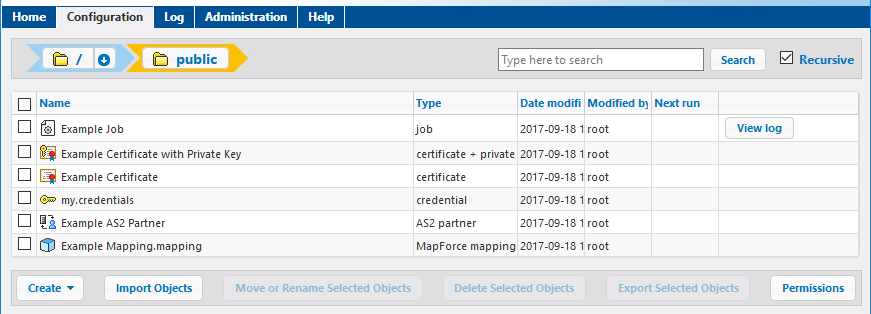
You can also search objects within the current container including children objects (if the Recursive check box is checked) or only within the current container (if the Recursive check box is unchecked).
Containers include objects such as jobs, functions, credentials, deployed MapForce mappings and StyleVision transformations. When you open a container, the following information is available about its objects:
Property | Description | ||||||||||||||||
|---|---|---|---|---|---|---|---|---|---|---|---|---|---|---|---|---|---|
Name | Specifies the name of the object on the file system. Note that, when you create a new object, the name must not be already in use. | ||||||||||||||||
Type | Specifies the object type (such as credential, job, or function). You can also identify the object type by its accompanying icon:
| ||||||||||||||||
Date modified | Specifies the date and time when the object was created or last modified. | ||||||||||||||||
Modified by | Specifies the name of the user who modified the object. | ||||||||||||||||
Next run | For jobs scheduled to run with time triggers, this column specifies the date and time of the next run, as defined in the job settings. | ||||||||||||||||
View log | For jobs, this button provides quick access to the execution log of the corresponding job. |


If you have been granted the appropriate permissions, you can create any number of additional containers to store your custom FlowForce server data (for example, one for each department). Alternatively, you can store data in the /public container, which by default is available to any authenticated user. If necessary, you can restrict access to the /public container (see Restricting Access to the /public Container).
You can also move, rename, and delete any containers where you have the relevant permissions.