Connection Context Menu
This topic describes commands available in the connection context menu. When you right-click a connection, the following context commands become available:
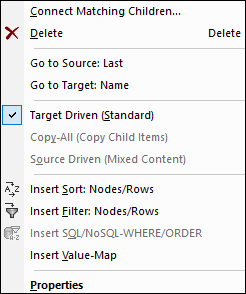
For more information, see the subsections below.
General settings
•Connect Matching Children: Opens the Connect Matching Children dialog box. This command is enabled when the connection is allowed to have matching children.
•Delete: Deletes the selected connection.
•Go to Source: <item name>: Highlights the output connector of the selected connection.
•Go to Target: <item name>: Highlights the input connector of the selected connection.
Connection types
See details about connection types in Connection Types and Connection Settings.
Insert commands
•Insert Sort: Nodes/Rows: Adds a sort component between a source node and a target node.
•Insert Filter: Nodes/Rows: Adds a filter component between a source node and a target node.
•Insert SQL/NoSQL-WHERE/ORDER: Adds an SQL/NoSQL-WHERE/ORDER component between a source node and a target node (Professional and Enterprise editions).
•Insert Value-Map: Adds a value-map between a source node and a target node.
Properties
Opens the Connection Settings dialog box.