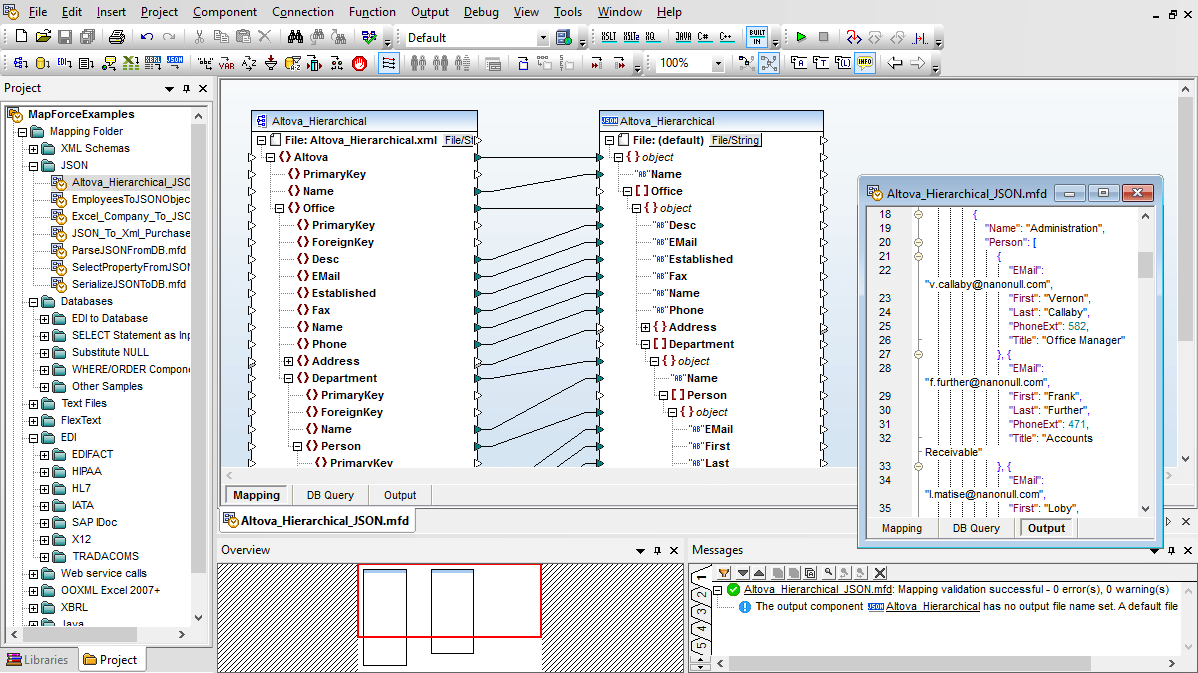
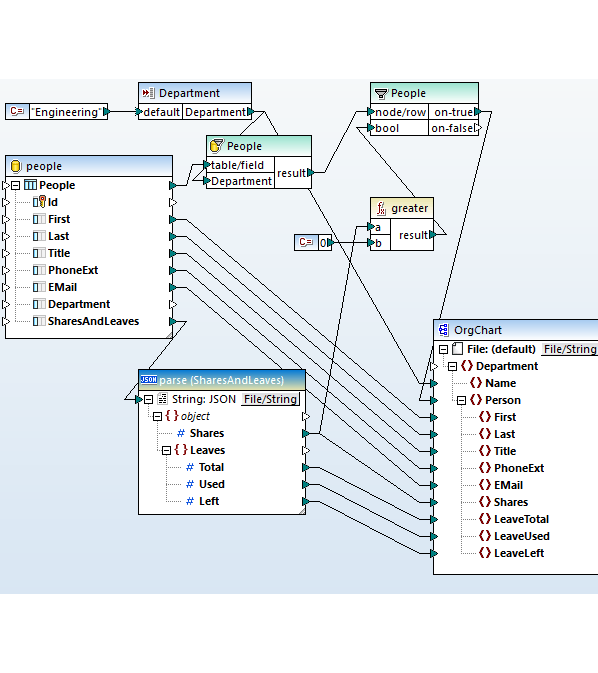
MapForce의 그래픽 도구를 사용하면 JSON 데이터를 변환하기 위한 데이터 매핑 및 처리 규칙을 쉽게 정의할 수 있습니다. MapForce는 JSON을 입력 및 출력 형식 모두로 지원하므로, 다음과 같은 다양한 방식으로 활용할 수 있습니다
| JSON ↔ XML | 최신 웹 API(JSON)를 기존의 엔터프라이즈 시스템과 통합할 때 자주 필요합니다 |
| JSON ↔ databases | JSON 데이터를 관계형 데이터베이스 테이블에 삽입하거나, 관계형 데이터를 추출하여 API용 JSON 데이터를 생성하는 작업 |
| JSON ↔ Excel or CSV | 비즈니스 도구 및 보고 시스템과의 통합, 또는 데이터 웨어하우스 및 분석 플랫폼을 위한 데이터 준비 작업에 사용됩니다 |
| GeoJSON ↔ KML 또는 엑셀 파일 변환 | (다양한 상황에 따라 적절한 표현을 선택해야 합니다. 몇 가지 예시를 제시합니다.) 지리공간 데이터를 변환하는 것 다른 형식으로 변환하거나, REST API의 결과를 지도에 표시하는 기능 |
| JSON ↔ EDI | 기존의 B2B 시스템과 최신 애플리케이션을 통합하기 위해 |
| PDF ↔ JSON | PDF 파일에서 데이터를 추출하고, API 또는 다른 시스템과의 연동을 위해 JSON 형식으로 변환합니다 |
| API 응답 파싱 | REST API에서 반환되는 JSON 데이터를 내부적으로 활용 가능한 형식(예: 데이터베이스 레코드 또는 XML 구조)으로 변환합니다 |
JSON 매핑 프로젝트를 정의한 후, "출력" 버튼을 클릭하면 데이터를 즉시 변환할 수 있습니다. (JSON 데이터를 데이터베이스로 매핑하는 경우, "출력" 화면에서는 매핑이 시작되면 데이터베이스에 실행될 SQL 문을 확인할 수 있습니다.)
고급 문제 해결을 위해 MapForce는 대화형 기능을 제공합니다 데이터 매핑 디버거 매핑 실행 과정에서 데이터가 소스 노드와 대상 노드를 어떻게 이동하는지 추적하기 위해 사용됩니다.
반복적인 JSON 변환 작업을 자동화하려면, MapForce 프로젝트를 MapForce 서버에 배포할 수 있습니다. MapForce 서버는 다음과 같은 기능을 제공합니다 모든 데이터 매핑 프로젝트에 대한 고성능 자동화 솔루션 기존의 고가 데이터 관리 제품에 비해 훨씬 저렴한 비용으로 사용할 수 있습니다.
| 이름 | 확장 | 설명 | 수직의 | 표준화 기구 |
|---|---|---|---|---|
| ArcGIS Pro 레이어/맵 파일 |
.lyrx .mapx 파일 | Esri의 레이어 및 지도 문서는 심볼, 레이블, 레이아웃, 그리고 데이터 소스 설정 정보를 카토그래픽 정보 모델 JSON 형식으로 저장합니다. | 지리공간 정보 / 지리정보 시스템 | |
| 자산 관리 셸(Asset Administration Shell, AAS) JSON 형식 |
.json 파일입니다 | 산업 자산의 특성, 문서, 그리고 기능 등을 설명하는 Industry 4.0 디지털 트윈 표준을 JSON 형식으로 변환한 데이터입니다. | 제4차 산업 혁명, 제조업 | |
| AsyncAPI 설명 |
.json 파일입니다 | 이 문서는 이벤트 기반 및 메시지 기반 API, 즉 카프카 토픽, MQTT 채널, 큐 등을 설명하며, 이는 REST API를 위한 OpenAPI와 유사한 역할을 합니다. | 이벤트 스트리밍, 기업 통합 | |
| 아브로 스키마 (Avro 스키마) |
.avsc 파일입니다 | Apache Avro의 JSON 스키마 언어는 Kafka, Confluent Schema Registry, 그리고 Hadoop에서 스트리밍 및 빅데이터 직렬화를 위한 데이터 구조를 정의합니다. | 데이터 엔지니어링, 이벤트 스트리밍 | |
| COCO 데이터셋 주석 정보 |
.json 파일입니다 | 컴퓨터 비전 학습 데이터에 가장 널리 사용되는 JSON 어노테이션 형식으로, 객체 감지 프레임워크에서 거의 모든 기능을 지원하며, 바운딩 박스, 세그멘테이션 마스크, 주요 지점 등의 어노테이션을 포함합니다. | 머신러닝, 컴퓨터 비전 | |
| CZML (Cesium Markup Language)은 지구 표면 시각화 및 3D 모델링을 위한 마크업 언어입니다 |
.czml 파일입니다 | CesiumJS 가상 지구에서 시간의 흐름에 따라 변화하는 3차원 지리 공간 장면, 즉 위성 궤적, 비행 경로, 센서 커버리지 등을 설명하는 형식입니다. | 항공우주, 방위산업, 지리공간 시각화 | |
| 시티JSON (CityJSON) |
.city.json 파일 .cityjson 파일 | 도시 계획, 디지털 트윈, 그리고 지자체 GIS 시스템에 사용되는 3D 도시 모델을 위한 CityGML 데이터 모델의 간결한 JSON 형식 표현입니다. | 도시 계획, 디지털 트윈, 지리 정보 시스템 | |
| 클라우드 이벤트(CloudEvents) |
.json 파일입니다 | CNCF는 서버리스 플랫폼, 메시지 브로커, 그리고 이벤트 기반 통합 시스템 전반에 걸쳐 이벤트 데이터를 설명하는 표준 형식을 제공합니다. | 이벤트 기반 아키텍처, 클라우드 통합 | |
| CycloneDX SBOM (CycloneDX 소프트웨어 헌장 목록) |
.cdx.json 파일 | OWASP 소프트웨어 부품 목록(Software Bill of Materials, SBOM) 표준은 현재 조달 및 규제(미국 행정명령 14028, 유럽연합 사이버 회복력 법)에 따라 소프트웨어 구성 요소를 파악하는 데 필수적으로 요구되고 있습니다. | 소프트웨어 공급망, 규정 준수 | |
| DICOM JSON 모델 |
.json 파일입니다 | PS3.18에서 정의된 DICOM 의료 영상 메타데이터의 JSON 표현 방식으로, 이는 방사선 및 병리학 시스템에서 사용되는 DICOMweb 서비스에 활용됩니다. | 의료 영상, 의료 정보 기술 | |
| 디자인 토큰 |
.tokens .tokens.json 파일 | 피그마, 코드, 그리고 문서 작성 시스템 간에 디자인 시스템의 요소(색상, 글꼴, 간격 등)를 교환하기 위한 새로운 W3C 표준 형식이 등장하고 있습니다. | 디자인 시스템, 제품 디자인 | |
| 다이나모 워크스페이스 |
.dyn .dyf 파일은 특정 소프트웨어에서 사용되는 데이터 파일 형식일 수 있습니다. 정확한 내용은 해당 파일이 어떤 프로그램에서 사용되는지에 따라 달라집니다 | Revit 및 Civil 3D 작업 흐름을 자동화하는 데 사용되는 시각적 프로그래밍 그래프는 Dynamo 2.0 버전부터 작업 공간과 사용자 정의 노드를 JSON 형식으로 저장합니다. | AEC, 계산 기반 설계 | |
| EnergyPlus JSON 입력 방식 |
.epjson 파일입니다 | 미국 에너지부의 표준 건물 에너지 시뮬레이션 엔진인 EnergyPlus에서 사용하는 JSON 형식의 입력 데이터입니다. | 건물 에너지 모델링, 지속 가능성 | |
| 이더리움 스마트 컨트랙트의 ABI (응용 프로그램 프로그래밍 인터페이스) |
.abi 파일은 일반적으로 애플리케이션 바이너리 인터페이스(Application Binary Interface)를 나타냅니다. 이는 소프트웨어 구성 요소 간의 통신을 위한 표준 인터페이스를 정의하는 데 사용됩니다 | 스마트 컨트랙트의 호출 가능한 함수와 이벤트를 설명하는 애플리케이션 바이너리 인터페이스(ABI)는 모든 지갑, 블록 탐색기, 그리고 탈중앙화 애플리케이션(dApp) 통합에 필수적입니다. | 블록체인, 핀테크 | |
| 마찰 없는 데이터 패키지 |
.json 파일입니다 | `datapackage.json`은 표 형태의 데이터 파일들을 스키마, 라이선스, 그리고 데이터 출처 정보와 함께 묶어 공개 데이터 배포를 위한 설명 파일입니다. | 개방형 데이터, 연구 데이터 관리 | |
| GBFS (일반 자전거 공유 시스템 데이터 표준) |
.json 파일입니다 | 자전거 공유, 전동 킥보드, 그리고 기타 공유 모빌리티 서비스 제공업체들이 도시와 여행 계획 서비스에 실시간으로 차량 및 스테이션 정보를 제공하는 개방형 표준입니다. | 교통, 스마트 도시 | |
| GeoJSON (지오JSON) | IETF에서 정의한 표준으로, 지리적 특징(점, 선, 다각형)을 JSON 형식으로 표현하는 방식입니다. 웹 매핑 및 공간 API 분야에서 널리 사용되는 표준입니다. | 지리공간 정보 / 지리정보 시스템 (GIS), 웹 매핑 | ||
| 그라파나 대시보드 모델 |
.json 파일입니다 | Grafana 대시보드의 패널, 쿼리, 변수를 설명하는 JSON 모델이며, 관찰 가능성 대시보드를 교환하는 표준 형식입니다. | 관측 가능성, IT 운영 | |
| HAR (HTTP 아카이브) 파일 |
.har | 웹 브라우저 및 진단 도구가 기록한 HTTP 트래픽 데이터를 저장하는 형식으로, 웹 애플리케이션 문제 해결을 위해 기술 지원팀에서 자주 요청하는 자료입니다. | 웹 운영, IT 지원, 성능 테스트 | |
|
.json 파일입니다 | 미국 보건복지부(CMS)의 상호운용성 규정에 의해 의무화되고 전 세계의 전자 건강 기록(EHR) 공급업체에 의해 채택된, 의료 데이터(환자 정보, 검사 결과, 약물 정보, 보험 청구 내역 등) 교환을 위한 주요 표준은 JSON 형식을 사용합니다. JSON은 FHIR 표준에서 가장 널리 사용되는 데이터 표현 방식입니다. | 의료 서비스 | ||
| IIIF 프레젠테이션 매니페스트 |
.json 파일입니다 | 국제 이미지 상호 운용 프레임워크(International Image Interoperability Framework)는 디지털화된 자료를 설명하는 표준이며, 전 세계의 도서관, 박물관, 기록 보관소 등이 자료를 공개하는 데 사용됩니다. | 도서관, 박물관, 디지털 인문학 | |
| JSON 라인 형식 / NDJSON 형식 |
.jsonl 파일은 JSON 형식으로 된 데이터를 한 줄씩 저장하는 파일입니다 .ndjson 파일 .ldjson 파일 | 줄 바꿈으로 구분된 JSON 형식으로, 각 줄에 하나의 객체가 포함됩니다. 이 형식은 애플리케이션 로그, 이벤트 스트림, 대량 API 데이터 추출, 데이터 파이프라인, 그리고 LLM(대규모 언어 모델) 미세 조정 데이터셋의 기본 형식으로 사용됩니다. | 데이터 엔지니어링, 데이터 분석, 머신러닝 | |
| JSON-LD (데이터 연결을 위한 JSON) |
.jsonld 파일입니다 | W3C에서 정의한 JSON 형식의 연결 데이터 표준은 schema.org의 구조화된 데이터를 기반으로 하며, 이 데이터는 검색 엔진의 풍부한 검색 결과와 AI 기반 답변 시스템을 구동하는 데 사용됩니다. | SEO/AEO, 지식 그래프, 연결 데이터 | |
| JSON-stat (JSON-stat은 JSON 형식으로 통계 데이터를 표현하는 표준입니다.) |
.json 파일입니다 | 이 표준은 유럽 각국의 국가 통계 기관에서 공식 통계 데이터셋과 다차원 데이터를 배포하는 데 사용되는 경량화된 방식입니다. | 공식 통계, 정부 데이터 | |
| 주피터 노트북 (Jupyter Notebook) |
.ipynb 파일은 일반적으로 주피터 노트북(Jupyter Notebook) 형식의 파일 확장자입니다 | 코드, 결과, 그리고 설명을 하나의 JSON 문서에 통합한 노트북 형식은 데이터 과학 및 연구 컴퓨팅 분야에서 표준적인 작업 파일로 사용됩니다. | 데이터 과학, 연구, 교육 | |
| 로티 애니메이션 |
.json 파일입니다 | 애프터 이펙트에서 내보낸 벡터 애니메이션은 JSON 형식으로 저장되며, iOS, Android, 그리고 웹 앱에서 네이티브 방식으로 렌더링됩니다. 이 기술은 많은 앱의 작은 애니메이션 효과와 로딩 표시기에 활용되고 있습니다. | 모션 디자인, 모바일 및 웹 사용자 인터페이스 | |
| Mapbox/MapLibre 스타일 사양 |
.json 파일입니다 | Mapbox GL, MapLibre, 그리고 대부분의 현대적인 웹 지도 제작 도구에서 사용되는 JSON 형식의 문서는 벡터 웹 지도가 어떻게 표현되는지를 정의합니다. 여기에는 레이어, 색상, 글꼴, 확대/축소 규칙 등이 포함됩니다. | 웹 지리 정보, 지리 공간 정보 | |
| NIEM JSON-LD 형식 |
.json 파일입니다 .jsonld 파일입니다 | 미국 사법, 이민, 재난 관리, 그리고 공공 보건 기관 간의 정보 공유에 사용되는 국가 정보 교환 모델의 JSON 형식으로 변환된 데이터입니다. | 정부 간 정보 교류 | |
| OCDS(개방형 계약 데이터 표준) |
.json 파일입니다 | 전 세계 정부와 부패 방지 전문가들이 사용하는, 공공 조달 관련 데이터(입찰, 낙찰, 계약 등)의 표준입니다. | 정부, 공공 조달 | |
| OCPP(개방형 충전소 프로토콜) 메시지 |
.json 파일입니다 | 전기차 충전소와 네트워크 운영자 간의 인증, 계량, 그리고 스마트 충전을 위한 JSON 메시지 형식입니다. | 전기차 충전, 에너지 | |
| OPC UA JSON 인코딩 |
.json 파일입니다 | OPC UA 데이터의 JSON 인코딩 방식은 제6장에서 정의되어 있으며, 이 방식은 MQTT 및 클라우드 IIoT 환경에서 산업용 기계 데이터를 전송하는 데 사용됩니다. | 산업 자동화, 산업용 사물 인터넷 (IIoT) | |
| OSCAL (개방형 보안 제어 평가 언어) |
.json 파일입니다 | NIST에서 개발한 기계가 읽을 수 있는 형식으로, 보안 통제 목록, 시스템 보안 계획, 그리고 평가 결과를 담고 있으며, FedRAMP 및 정부 규정 준수 자동화에 사용됩니다. | 보안 규정 준수, 정부 | |
| 오픈 소스 취약점 기록 |
.json 파일입니다 | 오픈 소스 패키지에서 발견되는 취약점을 설명하기 위한 OpenSSF 표준은 GitHub, Google, 그리고 다양한 배포판의 보안 공지 서비스에 활용됩니다. | 소프트웨어 보안, 취약점 관리 | |
| OpenAPI / Swagger 설명 |
.json 파일입니다 | API 게이트웨이, SDK 생성 도구, 개발자 포털 등에서 사용되는 REST API (엔드포인트, 매개변수, 스키마, 인증 방식 등)를 설명하는 사실상의 표준 계약입니다. | API 관리, 기업 통합 | |
| OpenRTB 입찰 요청 / 응답 |
.json 파일입니다 | 프로그래매틱 디지털 광고의 핵심인 IAB 표준 메시지 형식은 광고 거래소와 입찰자 간에 초당 수십억 번 교환됩니다. | 디지털 광고, 광고 기술 | |
| 오픈 타임라인 IO (OpenTimelineIO) |
.otio | 아카데미 소프트웨어 재단에서 개발한 JSON 기반의 교환 형식은, Premiere, Resolve, Avid 및 시각 효과(VFX) 파이프라인 간의 편집 타임라인 정보를 효율적으로 교환할 수 있도록 설계되었습니다. 이를 통해 다양한 편집 프로그램 및 시각 효과 작업 환경 간의 협업이 원활해집니다. | 영화 및 영상의 후반 작업 | |
| 포스트맨 컬렉션 |
.json 파일입니다 | API 요청, 환경 설정, 테스트 항목 등을 정의하는 휴대용 JSON 파일은 API 개발 및 품질 보증 과정에서 가장 널리 사용되는 자료입니다. | API 개발, 품질 보증 | |
| SARIF (정적 분석 결과 교환 형식) |
.sarif 파일은 소프트웨어 보안 취약점 보고 형식입니다 | GitHub Advanced Security와 Azure DevOps에서 기본적으로 지원하는, 정적 분석 및 보안 검사 도구의 결과 보고를 위한 OASIS 표준입니다. | 애플리케이션 보안, 데브섹옵스 | |
| SDMX-JSON 포맷 |
.json 파일입니다 | ECB(유럽중앙은행), Eurostat(유럽통계청), IMF(국제통화기금), OECD(경제협력개발기구), 그리고 BIS(국제결제은행)에서 사용하는 통계 데이터 및 메타데이터 교환을 위한 ISO 표준인 SDMX의 JSON 형식으로의 변환. | 공식 통계, 중앙은행 | |
| SPDX SBOM (JSON 형식) |
.spdx.json 파일 | ISO 표준에 따른 소프트웨어 패키지 데이터 교환 형식으로, 소프트웨어 구성 요소, 라이선스, 그리고 소프트웨어의 출처 정보를 교환하는 데 사용됩니다. | 소프트웨어 공급망, 라이선스 준수 | |
| STAC (공간 시간 자산 카탈로그) |
.json 파일입니다 | NASA, ESA, USGS, Microsoft Planetary Computer, 그리고 AWS Open Data에서 채택한, 위성 이미지 및 지구 관측 데이터의 표준화된 분류 체계입니다. | 지구 관측, 원격 탐사 | |
| STIX 2.x (구조화된 위협 정보 표현 방식) |
.json 파일입니다 | OASIS는 사이버 위협 정보(지표, 위협 주체, 공격 패턴 등)를 보안 플랫폼과 정보 공유 커뮤니티 간에 교환하기 위한 표준입니다. | 사이버 보안, 위협 정보 | |
| 소스 맵 |
.map | 최적화된 웹 자산(예: .js, .css 파일)을 원래 소스 코드와 연결하는 JSON 파일(.js.map, .css.map)이 있으며, 이러한 파일은 현재 ECMA-426 표준으로 정의되어 있습니다. | 웹 개발, 애플리케이션 모니터링 | |
| Terraform 상태 |
.tfstate 파일 | Terraform은 프로비저닝된 모든 클라우드 리소스와 해당 속성을 기록하는 JSON 파일을 사용하며, 이는 인프라를 코드로 관리하는 시스템에서 핵심적인 역할을 합니다. | 클라우드 인프라, IT 운영 | |
| TopoJSON은 지리 정보를 효율적으로 저장하고 전송하기 위한 데이터 형식입니다 |
.topojson 파일 | 공유된 지리 정보를 담는 GeoJSON 확장 기능으로, 등고선 지도 및 D3 기반 데이터 시각화에 사용되는 파일 크기를 획기적으로 줄여줍니다. | 지리공간 정보 / GIS, 데이터 시각화 | |
| 웹 앱 매니페스트 |
.webmanifest 파일 | W3C에서 제공하는 매니페스트 파일은 프로그레시브 웹 앱(PWA)이 네이티브 애플리케이션처럼 설치될 수 있도록 하며, 앱의 이름, 아이콘, 테마 색상, 표시 방식 등을 정의합니다. | 웹 및 모바일 애플리케이션 | |
| Zarr 메타데이터 |
.zarray (점 배열) .zattrs (파일 확장자) .zgroup | 클라우드 환경에서 운영되는 기후, 위성, 생체 이미징 데이터 저장소에 저장된, 분할 및 압축된 N차원 배열 데이터셋에 대한 정보를 담고 있는 JSON 메타데이터 파일입니다. | 지구과학, 생체 영상 기술, 과학 계산 | |
| glTF (GL 전송 형식) |
.gltf 파일 형식 | "3D JPEG"은 크로노스(Khronos)에서 개발한 런타임 형식으로, 전자 상거래 제품 뷰어, 증강 현실/가상 현실(AR/VR), 디지털 트윈, 게임 엔진 등에서 사용되는 3D 장면 및 모델을 표현하는 데 사용됩니다. | 3D 그래픽, 증강현실/가상현실, 전자상거래 | |
| ifcJSON (IFC JSON 형식) |
.ifcjson (IFC JSON 형식) | buildingSMART의 IFC 모델을 JSON 형식으로 변환하여, 건물 정보 모델(BIM)을 웹 및 클라우드 환경에서 보다 쉽게 활용할 수 있도록 지원합니다. | AEC (건축, 엔지니어링, 건설), BIM (빌딩 정보 모델링), 건설 | |
| xBRL-JSON 형식 |
.json 파일입니다 | XBRL 재무 보고 데이터는 JSON 형식으로 제공되며, 이는 규제 기관에 제출되는 정보가 분석 도구 및 API를 통해 직접 활용될 수 있도록 설계되었습니다. | 금융, 규제 보고 |