Converting Invoice Data and Country-Mandated E-Invoice XML
If your company invoices customers anywhere in the European Union, the invoice you send is becoming a data file rather than a document. A wave of national mandates being enacted through 2026 and 2027 requires invoices to be exchanged as structured XML that a tax authority or a customer’s accounting system can read without a human involved.
The complication is that the requirement is EU-wide, but the format varies per-country. Germany wants XRechnung or ZUGFeRD. France accepts Factur-X, UBL, or CII. Italy has used FatturaPA for years. Poland files through KSeF. Belgium runs on Peppol. All of them align to the same European semantic standard, EN 16931, and all of them express it differently.
Because of this, organizations face a variety of challenges beyond compliance. An invoice generated by the company’s ERP system has to be restructured into the format a given country requires. E-invoices you receive now arrive as XML and need to be transformed before importing to your database or accounting system. And a company already producing one compliant format is sometimes asked for another — a supplier set up for XRechnung being asked for the CII XML that ZUGFeRD carries, or an Italian business sending FatturaPA at home and Peppol BIS across a border.
All three are the same problem with the source and target swapped, which is why they call for one data mapping solution rather than three separate tools.
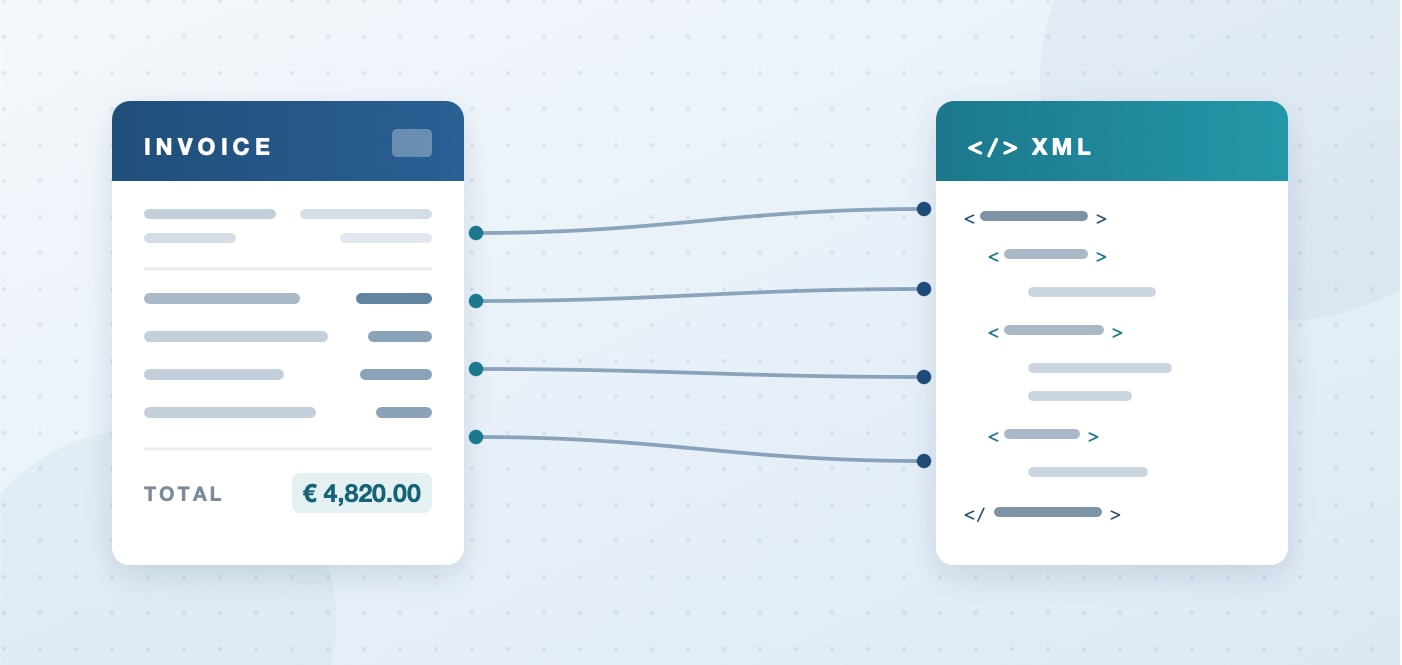
MapForce Converts to and from XML
Most e-invoicing products only support the formats their vendor has built. That works until a new mandate lands, or a customer asks for a syntax that is not on the list, and then you are waiting on someone else’s roadmap.
Altova MapForce comes at it from the other end. It maps your source invoice to or from whatever schema you load — UBL, CII, XRechnung, FatturaPA, or a national format published next year. The other side of the data mapping reads what you already have:
- Excel and CSV exports from an ERP or accounting system
- Databases, including the tables behind your billing system
- XML and JSON from an API or another application
- PDF sources, using the MapForce PDF Extractor
- EDI, where invoices are formatted as EDIFACT or X12 messages
That combination is the reason this is a mapping problem rather than a converter problem. Invoice data rarely lives in one clean place: some of it is in the ERP, some in a spreadsheet a subsidiary maintains, some in supplier PDFs, and the e-invoice XML format changes based on the country at hand.
In MapForce, data mapping projects are built visually, so the person who understands what is in the invoice data can build one without writing code. And the second country costs much less than the first: the mapping with your internal systems is already built, so you copy the mapping, swap in the new e-invoice schema, and adjust only where the two formats actually differ. You don’t need a separate tool for every country.
Per-Country e-Invoicing Standards
Here is where the main EU markets stand. Every format below aligns to EN 16931; what differs is the syntax each country accepts and the route the invoice has to travel.
| Country | Required format | What it is | Status |
|---|---|---|---|
| France | Factur-X, UBL or CII | Factur-X is hybrid: a PDF/A-3 with the XML embedded inside it. UBL and CII are pure XML. Invoices travel through an approved platform (PDP). Locally, facturation électronique. | All in-scope businesses must be able to receive from September 1, 2026. Issuing and e-reporting: large enterprises and ETIs from September 2026, SMEs and micro-enterprises from September 2027 |
| Germany | XRechnung or ZUGFeRD 2.1+ | XRechnung is pure XML. ZUGFeRD is the hybrid PDF/A-3 with embedded CII XML. Locally, E-Rechnung. | Receiving mandatory since 1 January 2025. Issuing from 1 January 2027 for businesses above €800,000 turnover, and all businesses from January 1, 2028 |
| Italy | FatturaPA | Pure XML, exchanged through the SdI clearance platform. Locally, fattura elettronica. | Live. Mandatory for domestic B2B since 2019 |
| Poland | KSeF structured invoice | A national XML Schema submitted through the KSeF platform. Locally, faktura ustrukturyzowana. | Live. From February 1, 2026 for the largest taxpayers and all B2B from April 1, 2026 |
| Belgium | Peppol BIS Billing 3.0 | Pure XML, exchanged over the Peppol network rather than sent directly. | Live since January 1, 2026 |
| United Kingdom (UK) | Peppol-based | Outside the EU wave and on a different timetable. | Not yet mandatory. A Peppol-based B2B mandate is confirmed for April 2029 |
Working with Hybrid e-Invoice Formats
Unlike the pure XML formats, ZUGFeRD and Factur-X are PDF/A-3 files with the invoice XML embedded as an attachment. The visible page is a courtesy for the human reader; where the two disagree, the embedded XML is what counts.
Receiving one: In this case, don't extract data from the PDF —this would give you the courtesy copy rather than the data. Detach the attachment and map from the XML. The open-source poppler-utils package does it in one command:
pdfdetach -list invoice.pdf # show embedded files
pdfdetach -saveall invoice.pdf # extract all attachments
The attachment name tells you the profile: ZUGFeRD-invoice.xml for ZUGFeRD 1.0, factur-x.xml for ZUGFeRD 2.x and Factur-X, and xrechnung.xml in the XRechnung reference profile. Poppler-utils is available for Windows, Linux, and macOS. This step automates well as the first stage of a FlowForce Server job, with the mapping running immediately after.
Sending one: MapForce reads PDF as a source but does not write it, so it produces the XML that goes inside a ZUGFeRD or Factur-X file rather than the hybrid PDF itself. The container is assembled by your PDF toolchain.
One caveat either way. ZUGFeRD and Factur-X define several profiles, and at the lower ones the embedded XML carries only header data while the line-item detail stays in the PDF layer where software cannot read it. Confirm which profile your customer or platform requires before deciding what the mapping has to populate.
Creating an e-Invoice
Getting an invoice from your system to your customer’s involves four distinct jobs. They tend to get discussed as a single thing called “e-invoicing,” which is how teams end up surprised partway through a project by what their software does not do.
Extract — get the invoice data out of wherever it currently lives: an ERP export, a database, a spreadsheet, or a supplier’s PDF
Map and Transform — restructure it into the fields the target format defines, converting codes, dates, and tax categories on the way
Validate — confirm the result conforms to the schema before anyone tries to send it
Deliver — transmit it over Peppol, through a French PDP, or to a national platform such as SdI or KSeF
Extracting, mapping, and transforming data are data mapping tasks, and they are what MapForce does, along with checking the output against the target schema, so you know the file is structurally correct before it leaves.
Two things sit outside that. EN 16931 carries business rules out side of what XSD can express, and those are checked with a Schematron validator. The EU publishes the rule sets free, and delivery platforms generally run them on receipt as well. Delivery itself is a network and accreditation question for a Peppol access point or an approved platform provider.
Knowing where those lines fall before you scope the work is the difference between a plan and a surprise.
Real-World Example: PDF to an XML e-Invoice
This is a common problem for finance teams: the billing system only produces a PDF, or invoices arrive from a subsidiary running different software, and they now need to leave the building as XRechnung.
One thing to understand before looking at the mapping. EN 16931 is a semantic model: it defines what an invoice has to contain, not what the XML looks like. Two syntaxes carry that model — UBL and CII — and a compliant e-invoice can conform to either of them, following the standard's rules. So there is no file type called "an EN 16931 file." There are XML-based UBL invoices and CII invoices that conform to it.
XRechnung accepts either syntax, so this is one of two valid routes to the same requirement. The UBL schemas are published free by OASIS and the CII D16B schemas by UN/CEFACT, and you can install them quickly using the XML Schema Manager in MapForce.
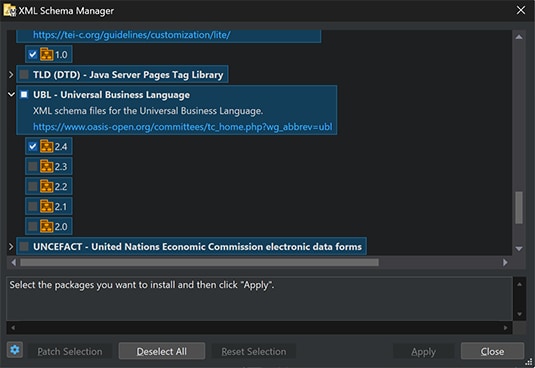
The example below targets an XML-based UBL e-Invoice.
We’ve used the MapForce PDF Extractor to define rules for extracting the data from the PDF invoice. This creates a template that becomes the source component that we will map to the target UBL schema. MapForce reads the structure from the schema, so the target tree shows the exact elements the format defines rather than a generic XML shape. We’ve started with Altova AI (an optional add-on subscription) to suggest connections between the PDF and the UBL invoice XML Schema, but you can also connect them manually.
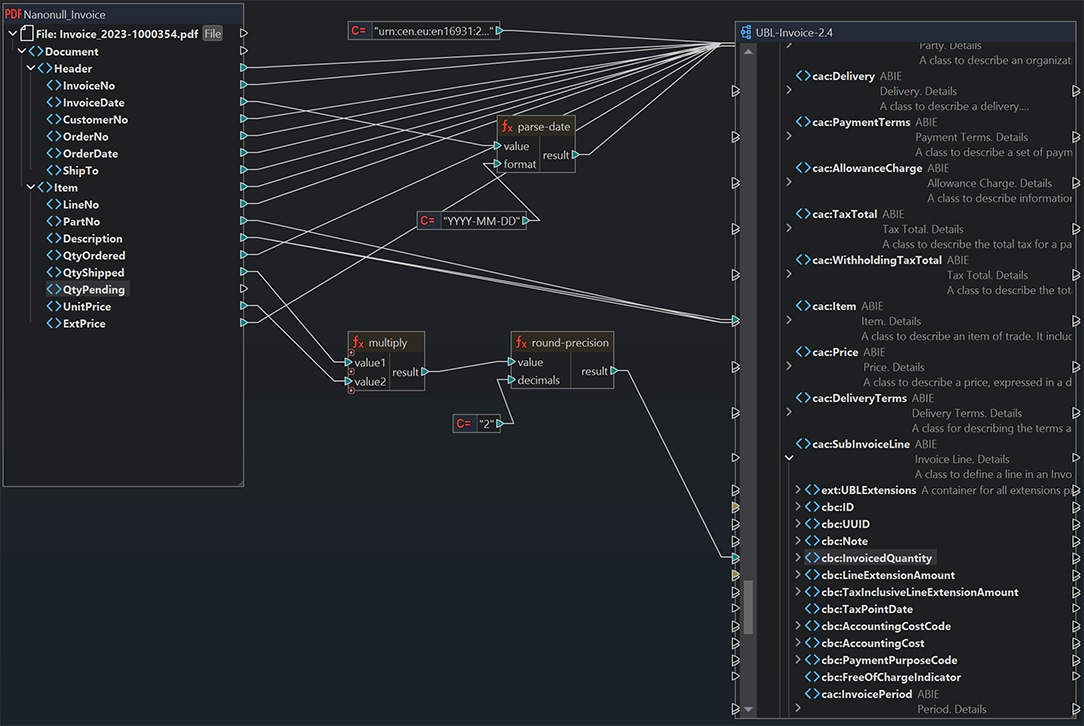
Not every target field is a straight connection. Some fields map directly, and others need to be calculated or transformed, and some values are not present in the source at all.
MapForce includes a rich library of data processing functions for all these scenarios: arithmetic and rounding for calculated values, string handling for reformatting dates and splitting a single address field into street, city, postal code and country, and constants and lookups for the values the source does not include.
Once the mapping produces a valid file, the useful part is that it keeps producing them. Point it at next month’s export, and the conversion runs unchanged. Compile it for MapForce Server, schedule it with FlowForce Server, and invoices convert as they arrive.
Receiving e-Invoices
The obligation runs both ways. Germany has required businesses to be able to receive structured e-invoices since January 2025, and from September 2026 French business must too. The flow is shorter in this direction:
Receive — the file arrives through your access point, PDP, or a national platform
Map and Transform — restructure the incoming XML into whatever your ERP, database, or accounting system expects
Import — write it into the system that will actually use it
Once again, this is a job for MapForce – and the workflow can be fully automated with MapForce Server and FlowForce Server.
Benefits of MapForce for e-Invoicing Specifically
One tool, not one per direction. Whether the flow is outbound to a national format, inbound to your database, or one compliant format to another, they’re all the same kind of mapping.
Mandates arrive on a schedule. A saved mapping is an asset you extend when the next date lands, not a project you repeat.
Correctness is designed in, not discovered later. Getting the fields and code lists right in the mapping is what keeps a file from coming back rejected — and a rejected invoice is a delayed payment plus a manual investigation.
The mapping is inspectable. When an auditor asks how a tax figure was derived, the answer is a diagram that’s easy to understand.
• It runs on your own infrastructure. Invoices contain commercial and personal data. MapForce processes it on your machine, and MapForce Server and FlowForce Server run on servers you control.
Try it on Your Own Invoice Data
The fastest way to see whether this fits your process is to take one real export and one target schema and map them. If the conversion works on a single invoice, it works on the batch.
You can download a free, 30-day trial of MapForce to get started.