Taxonomy Package Manager
XBRL Taxonomy Package Manager (aka Package Manager) is an Altova tool that provides a centralized way to install and manage XBRL taxonomy packages (aka packages) for use across all Altova's XBRL-enabled applications, including EBA XBRL Add-in.
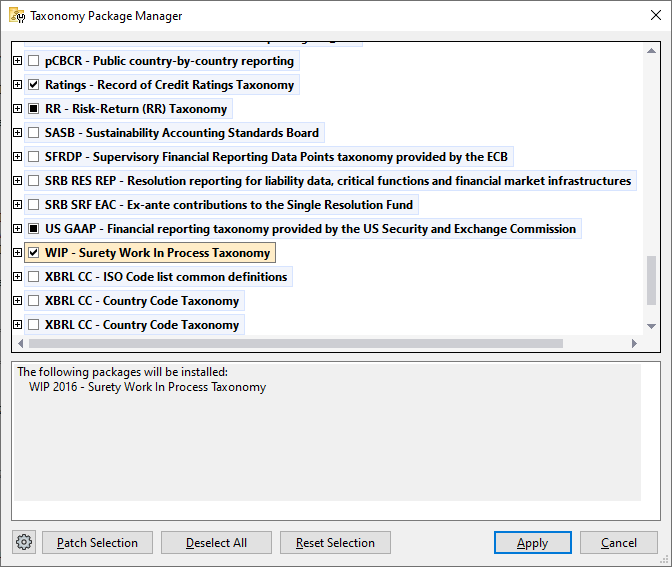
•On Windows, Taxonomy Package Manager has a graphical user interface (screenshot below) and is also available at the command line. (Altova's desktop applications are available on Windows only; see table below.)
•On Linux, Taxonomy Package Manager is available at the command line only. (Altova's server applications are available on Windows and Linux; see table below.)
Altova's XBRL-enabled applications
Desktop applications (Windows only) | Server applications (Windows, Linux) |
MapForce Server (Standard and Advanced Editions) | |
Installation and de-installation of Taxonomy Package Manager
Taxonomy Package Manager is installed automatically when you first install a new version of Altova Mission Kit Enterprise Edition or of any of Altova's XBRL-enabled applications (see table above).
Likewise, it is removed automatically when you uninstall the last Altova XBRL-enabled application from your computer.
Taxonomy Package Manager features
Taxonomy Package Manager provides the following features:
•Shows XBRL taxonomy packages installed on your computer and checks whether new versions are available for download.
•Downloads newer versions of XBRL taxonomy packages independently of the Altova product release cycle. (Altova stores taxonomy packages online, and you can download them via Taxonomy Package Manager.)
•Install or uninstall any of the multiple versions of a given taxonomy package (or all versions if necessary).
•A taxonomy package may have dependencies on other taxonomy packages. When you install or uninstall a particular package, Taxonomy Package Manager informs you about dependent packages and will automatically install or remove them as well.
•Taxonomy Package Manager uses the XML catalog mechanism to map schema references to local files. In the case of large taxonomy packages, processing will therefore be faster than if the packages were at a remote location.
•All major taxonomy packages are available via Taxonomy Package Manager and are regularly updated for the latest versions. This provides you with a convenient single resource for managing all your taxonomy packages and making them readily available to all of Altova's XBRL-enabled applications.
•Changes made in Taxonomy Package Manager take effect for all Altova products installed on that machine.
How it works
Altova stores online all the taxonomy packages that are used in Altova products. This repository is updated when new versions of taxonomy packages are released. Taxonomy Package Manager tracks these updates and displays information about the latest available packages when it is invoked, in either its GUI form or at the CLI. You can then install, upgrade or uninstall packages via Taxonomy Package Manager.
Local cache: tracking your taxonomy packages
All information about installed taxonomy packages is tracked in a centralized Altova cache directory on your computer, located here:
Windows | C:\ProgramData\Altova\pkgs\.cache or <USER-HOME>\Documents\Altova\pkgs\.cache (the path depends on the directory you have selected for the Taxonomies Folder field in the Settings dialog) |
Linux | /var/opt/Altova/pkgs\.cache |
This cache directory is updated regularly with information about the latest taxonomy packages at Altova's online storage. The cache updates are carried out at the following times:
•Every time you start Taxonomy Package Manager.
•When you start EBA XBRL Add-in for the first time on any given calendar day.
•If EBA XBRL Add-in is open for more than 24 hours, the cache is updated every 24 hours.
•When you run the update command at the command line interface.
The cache therefore enables Taxonomy Package Manager to continuously track your installed taxonomy packages against the packages available online at the Altova website.
Do not modify the cache manually!The local cache directory is maintained automatically based on the taxonomy packages you install and uninstall. It should not be altered or deleted manually.
If you ever need to reset Taxonomy Package Manager to its original "pristine" state, then, on the command line interface (CLI) do one of the following: (i) run the reset command with the --i option, or (ii) run the reset command and then the initialize command.
|
HTTP proxy
You can use an HTTP proxy for Taxonomy Package Manager connections. The Windows system's proxy settings will be used.