Data Export
Once your report is ready and valid, you can generate an XBRL instance file, using the Export to XBRL ribbon command.
Export formats
The available export formats are listed below.
Basic Edition:
•xBRL-XML report (*.xbrl or *.xml)
•Zipped xBRL-XML report (*.zip)
•xBRL-XML for OneGate (*.xml)
Enterprise and Consultant editions:
•xBRL-XML report (*.xbrl or *.xml)
•Zipped xBRL-XML report (*.zip)
•xBRL-XML for OneGate (*.xml)
•xBRL-CSV report (*.json)
•xBRL-CSV report package (*.zip)
•xBRL-CSV for OneGate (*.xml)
Data validation during export
During export, data is automatically validated. Any errors, inconsistencies and warnings are reported in the Validation Report. For more information, see Data Validation.
Cell values that do not conform to the data type of the underlying XBRL concept prevent the report from being exported. For tips on how to avoid data formatting errors, see Data Entry. Note, however, that not all XBRL validation errors might be related to incorrect formatting. Some errors might occur because entered data does not meet the XBRL validation rules for the report you are filing.
Reports for submission to the Central Bank of Ireland (CBI)
For reports for submission to the Central Bank of Ireland, the exported XBRL file uses the following naming convention:
InstitutionCode_YYYYMMDD_ReportType.xbrl
The file name contains the institution code, the reporting date in YYYYMMDD format, and the report type (also known as the return file name), which can consist of several parts. For more information about the CBI file naming convention, refer to the topic XBRL File Naming Convention in the CRD IV XBRL File Upload User Guidelines Document.
Below is an example of such a report name:
C12345_20260921_AE_Individual-Banking.xbrl
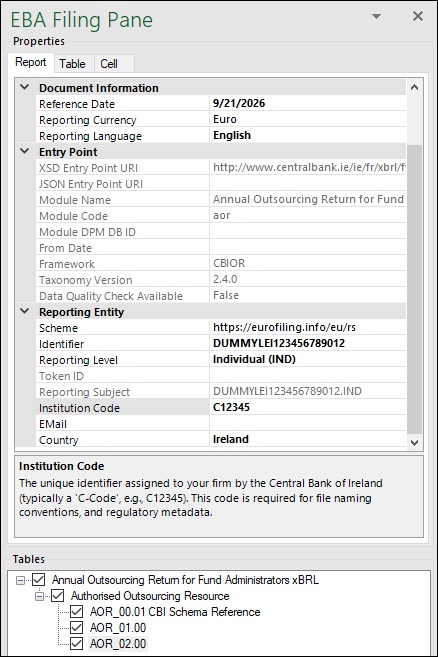
To export a report with the CBI-specific file naming convention, you must satisfy the following conditions (shown in screenshot below):
•The Institution Code parameter in the EBA Filing Pane has a value, and
•Either:
oThe Country parameter is set to Ireland, or
oThe selected entry point belongs to the CBI, identified by a URI starting with http://www.centralbank.ie/.
During export, you can change the file name if necessary.