创新型 XPath/XQuery 工具
在 XMLSpy 2015 版本的第三个版本中,XPath 和 XQuery 的支持得到了显著提升。除了增加对最新标准版本的支持,即 XPath 3.1 和 XQuery 3.1,我们还为 XPath/XQuery 窗口添加了创新的新工具,用于开发和测试 XPath 和 XQuery 表达式。
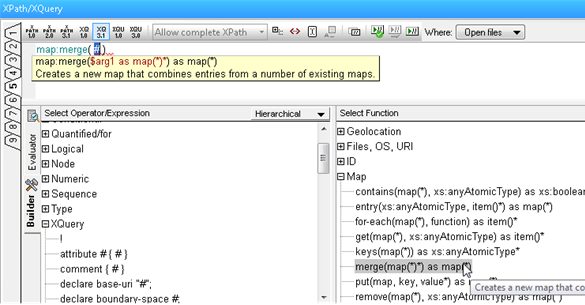
这些新工具可以显著加快开发、评估和完善表达式和语句的过程,然后再将它们添加到更大的 XSLT 或 XQuery 文档中。这可以节省您的时间和精力,因为您可以立即了解每个运算符或函数的工作方式,并确保您的表达式能够返回预期的结果。我发现这些函数描述和输入辅助工具对于学习 XPath/XQuery 3.1 中新引入的映射和数组功能的工作原理特别有帮助。

如您在下方看到的,XPath/XQuery 窗口支持所有版本的 XPath (1.0/2.0/3.1) 和 XQuery (1.0/3.1),以及 XQuery 更新功能 (1.0/3.0)。
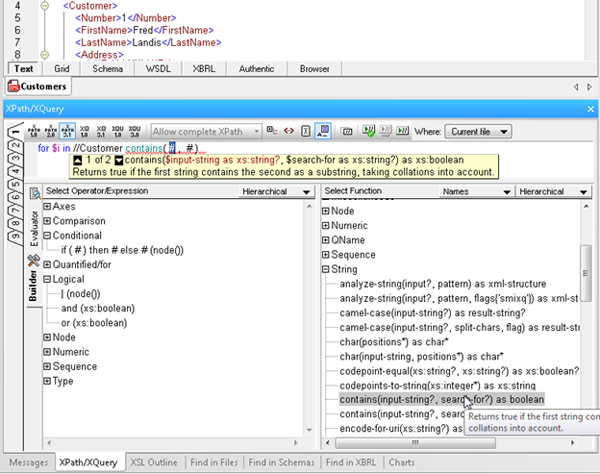
XPath/XQuery 工具窗口有两种模式:构建模式和评估模式,您可以在工作过程中在两种模式之间切换。
构建模式
构建模式为您提供了众多工具,这些工具可以帮助您快速、轻松地创建 XPath 和 XQuery 表达式:
- Point-and-click expression building, via a comprehensive a list of operators, expressions, and built in functions, which you can insert in an expression by double clicking. Functions are inserted with their arguments indicated by “#” placeholders, making it easy to build expressions quickly and error-free.
- Mouse-over hints that describe each operator, expression, and function, so you can be sure to choose the correct one for the expression at hand.
- Enhanced entry helpers that display the description of built in functions, and then show helpful function and parameter details as you type, speeding development and ensuring accuracy.
- Ready-to-use code snippets for complex statements such as FLWOR and XQuery Update Facility expressions, found in the Operator/Expression pane. Here you can read a description of each and insert the expression at the cursor by double clicking.
评估模式
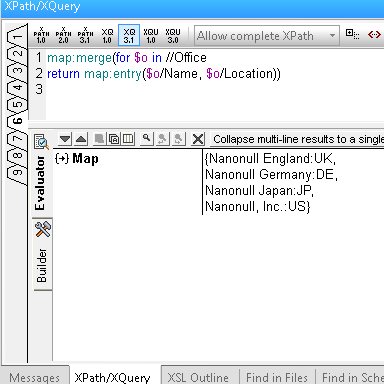
评估模式允许您在工作过程中测试 XPath/XQuery 语句的结果,这具有以下几个优点:
- Save time and avoid errors by testing expressions before adding them to your document and adjusting as needed.
- Evaluate an XPath or XQuery expression against one or more files: the active document, all open files, a folder, or an entire XMLSpy project.
- Utilize nine tabs for developing and testing complex expressions. Once you have composed an expression on one tab, switching to a new tab lets you build and analyze the results of a new expression – but when you switch back to the previous tab, the expression and results are still there. This allows you develop multiple expressions side-by-side and incrementally make changes to each one of them, preserving both the expression and the result for each tab.
现在就来尝试这些新的 XPath 和 XQuery 工具吧,您可以免费下载 XMLSpy 软件的 30 天免费试用.
最后一点:我之前提到,XPath/XQuery 工具不仅可以节省时间和减少错误,还能帮助您了解最新标准版本中的新功能。您还可以参考 Altova 提供的全新、免费的 在线 XPath 3.0 培训课程。