Innovative neue Tools für XPath/XQuery
Die Unterstützung für XPath und XQuery in XMLSpy wurde mit der Version 2015, Release 3, erheblich verbessert. Neben der Integration der neuesten Standards – XPath 3.1 und XQuery 3.1 – haben wir innovative neue Werkzeuge zur Entwicklung und zum Testen von XPath- und XQuery-Ausdrücken im XPath/XQuery-Fenster hinzugefügt.
Diese neuen Werkzeuge ermöglichen eine deutlich schnellere Entwicklung, Bewertung und Verfeinerung von Ausdrücken und Anweisungen, bevor diese in größere XSLT- oder XQuery-Dokumente integriert werden. Dies spart Ihnen Zeit und vermeidet Frustration – da Sie verstehen können, wie jeder Operator oder jede Funktion funktioniert, und sicherstellen können, dass Ihre Ausdrücke sofort die gewünschten Ergebnisse liefern. Ich fand die Funktionsbeschreibungen und die Hilfefunktionen besonders hilfreich, um zu verstehen, wie die neuen Funktionen für Karten und Arrays in XPath/XQuery 3.1 implementiert sind.

Wie Sie unten sehen können, unterstützt das XPath/XQuery-Fenster alle Versionen von XPath (1.0/2.0/3.1) und XQuery (1.0/3.1), sowie die XQuery-Update-Funktionalität (1.0/3.0).
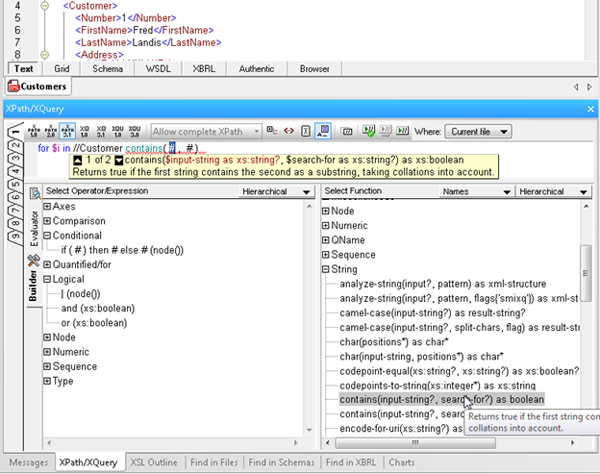
Das XPath/XQuery-Fenster verfügt über zwei Modi: "Editor" und "Evaluator", zwischen denen Sie während der Arbeit umschalten können.
Baukastenmodus
Der Entwicklermodus bietet Ihnen Zugriff auf zahlreiche Werkzeuge, die die Erstellung von XPath- und XQuery-Ausdrücken schnell und einfach machen:
- Point-and-click expression building, via a comprehensive a list of operators, expressions, and built in functions, which you can insert in an expression by double clicking. Functions are inserted with their arguments indicated by “#” placeholders, making it easy to build expressions quickly and error-free.
- Mouse-over hints that describe each operator, expression, and function, so you can be sure to choose the correct one for the expression at hand.
- Enhanced entry helpers that display the description of built in functions, and then show helpful function and parameter details as you type, speeding development and ensuring accuracy.
- Ready-to-use code snippets for complex statements such as FLWOR and XQuery Update Facility expressions, found in the Operator/Expression pane. Here you can read a description of each and insert the expression at the cursor by double clicking.
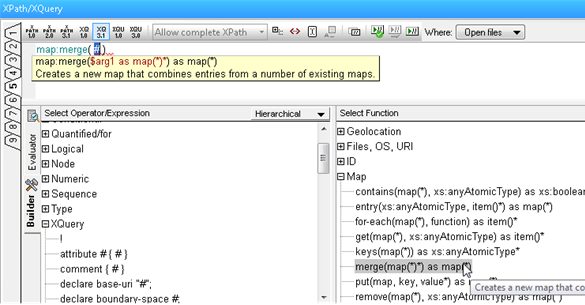
Evaluierungsmodus
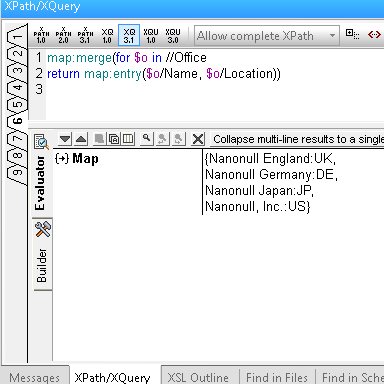
Der Evaluierungsmodus ermöglicht es Ihnen, die Ergebnisse Ihrer XPath-/XQuery-Anweisungen während der Arbeit zu testen, was mehrere Vorteile bietet:
- Save time and avoid errors by testing expressions before adding them to your document and adjusting as needed.
- Evaluate an XPath or XQuery expression against one or more files: the active document, all open files, a folder, or an entire XMLSpy project.
- Utilize nine tabs for developing and testing complex expressions. Once you have composed an expression on one tab, switching to a new tab lets you build and analyze the results of a new expression – but when you switch back to the previous tab, the expression and results are still there. This allows you develop multiple expressions side-by-side and incrementally make changes to each one of them, preserving both the expression and the result for each tab.
Probieren Sie diese neuen XPath- und XQuery-Tools jetzt aus, indem Sie eine kostenlose Version herunterladen 30-tägige Testversion von XMLSpy.
Eine letzte Anmerkung: Ich habe erwähnt, dass das XPath/XQuery-Fenster nicht nur Zeit und Fehler spart, sondern auch hilft, wenn man sich mit den neuen Funktionen in den neuesten Standardversionen vertraut machen möchte. Sie können sich auch von Altovas neuem, kostenlosen Online-XPath-3.0-Schulungskurs Unterstützung holen.