革新的なXPath/XQueryツールが登場
XMLSpyのバージョン2015、リリース3において、XPathおよびXQueryのサポートが大幅に強化されました。最新の規格バージョンであるXPath 3.1およびXQuery 3.1のサポートを追加したことに加え、XPath/XQueryウィンドウにおいて、XPathおよびXQueryの式を開発およびテストするための革新的な新機能が追加されました。
これらの新しいツールを使用することで、XSLTやXQueryのより大きなドキュメントに追加する前に、式や文を開発、評価、改善するプロセスが大幅にスピードアップします。これにより、時間と労力を節約できるだけでなく、各演算子や関数の動作を理解し、式が期待通りの結果をすぐに返すことを確認できます。特に、XPath/XQuery 3.1で導入された新しいマップや配列機能がどのように実装されているかを学ぶ上で、関数の説明や入力支援機能が非常に役立ちました。

以下に示すように、XPath/XQuery ウィンドウは、XPath (1.0/2.0/3.1) および XQuery (1.0/3.1) のすべてのバージョンに対応しており、さらに XQuery 更新機能 (1.0/3.0) もサポートしています。
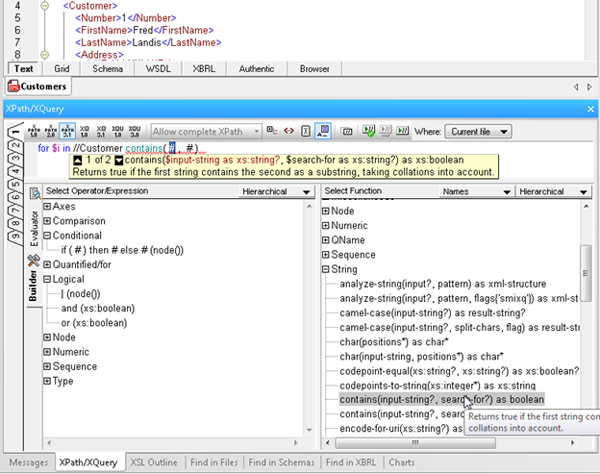
XPath/XQuery ウィンドウには、作業中に切り替え可能な2つのモードがあります。それは、構築モード(Builder)と評価モード(Evaluator)です。
構築モード
ビルダーモードでは、XPathやXQueryの式を迅速かつ容易に開発するための様々なツールを利用できます
- Point-and-click expression building, via a comprehensive a list of operators, expressions, and built in functions, which you can insert in an expression by double clicking. Functions are inserted with their arguments indicated by “#” placeholders, making it easy to build expressions quickly and error-free.
- Mouse-over hints that describe each operator, expression, and function, so you can be sure to choose the correct one for the expression at hand.
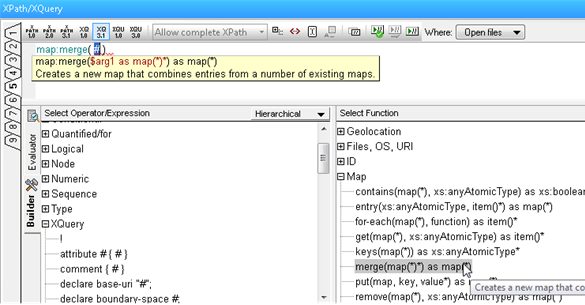
- Enhanced entry helpers that display the description of built in functions, and then show helpful function and parameter details as you type, speeding development and ensuring accuracy.
- Ready-to-use code snippets for complex statements such as FLWOR and XQuery Update Facility expressions, found in the Operator/Expression pane. Here you can read a description of each and insert the expression at the cursor by double clicking.
評価モード
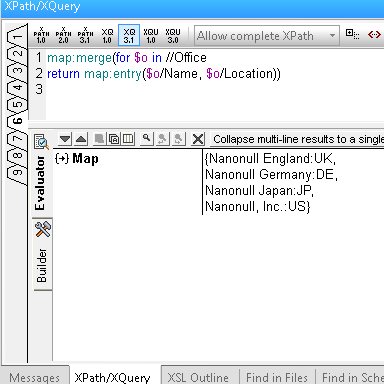
評価モードを使用すると、XPath/XQueryの記述を作成しながら、その結果をテストすることができます。これにはいくつかの利点があります
- Save time and avoid errors by testing expressions before adding them to your document and adjusting as needed.
- Evaluate an XPath or XQuery expression against one or more files: the active document, all open files, a folder, or an entire XMLSpy project.
- Utilize nine tabs for developing and testing complex expressions. Once you have composed an expression on one tab, switching to a new tab lets you build and analyze the results of a new expression – but when you switch back to the previous tab, the expression and results are still there. This allows you develop multiple expressions side-by-side and incrementally make changes to each one of them, preserving both the expression and the result for each tab.
これらの新しいXPathおよびXQueryツールをぜひお試しください。無料でダウンロードできます XMLSpyの30日間試用版.
最後に、XPath/XQuery ウィンドウは、時間とエラーの削減に役立つだけでなく、最新の規格バージョンに導入された新機能について学ぶ際にも役立ちます。また、Altovaが提供する新しい無料ツールも活用できます オンラインXPath 3.0トレーニングコース .