Strumenti innovativi per XPath/XQuery
Il supporto per XPath e XQuery in XMLSpy ha ricevuto un importante miglioramento con la versione 3 della release 2015. Oltre ad aggiungere il supporto per le ultime versioni degli standard – XPath 3.1 e XQuery 3.1 – abbiamo aggiunto nuovi e innovativi strumenti per lo sviluppo e il test di espressioni XPath e XQuery nella finestra XPath/XQuery.
Questi nuovi strumenti rendono molto più veloce lo sviluppo, la valutazione e la perfezionamento di espressioni e dichiarazioni prima di aggiungerle a documenti XSLT o XQuery più complessi. Questo vi farà risparmiare tempo e ridurre la frustrazione, perché potrete capire come funziona ogni operatore o funzione e assicurarvi che le vostre espressioni producano immediatamente i risultati desiderati. Ho trovato particolarmente utili le descrizioni delle funzioni e gli strumenti di supporto per capire come sono implementate le nuove funzionalità di mappe e array in XPath/XQuery 3.1.

Come potete vedere di seguito, la finestra XPath/XQuery supporta tutte le versioni di XPath (1.0/2.0/3.1) e XQuery (1.0/3.1), nonché la funzionalità di aggiornamento XQuery (1.0/3.0).
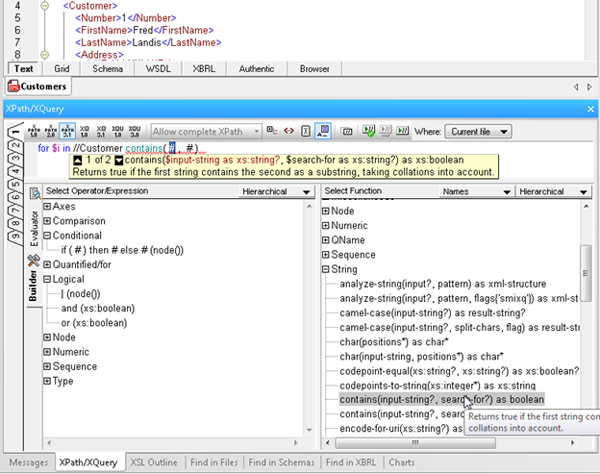
La finestra XPath/XQuery offre due modalità: "Costruttore" e "Valutatore", tra cui è possibile alternare durante l'utilizzo.
Modalità costruttore
La modalità "Builder" offre l'accesso a numerosi strumenti che semplificano e velocizzano lo sviluppo di espressioni XPath e XQuery:
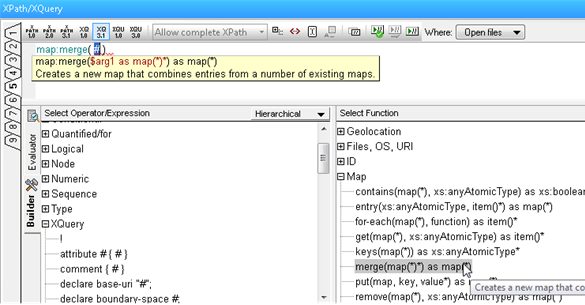
- Point-and-click expression building, via a comprehensive a list of operators, expressions, and built in functions, which you can insert in an expression by double clicking. Functions are inserted with their arguments indicated by “#” placeholders, making it easy to build expressions quickly and error-free.
- Mouse-over hints that describe each operator, expression, and function, so you can be sure to choose the correct one for the expression at hand.
- Enhanced entry helpers that display the description of built in functions, and then show helpful function and parameter details as you type, speeding development and ensuring accuracy.
- Ready-to-use code snippets for complex statements such as FLWOR and XQuery Update Facility expressions, found in the Operator/Expression pane. Here you can read a description of each and insert the expression at the cursor by double clicking.
Modalità di valutazione
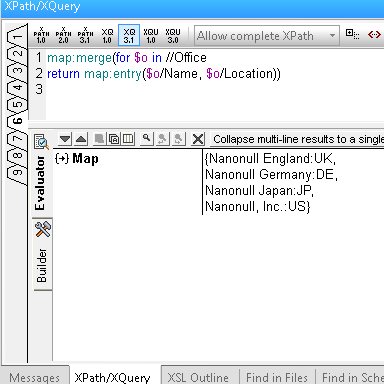
La modalità "Valutatore" consente di testare i risultati delle proprie espressioni XPath/XQuery durante il lavoro, e questo offre diversi vantaggi:
- Save time and avoid errors by testing expressions before adding them to your document and adjusting as needed.
- Evaluate an XPath or XQuery expression against one or more files: the active document, all open files, a folder, or an entire XMLSpy project.
- Utilize nine tabs for developing and testing complex expressions. Once you have composed an expression on one tab, switching to a new tab lets you build and analyze the results of a new expression – but when you switch back to the previous tab, the expression and results are still there. This allows you develop multiple expressions side-by-side and incrementally make changes to each one of them, preserving both the expression and the result for each tab.
Provate subito questi nuovi strumenti XPath e XQuery scaricando una versione gratuita Prova gratuita di XMLSpy per 30 giorni.
Un'ultima osservazione: ho menzionato che la finestra XPath/XQuery non solo fa risparmiare tempo ed evita errori, ma è anche utile quando si cerca di apprendere le nuove funzionalità presenti nelle ultime versioni degli standard. Inoltre, è possibile usufruire del nuovo strumento gratuito di Altova Corso di formazione online su XPath 3.0 .