혁신적인 새로운 XPath/XQuery 도구들
XMLSpy 2015 버전 3에서 XPath 및 XQuery 지원 기능이 크게 강화되었습니다. 최신 표준 버전인 XPath 3.1 및 XQuery 3.1 지원을 추가한 것 외에도, XPath/XQuery 창에서 XPath 및 XQuery 표현식을 개발하고 테스트할 수 있는 혁신적인 새로운 도구를 추가했습니다.
이 새로운 도구들은 XSLT 또는 XQuery 문서에 표현식과 문장을 추가하기 전에, 이를 개발, 평가, 개선하는 과정을 훨씬 빠르게 만들어 줍니다. 이를 통해 시간과 노력을 절약하고 불필요한 어려움을 줄일 수 있습니다 왜냐하면 각 연산자나 함수의 작동 방식을 이해하고, 표현식이 원하는 결과를 즉시 반환하는지 확인할 수 있기 때문입니다. 저는 특히 XPath/XQuery 3.1에 새롭게 추가된 매핑 및 배열 기능이 어떻게 구현되었는지 학습하는 데 함수 설명과 도움말 기능이 매우 유용하다고 생각했습니다.

아래에서 볼 수 있듯이, XPath/XQuery 창은 XPath의 모든 버전(1.0/2.0/3.1)과 XQuery의 모든 버전(1.0/3.1)을 지원하며, XQuery 업데이트 기능(1.0/3.0) 또한 지원합니다.
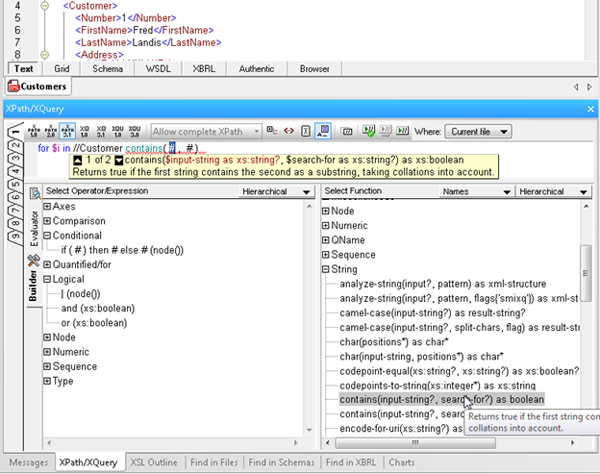
XPath/XQuery 창은 "빌더(Builder)" 모드와 "평가기(Evaluator)" 모드, 이렇게 두 가지 모드를 가지고 있으며, 작업 중에 이 두 모드 간을 자유롭게 전환할 수 있습니다.
빌더 모드
빌더 모드는 XPath 및 XQuery 표현식을 빠르고 쉽게 개발할 수 있도록 다양한 도구를 제공합니다
- Point-and-click expression building, via a comprehensive a list of operators, expressions, and built in functions, which you can insert in an expression by double clicking. Functions are inserted with their arguments indicated by “#” placeholders, making it easy to build expressions quickly and error-free.
- Mouse-over hints that describe each operator, expression, and function, so you can be sure to choose the correct one for the expression at hand.
- Enhanced entry helpers that display the description of built in functions, and then show helpful function and parameter details as you type, speeding development and ensuring accuracy.
- Ready-to-use code snippets for complex statements such as FLWOR and XQuery Update Facility expressions, found in the Operator/Expression pane. Here you can read a description of each and insert the expression at the cursor by double clicking.
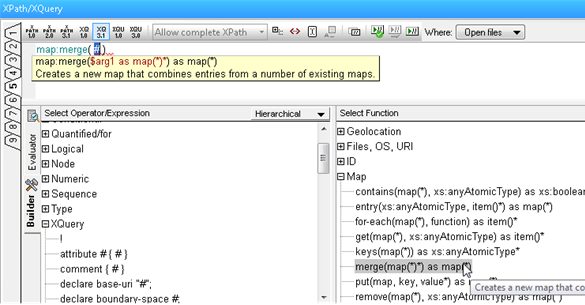
평가 모드
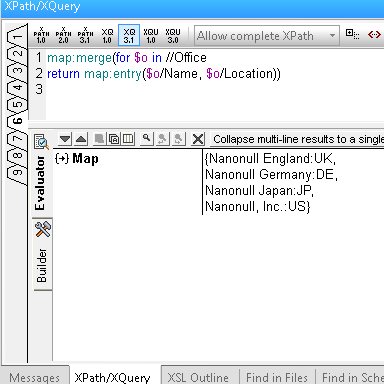
평가자 모드를 사용하면 XPath/XQuery 문장을 작성하는 동안 결과를 테스트할 수 있으며, 이는 다음과 같은 여러 가지 장점을 제공합니다
- Save time and avoid errors by testing expressions before adding them to your document and adjusting as needed.
- Evaluate an XPath or XQuery expression against one or more files: the active document, all open files, a folder, or an entire XMLSpy project.
- Utilize nine tabs for developing and testing complex expressions. Once you have composed an expression on one tab, switching to a new tab lets you build and analyze the results of a new expression – but when you switch back to the previous tab, the expression and results are still there. This allows you develop multiple expressions side-by-side and incrementally make changes to each one of them, preserving both the expression and the result for each tab.
새로운 XPath 및 XQuery 도구를 지금 바로 사용해 보세요. 무료로 다운로드하여 체험할 수 있습니다 XMLSpy 30일 체험 기간.
마지막으로 한 가지 말씀드리겠습니다. 앞서 말씀드린 것처럼, XPath/XQuery 창은 시간을 절약하고 오류를 줄이는 것뿐만 아니라, 최신 표준 버전의 새로운 기능들을 학습할 때도 도움이 됩니다. 또한, 알토바의 새로운 무료 기능들을 활용하여 도움을 받을 수도 있습니다 온라인 XPath 3.0 교육 과정 .