Filter and Sort Database Data
This topic explains how to filter and sort database data using the SQL/NoSQL-WHERE/ORDER component. This component enables you to manually enter a WHERE clause to filter data. Optionally, you can also:
•Specify an ORDER BY clause to sort the data by a particular database field in ascending or descending order.
•Select the Select Distinct rows only check box to have the database return only unique rows.
The SQL/NoSQL-WHERE/ORDER component must be connected to a table or field of a source database component. You can also connect a WHERE/ORDER component to a join component to filter the joined set of records.
Add an SQL/NoSQL-WHERE/ORDER component
To add an SQL/NoSQL-WHERE/ORDER component to the mapping, follow the instructions below:
1.Select the Insert SQL/NoSQL-WHERE/ORDER toolbar command. Alternatively, select SQL/NoSQL-WHERE/ORDER from the Insert menu or from the Component Gallery. By default, this component has the following structure:

2.Connect a source database table or field to the db-object item of the WHERE/ORDER component.
3.To specify a WHERE clause, double-click the header of the WHERE/ORDER component. Alternatively, right-click it and select Properties from the context menu. This opens the SQL/NoSQL-WHERE/ORDER Properties dialog. The screenshot below shows the properties of the WHERE/ORDER component in MapForceExamples\DB_PhoneList.mfd.

4.Type a WHERE clause in the text box at the top. In our example, the WHERE clause (Last LIKE :Name) returns rows where the Last field matches the pattern specified by the :Name parameter. Values are supplied to this parameter from the mapping. Optionally, add an ORDER BY clause. In our example, the ORDER BY clause sorts the Last values in ascending order. For more information, see WHERE and ORDER BY Clauses.
Parameters in SQL/NoSQL-WHERE/ORDER components
You can define parameters in the WHERE clause of an SQL/NoSQL-WHERE/ORDER component. They can be useful if you want to pass a value to the WHERE clause from the mapping.
In the WHERE/ORDER component illustrated above, the WHERE clause is specified as follows:
Last LIKE :Name, where:
•Last refers to the database field in the connected table.
•LIKE is an SQL operator that performs pattern matching.
•:Name is a parameter that receives values from the mapping.
In MapForceExamples\DB_PhoneList.mfd, Name appears as a parameter of the WHERE/ORDER component (screenshot below).
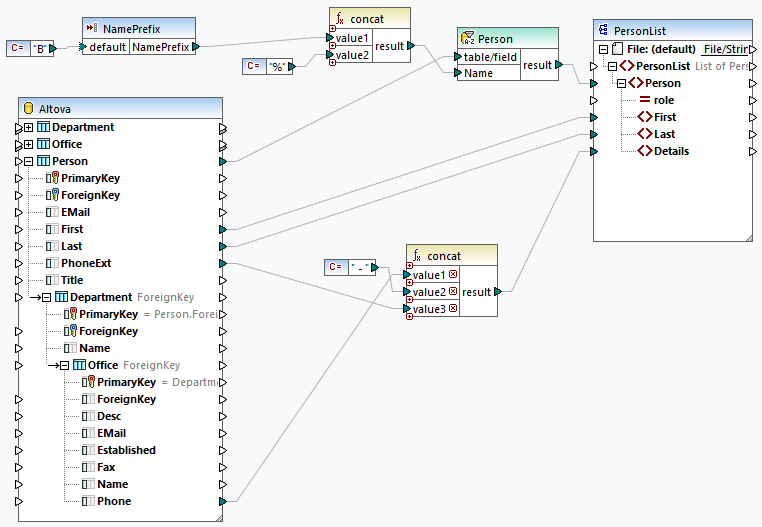
The value passed to this parameter is constructed as follows:
•The constant supplies the value B to the simple-input component.
•The concat function combines B with the % wildcard.
•The concatenated value (B%) is supplied to the Name parameter of the WHERE/ORDER component. The WHERE clause therefore returns only last names that start with the letter B. The % wildcard represents any number of characters.
Appearance of SQL/NoSQL-WHERE/ORDER components
SQL/NoSQL-WHERE/ORDER components change their appearance depending on the settings defined in them (see table below).
 | A WHERE clause has been defined. |
 | A WHERE clause with a parameter called sqlparameter has been defined. |
 | A WHERE clause with a parameter and an ORDER BY clause have been defined. The sorting is indicated by the A-Z sort icon. |
If you place the mouse cursor over the SQL/NoSQL-WHERE/ORDER header, you will see a tooltip displaying the clauses that have been defined.
Examples
For examples using the WHERE/ORDER component, see the following mappings:
•MapForceExamples\DB_PhoneList.mfd
•MapForceExamples\ParseJSONFromDB.mfd