Status Categories
Taxonomy Package Manager categorizes the taxonomy packages under its management as follows:
•Installed packages. These are shown with a blue background and their check boxes selected (in the screenshot below EBA 2.9, 3.0, 3.1, and 3.2 are installed packages).
•Uninstalled available packages. These are shown with their check boxes unselected. You can select the packages you want to install. When you do so, the package will be checked and its background turns yellow.
•Package Group indicators: If all versions are selected, then the selection mark of the package group is a tick. If at least one version is unselected, then the selection mark is a solid colored square, as with EBA in the screenshot below. You can deselect an installed package to uninstall it.
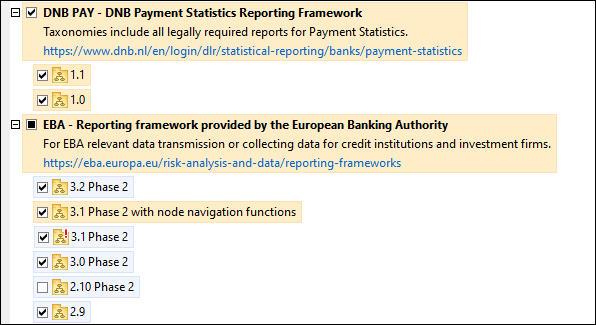
•Upgradeable packages are those which have been revised by their issuers since they were installed. They are indicated in the GUI by a  icon (see screenshot above). You can patch an installed package with an available revision.
Points to note
•In the screenshot above, both DNB packages and some of the EBA packages are checked. Those with the blue background are already installed. Those with the yellow background are not installed and have been selected for installation. Note that (i) the EBA 2.10 Phase 2 package is not installed and has not been selected for installation, (ii) the EBA 3.1 Phase 2 package has been installed, but it has been patched by its issuer since it was installed and the patch has not yet been installed.
•When running Taxonomy Package Manager from the command line, the list command is used with different options to list different categories of packages:
taxonomypackagemanager.exe list | Lists all installed and available packages; upgradeables are also indicated |
taxonomypackagemanager.exe list -i | Lists installed packages only; upgradeables are also indicated |
taxonomypackagemanager.exe list -u | Lists upgradeable packages |
Note: On Linux, use sudo ./taxonomypackagemanager list