Introducing Authentic Server, Visual Mapping Diffs, and More in Altova Version 2027
Altova Version 2027 is now available, and it introduces a brand-new product: Authentic Server, which brings WYSIWYG XML content authoring to any web browser. The release also adds mapping differencing and source control integration in MapForce, expanded OpenAPI support in XMLSpy, major performance gains in RaptorXML Server, and new capabilities in the Altova XBRL add-ins for Excel. Read on for the highlights.
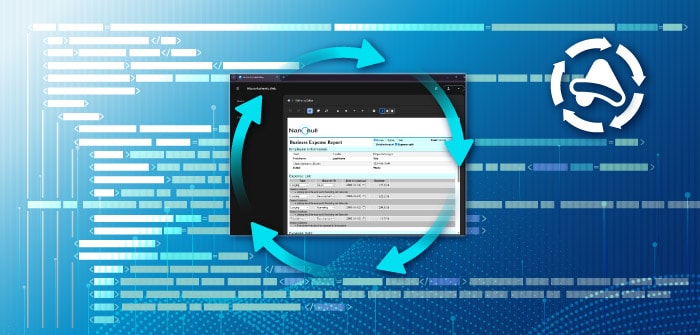
New: Authentic Server
Authentic Server is a new server software product that brings Authentic's WYSIWYG XML content authoring and document editing to every user in your organization, directly in the browser they already use. Business users can create and edit structured content with no XML expertise and no software to install.
Authentic has long given non-technical users a familiar, forms-based way to work with XML content, with schema-based validation and business rules enforced behind the scenes. Authentic Server extends that same experience to the web. Users open a document, edit it in a clean WYSIWYG view, and save valid XML, all from Chrome, Edge, Safari, or Firefox on any device.
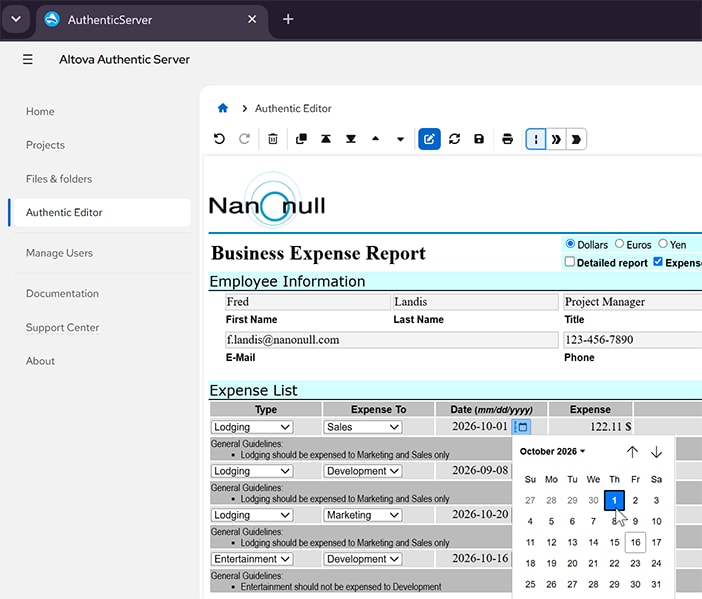
For IT, deployment is simple. Install Authentic Server where it fits your infrastructure, on your own servers or in the cloud, and manage users and editing privileges from a central admin interface. Because editing happens in the browser, there are no client installations to roll out and nothing to update on individual machines. Editing templates are designed in Altova StyleVision and deployed to Authentic Server.
Authentic Server also fits into the systems you already run. Browser-based editing makes it a natural front end for any CMS or content workflow, letting contributors update XML content where it lives without leaving the browser or learning a new tool.
Authentic Server is the easiest way yet to put structured content authoring in the hands of the people who write the content. Like all Altova products, you can try Authentic Server free for 30 days.
MapForce: Mapping Differencing and Source Control
In MapForce 2027, you can compare two versions of a data mapping project and see exactly what changed, right in the graphical mapping environment. New or removed connections, modified functions, and changed components are highlighted and color-coded. That makes it easy to review a colleague's edits, confirm a change did what you intended, or trace when a mapping started producing different results.
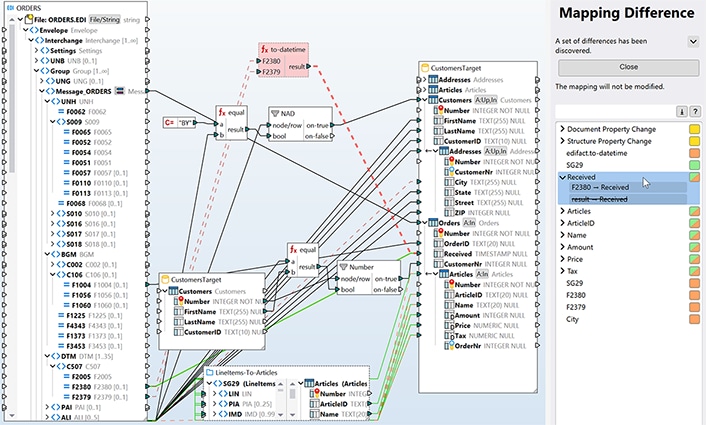
MapForce can also now be registered as the diff tool for .mfd mapping projects in your source control system. When you run a diff from your version control client or review a pull request, MapForce opens both versions side by side with every difference highlighted. Teams can commit mappings to a shared repository, review changes before merging, and look back through a mapping's history, all with the tools they already use.
Other MapForce 2027 updates include:
Python functions in mappings. Import existing, tested Python functions and call them directly from a mapping, locally for one mapping or globally for all future ones. This adds to existing support for Java and C# function libraries.
DISTINCT in the SQL WHERE/ORDER component. A new, optional checkbox adds DISTINCT to the generated SELECT statement, so the database returns only unique rows and less data is transferred and processed.
Automatic support for files with unknown extensions. Many formats, such as .kml, .svg, .gpx, and .nitf, are really XML or JSON under another name. MapForce now recognizes the underlying format and inserts the right component automatically, with no renaming required.
SWIFT 2026. Support for the latest version of the SWIFT EDI format used in global financial messaging has been added.
XMLSpy: Expanded OpenAPI Support
XMLSpy 2027 supports OpenAPI 3.2, the latest version of the standard, alongside earlier versions. It also makes it faster to go from an API definition to a working test request:
- Multipart/form-data requests. The HTTP Testing Window now sends multipart/form-data POST and PUT requests, the standard way APIs accept file uploads and mixed content. Entry helpers let you add as many parts as you need, each with its own name, type, and content. When you generate a request from an OpenAPI definition, XMLSpy pre-populates the expected parts for you.
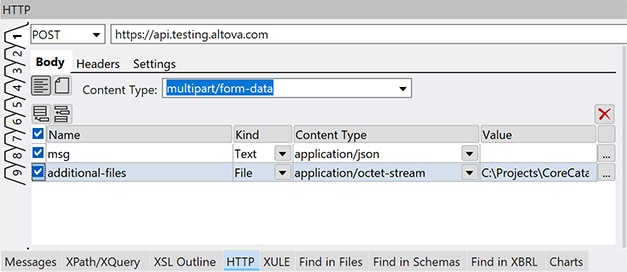
HTTP requests from the current OpenAPI file. Right-click any operation to open a ready-to-send request in the HTTP Testing Window, with the path, method, parameters, and body already filled in.
Graphical editing of embedded schemas. Toggle to Schema view to see the schemas in an OpenAPI document and open any of them in the graphical JSON Schema Editor.
Validation and sample generation for individual definitions. Validate a JSON instance against, or generate a sample from, a single definition in a JSON Schema or an OpenAPI document. This is ideal for checking a request payload or producing a realistic sample response without extracting the schema to a separate file.
XMLSpy can now also render human-readable XBRL tables as XML or HTML directly from xBRL-CSV documents, and a new option lets you open or switch files in the Project window with a single click (also available in MapForce and StyleVision).
Faster Validation and Export in RaptorXML Server
JSON Schema validation in RaptorXML Server 2027 is significantly faster, with some jobs completing more than 100 times faster than before. RaptorXML+XBRL Server now exports CSV tables in parallel, making CSV export of XBRL files up to 35% faster.
XBRL Add-ins for Excel
The Altova XBRL add-ins for Excel, which have supported xBRL-CSV Table Constraints since the draft stage, now support the final 1.0 Recommendation published by XBRL International on September 10, 2026. Support is also included in XMLSpy and RaptorXML+XBRL Server.
EIOPA XBRL add-in for Excel: CSV export. One of the most requested features from EIOPA add-in users. The add-in now supports the CSV format published by the Dutch insurance sector, the first to define one, and we'll add further formats as other authorities publish them.
EBA XBRL add-in for Excel: Compliant file names. Reporting firms in Ireland can now export files that follow the Central Bank of Ireland's required naming convention directly from Excel, with no manual renaming before submission.
More in Version 2027
DatabaseSpy generates SELECT statements with OFFSET/LIMIT, automatically using the right syntax for each database type, so you can preview large tables without pulling back the full result set.
FlowForce Server adds dark, light, and classic display modes to its web admin interface, plus faster SMTP speeds.
Updated database support across all database-enabled Altova products: SQL Server 2025, Oracle 26, Informix 15, MySQL 9.7, SQLite 3.53, and MariaDB 12.
Updated Eclipse support for Eclipse 4.40 (2026-06) and 4.41 (2026-09).
Get Version 2027
Altova Version 2027 is available now. Customers with an active Support and Maintenance Package can upgrade at no additional cost, and anyone can download a free 30-day trial of any Altova product, including the new Authentic Server, from the Altova website.