![]() |
![]() | ![]() | ![]() | XSLT EditorAltova XMLSpy® 2010 includes a powerful XSLT editor with support for XSLT 1.0 and schema-aware XSLT 2.0. The XMLSpy XSLT editor includes numerous tools that facilitate quick, error-free stylesheet development. Though you can use the XSLT editor in XMLSpy’s Enhanced Grid View to view and edit your stylesheet code in a tabular format, most developers prefer to work Advanced Text View for this type of development. When you're editing XSLT, the Text View provides syntax coloring, line numbering, source folding, book marking, and other visual cues for organizing and navigating through your code quickly and easily.
The XMLSpy XSLT editor has built-in knowledge of XSL, XSLT, and XHTML. It provides intelligent entry helper windows and drop down menus that offer you choices of elements, attributes, and entities that you can insert with one click, and code completion speeds typing and ensures balanced opening and closing tags.
A handy XSLT tab in the XMLSpy Info Window provides useful information while you're working with stylesheets in the XSLT editor. This tab allows you to view the associated schema and XML instance files, as well as any included or imported XSLT documents, and mousing-over the file names reveals the complete file path. You can even configure the schema and XML instance relationships directly in this tab with just a few clicks. In addition, toolbar buttons allow you to quickly organize some or all of the files into an XMLSpy project or even add all files to a ZIP archive in a user-defined location with just a few clicks.
The new XSL Outline entry helper window in the XSLT editor is another powerful feature for optimizing XSLT development. When you're working with an XSLT 1.0 or 2.0 stylesheet, it lists the templates and functions in the current XSLT file as well as those in any included or imported files. Color coded icons provide at-a-glance information on templates and functions, and selecting the Go to Item icon or double clicking a template or function highlights it in the current document. Functions are listed by name, while templates are displayed by name and/or XPath expression. You can view or edit each template's mode, priority, and associated comment directly in the XSL Outline window. You can search for, filter, and sort the templates and functions displayed in the outline by multiple criteria. The window also allows you to quickly insert calls to named templates and select a named template as the entry point for transformations.
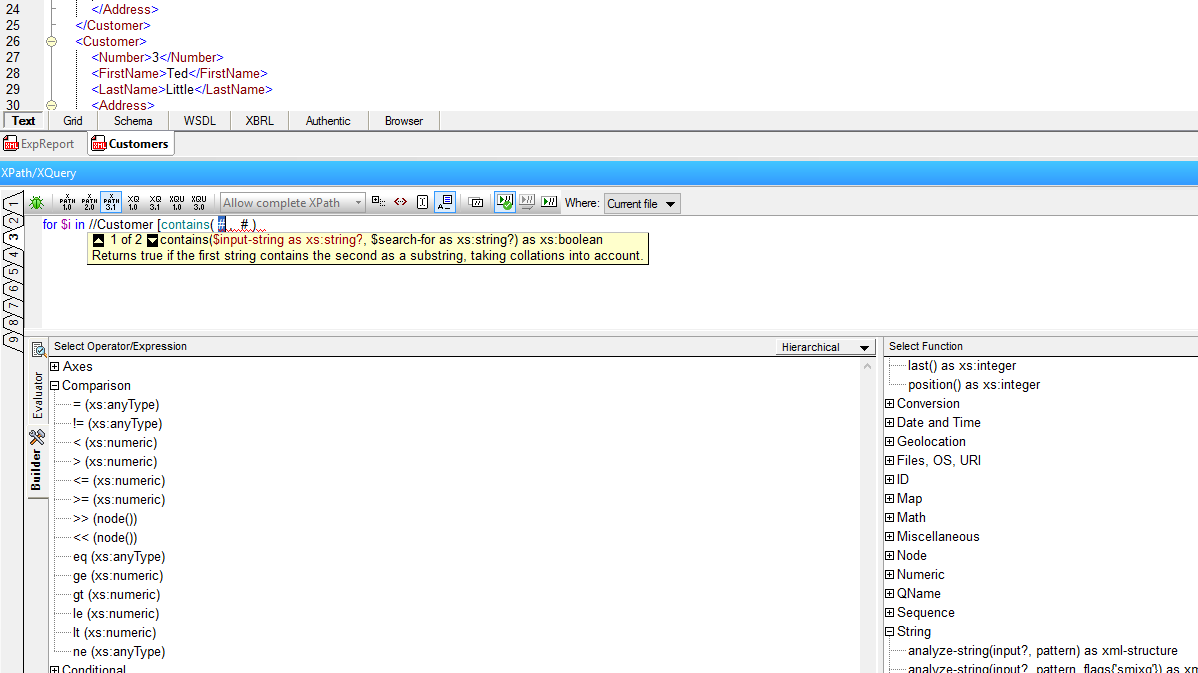
Intelligent XPath Auto-completionXMLSpy® 2010 provides powerful support for working with XPath 1.0 and 2.0 in the XSLT editor. As you’re composing an XPath expression in Text View, Grid View, or in XMLSpy's XPath Analyzer window, XMLSpy provides you with valid XPath functions, as well as element and attribute names from the associated schema and XML instance(s). Intelligent XPath auto-completion accounts for namespaces when listing options and even provides deep path suggestions when the required node is not in close proximity to the current context. This functionality, along with the XPath Analyzer and XPath Builder greatly assists in the building and testing of XPath expressions in your stylesheets.
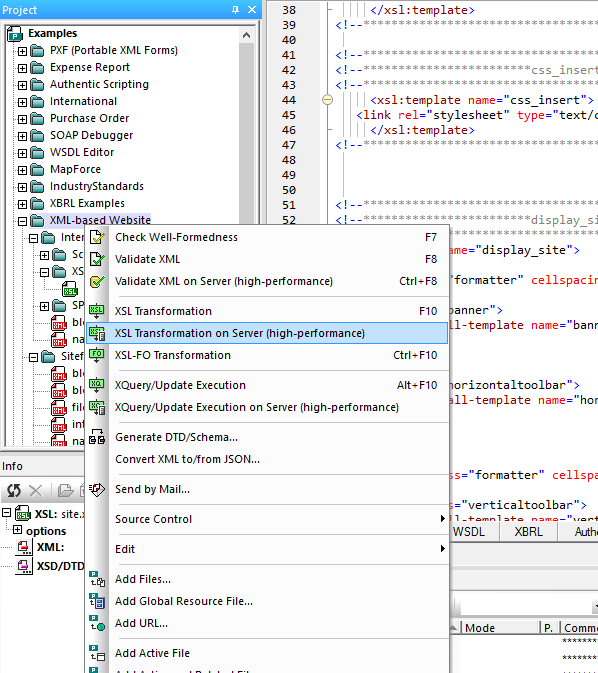
XSLT Editor Options and Open XSLT ArchitectureAt any time during the XSLT editing process, you can transform your file(s) with a single click to preview the generated output in XMLSpy's Browser View. The XSLT editor offers many ways to initiate the XSLT transformation:
The XSL Options dialog allows you to customize the behavior of the XSLT editor. XMLSpy includes the award-winning, standards-conformant Altova XSLT processor for performing XSLT 1.0 and schema-aware XSLT 2.0 transformations, and it also provides built-in support for the MSXML XSLT engine. An open XSLT architecture allows the use of any other external XSLT processor, including Apache Xalan, Saxon, or XT. This enables you to build a powerful Web site that fully utilizes XSLT 1.0 or 2.0.
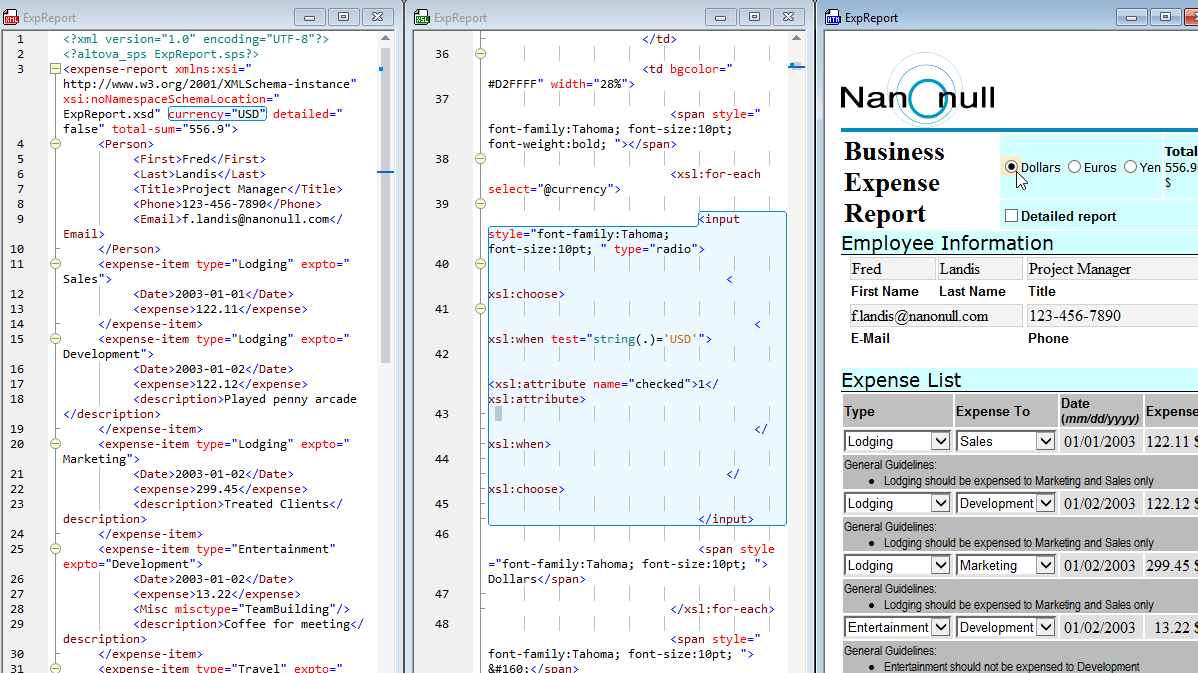
The XMLSpy XSLT editor does not restrict you to XHTML or HTML output. Because XMLSpy can open and edit any non-XML text file, you can produce XSLT files that generate any arbitrary textual output and still use XMLSpy to view the resulting files. Support for Java, C#, JavaScript, VBScriptDevelopers often embed program code in Java, C#, JavaScript, or VBScript to add advanced functionality to their XSLT stylesheets. The XSLT engine in XMLSpy supports these types of program code, allowing you to not only take advantage of the powerful XSLT editing and transformation capabilities for stylesheets that contain program code – you can also test, perfect, and optimize them using the XSLT debugger and XSLT profiler. An example of a stylesheet that contains VBScript is shown below.
Assigning XSL TransformationsIf you intend to serve your content to an XML-aware browser (such as Internet Explorer 5.x or higher), you may also want to include a reference to your XSLT stylesheet in the actual XML document.
The "Assign XSL" dialog auto-generates the proper <?xsl-stylesheet....?> processing instructions, allowing you to simply select an XSLT file from your hard-disk, any open window, or any file or URL from the project view. Testing and Perfecting StylesheetsAs you’re working with an XSLT file in the XSLT editor, you can also take advantage of the XSLT debugger and XSLT profiler to help you test, perfect, and optimize your stylesheet. Support for XSLT 1.0 and Schema-aware XSLT 2.0In addition to support for XSLT 1.0, the XMLSpy XSLT editor includes full support for the important new XSLT 2.0 and XPath 2.0 specifications, which are both used in XSLT development. The 2.0 versions of these standards represent a significant upgrade compared to their 1.0 versions, extending the languages with features that increase productivity, improve code quality and reusability, and provide powerful new functions. The new features in XSLT 2.0 and XPath 2.0 are designed to make development simpler, more efficient, and therefore more productive, allowing you to produce higher-quality applications in less time. Schema-awareness in XSLT 2.0 provides additional mechanisms for error isolation, simplified debugging, and enhanced code performance. XMLSpy combines its implementation of XSLT 2.0 and XPath 2.0 with powerful editing and debugging features, allowing you to create the most advanced stylesheets quickly and easily. To learn more about the benefits developers will experience through working with XSLT 2.0 and XPath 2.0, visit our XSLT/XPath 2.0 page. Experience the powerful XMLSpy XSLT editor for yourself - Download a free 30-day trial of XMLSpy. | ![]() |
![]() | ![]() | |||||||||||||||||||||||||||||||||||||||||||||||||||
| Company | Legal | Press | Partners | Careers | Sitemap | Contact Us | Altova Blog | |||
|