Example Projects
There are four example projects in this section, each of which builds on the previous project. The first project shows how to create a control template and use it. The goal is a simple one: to let the user select a continent, then a country, and a city (see screenshot below). A selection at each level generates a list of radio buttons at the next level. We reuse control templates to generate these radio button lists. Subsequent projects add functionality and demonstrate different ways in which control templates can be used.
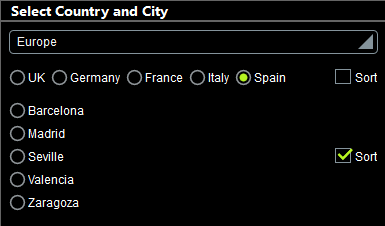
To open and experiment with any of the example projects, simply double-click its MTD file (see below for location).
Location of project files
All the example project files listed below are located in the (My) Documents folder: Altova\MobileTogetherDesigner10\MobileTogetherDesignerExamples\Tutorials\ControlTemplates.
•Cities1-Reuse.mtd
•Cities2-SwitchTemplates.mtd
•Cities3-DynamicUpdates.mtd
•Cities4-DynamicSelection.mtd
•CitiesWorldwide.xml

<?xml version="1.0" encoding="UTF-8"?> <!-- Cities in which the survey is being carried out --> <Cities> <Continent name="Americas"> <Country name="USA"> <City name="Miami"/> <City name="San Francisco"/> <City name="Chicago"/> <City name="Washington"/> <City name="Los Angeles"/> <City name="Boston"/> <City name="New Orleans"/> <City name="Denver"/> <City name="Seattle"/> <City name="New York"/> <City name="Philadelphia"/> <City name="Minneapolis"/> </Country> <Country name="Canada"> <City name="Vancouver"/> <City name="Ottawa"/> <City name="Toronto"/> <City name="Montreal"/> <City name="Calgary"/> <City name="Edmonton"/> </Country> <Country name="Mexico"> <City name="Mexico City"/> <City name="Guadalajara"/> <City name="Puebla"/> <City name="Tijuana"/> <City name="Monterrey"/> </Country> </Continent> <Continent name="Europe"> <Country name="UK"> <City name="London"/> <City name="Edinburgh"/> <City name="Cambridge"/> <City name="Oxford"/> <City name="Liverpool"/> <City name="Bristol"/> </Country> <Country name="Germany"> <City name="Heidelberg"/> <City name="Stuttgart"/> <City name="Berlin"/> <City name="Frankfurt"/> <City name="Hamburg"/> <City name="Bonn"/> <City name="Munich"/> </Country> <Country name="France"> <City name="Paris"/> <City name="Marseille"/> <City name="Lyon"/> <City name="Toulouse"/> <City name="Nice"/> <City name="Strasbourg"/> </Country> <Country name="Italy"> <City name="Rome"/> <City name="Milan"/> <City name="Naples"/> <City name="Turin"/> <City name="Palermo"/> <City name="Genoa"/> <City name="Bologna"/> <City name="Florence"/> <City name="Venice"/> </Country> <Country name="Spain"> <City name="Madrid"/> <City name="Zaragoza"/> <City name="Barcelona"/> <City name="Valencia"/> <City name="Seville"/> </Country> </Continent> <Continent name="Asia"> <Country name="Japan"> <City name="Tokyo"/> <City name="Osaka"/> <City name="Nagoya"/> <City name="Sendai"/> <City name="Sapporo"/> </Country> <Country name="China"> <City name="Beijing"/> <City name="Shanghai"/> <City name="Tianjin"/> <City name="Hong Kong"/> </Country> <Country name="India"> <City name="New Delhi"/> <City name="Mumbai"/> <City name="Chennai"/> <City name="Bengaluru"/> <City name="Kolkata"/> </Country> </Continent> <Continent name="Oceania"> <Country name="New Zealand"> <City name="Auckland"/> <City name="Wellington"/> <City name="Christchurch"/> </Country> <Country name="Australia"> <City name="Canberra"/> <City name="Melbourne"/> <City name="Brisbane"/> <City name="Sydney"/> <City name="Adelaide"/> <City name="Hobart"/> <City name="Perth"/> </Country> </Continent> <Continent name="Africa"> <Country name="South Africa"> <City name="Pretoria"/> <City name="Johannesburg"/> <City name="Cape Town"/> <City name="Port Elizabeth"/> <City name="Durban"/> </Country> <Country name="Egypt"> <City name="Cairo"/> <City name="Alexandria"/> </Country> <Country name="Nigeria"> <City name="Lagos"/> <City name="Abuja"/> <City name="Kano"/> </Country> <Country name="Kenya"> <City name="Nairobi"/> <City name="Mombasa"/> </Country> </Continent> </Cities>
|
In this section
This section consists of the following topics:
•Dynamically Changing Template Content
•Dynamically Selecting a Template