Build Faster and Design Sharper with MobileTogether 10.4
MobileTogether 10.4 is now available, and this release focuses on two things every app builder cares about: getting more done in less time and making finished apps look great. From copy & paste support for reusable design components to eye-catching new table cell styling, version 10.4 delivers practical upgrades across the design, debugging, and deployment workflow.
Let’s take a look at the highlights.

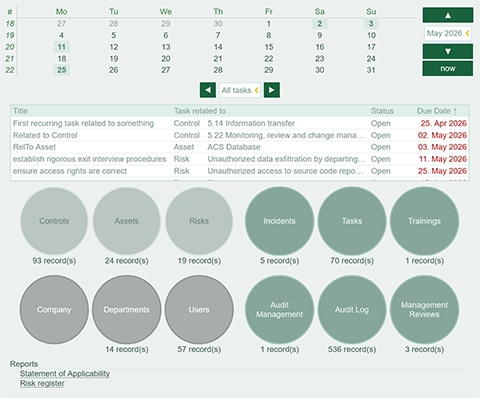
Give Tables a Modern Look with Cell Shapes
Tables do a lot of heavy lifting in enterprise apps, and now MobileTogether offers more options for polishing their look and feel. Table cells can be styled with a background shape — an oval or perfect circle, rectangle, or diamond — complete with gradient fills and borders. Configured through the cell's Shape Style property, these options make it easy to build polished dashboards, status indicators, and badges without extra design work.
Reuse Components Across Projects to Refactor Faster
The biggest time-saver in 10.4 is expanded copy & paste support for the building blocks of your solutions:
Copy & paste control templates: Control templates can now be copied into other projects, so a component you've built and refined once can standardize the look and behavior of your entire app portfolio.
Copy & paste action groups: Action groups, which are sequences of app logic, can be pasted within a project or into a different one, keeping business rules consistent everywhere while reducing redundant development work.
Copy & paste localization strings: Localization strings can now be copied and pasted directly within the localization dialog, and all of a string's translations come along with it. Strings can be pasted into the same project or into a different project entirely. Teams maintaining multiple multilingual apps no longer need to re-enter translations by hand.
Together, these additions make refactoring and consolidating solutions dramatically faster and less error-prone.
Find Performance Bottlenecks Instantly
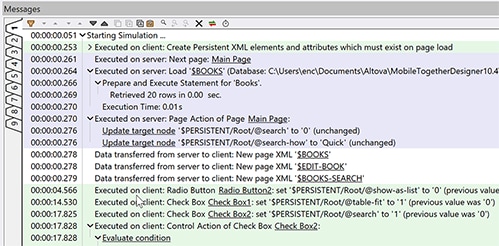
Log messages in the MobileTogether Designer Messages pane can now display timestamps during simulation — and here's the best part: you can turn them on after a run and see them retroactively. If a solution suddenly slows down, you can pinpoint exactly where the delay occurred without reproducing the issue, turning the log into a built-in performance diagnosis tool.
Capture the Moment with the Take Screenshot Action
The new Take Screenshot Of action captures the current page, a table row group, or an individual control and saves it as a Base64 image in a page source node. Trigger it from any event — a button click, for instance — to generate visual receipts, save a record of what the user saw, or capture a table's state at a precise moment.
Smarter Data Entry and Handling
Two refinements round out the designer toolkit: Bulk Insert now supports dynamic target fields selected via XPath, so it works even when the target structure varies at runtime, and Edit Fields accept a maximum text length setting that caps input at the limit you choose — no extra validation logic required.
One Place for All Your Favorite Apps
For end users working across multiple MobileTogether Servers, the Favorites tab now brings frequently used solutions from every server into a single spot. Now there's no need to switch between servers to find the app you need.
Update Now
MobileTogether 10.4 is available now. Download the latest version to get started.