XBRL Development Tools
Simplify XBRL development, conversion, and automation
Simplify XBRL development, conversion, and automation
The eXtensible Business Reporting Language (XBRL) is an XML-based vocabulary for electronic transmission of business and financial data. Currently in version 2.1, XBRL is an open standard that is maintained by XBRL International. A mandate from the United States Securities and Exchange Commission (SEC) and official support from European Parliament and other governing bodies worldwide have secured XBRL as the official standard for financial reporting.
Altova has extended the reach of its XML development tools with support for XBRL, giving organizations of all types the ability to comply with current and future regulations using the affordable tools that they are already comfortable with.
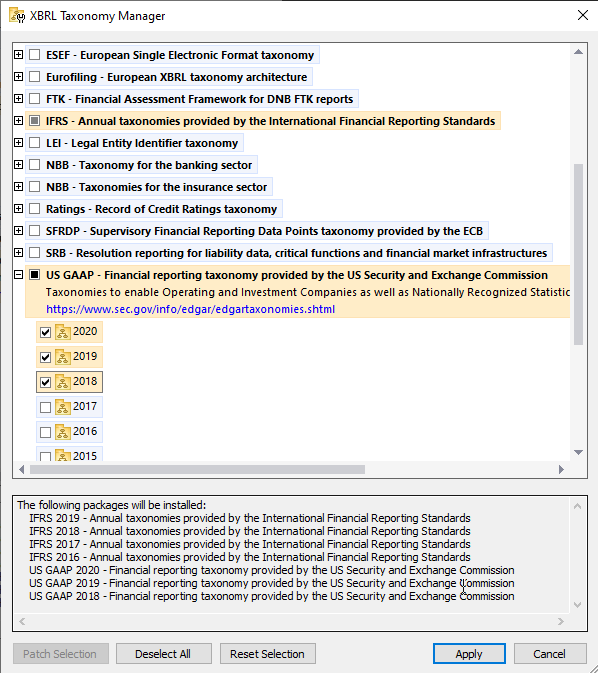
Adoption of XBRL is ever-increasing, and with that, a multitude of XBRL taxonomies targeted at specific verticals or jurisdictions have emerged to meet the wide variety of reporting needs around the globe. To help customers install the exact taxonomies and versions they require, Altova products include an XBRL Taxonomy Package Manager that provides a centralized way to install and manage XBRL taxonomies and taxonomy packages for use across all Altova XBRL-enabled applications.
The XBRL Taxonomy Package Manager allows you to:
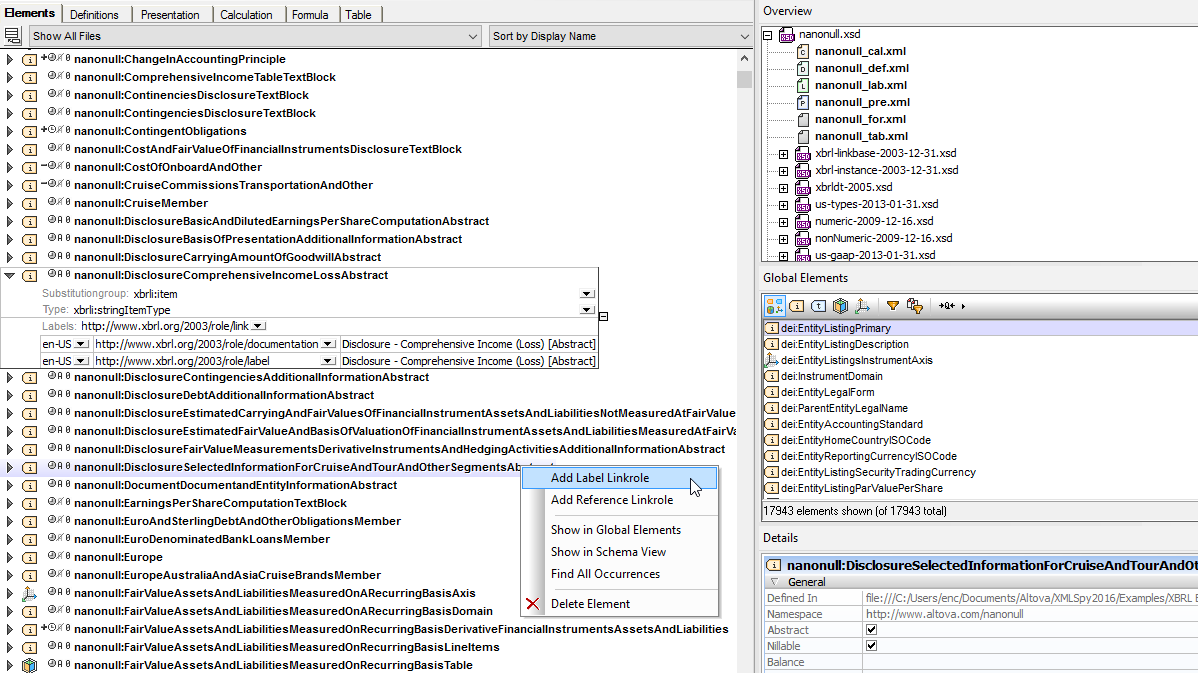
XBRL Taxonomy development can be complex and confusing. The XBRL Taxonomy editor and validator in XMLSpy makes the process easier with a graphical approach.
By organizing different components on easy-to-filter tabs and providing informative icons, mouse-over messages, detail windows, and context-sensitive entry helpers, the XMLSpy XBRL Taxonomy editor makes it easy to both view and understand existing taxonomies, and create new ones by way of extending industry-standard taxonomies.
It even includes the handy XBRL Taxonomy Wizard to give you a head start when extending or creating a new XBRL taxonomy.
XMLSpy includes support for XBRL Formula 1.0 validation, editing, and execution. XBRL Formula is often used to provide validation capabilities in addition to those in XBRL 2.1 to enforce specific business rules.
The Formula tab of the XBRL Taxonomy editor provides a graphical interface for creating and editing formulas, and the Execute XBRL Formula in the XBRL menu evaluates the formulas and displays the results directly in XMLSpy, either in XML or JSON format.
XULE is a business rule language from XBRL.US for defining assertions and validation rules for XBRL files. XULE can be used to provide validation capabilities in addition to those in XBRL to enforce specific business rules and has primarily been used to improve the data quality of SEC filings as part of the DQC (Data Quality Committee) rules in the United States.
XMLSpy includes a built-in XULE processor as well as an interactive XULE editor that makes it easy to write and test XULE rules with syntax help, code completion, and other helpful features. For high volume XULE processing, check out RaptorXML+XBRL Server.
XMLSpy supports the OIM (Open Information Model) for XBRL, which provides a model for easily transforming XBRL data between XML and other popular data formats, including JSON and CSV. Learn about OIM tools in XMLSpy and RaptorXML Server.
To facilitate communication and analysis of your XBRL taxonomy, XMLSpy generates comprehensive documentation in hyperlinked HTML, RTF, or Word documents based on options you select.
Since financial data is most often stored in back end systems such as relational databases, it’s useful to convert that data directly to valid XBRL instance documents for submission. Using MapForce, you can map database or other data to the relevant XBRL Taxonomy for instance generation.
This makes public financial data submission a repeatable and highly manageable process, allowing you to produce valid XBRL reports as required based on the variable data stored in accounting system fields. You can also map XBRL data to backend systems in MapForce, for in-depth analysis.
Once data is in XBRL, it lends itself readily to financial report generation for communication with stakeholders, either on the web or in printed documents – or both. StyleVision is a graphical, multi-channel report tool that lets you render XBRL in beautiful reports for simultaneous publication in HTML, PDF, Word, and other formats.
StyleVision’s visual design model radically simplifies XBRL-related reporting and analysis with an XBRL Chart Wizard and XBRL Table Wizard that practically do the work for you. And, once your report design is created, you can use it to generate reports on a recurrent basis.
For companies submitting financials in iXBRL format, StyleVision includes an iXBRL Wizard for automatic generation of iXBRL documents from US-GAAP taxonomies based on definitions in the presentation linkbase.
XMLSpy, MapForce, and StyleVision XBRL tools are all included in the specially-priced Altova MissionKit. Get 7 XBRL tools for less than the price of 2!
RaptorXML+XBRL Server is a hyper-fast XBRL validator and processing engine.
RaptorXML+XBRL Server is an XBRL validation and processing engine that delivers high-speed, parallel processing on modern multi-core CPUs to achieve advanced throughput. RaptorXML+XBRL Server also supports XULE processing and OIM validation and conversion.
RaptorXML+XBRL Server gives organizations a comprehensive XBRL development platform they can use to build custom XBRL processing solutions. Available Python, .NET, and COM APIs allow developers to integrate high-performance XBRL processing functionality in their server-based or desktop applications to meet just about any requirement.
For instance, the .NET API lets developers create applications for the Microsoft platform, such as Excel add-ins for generating XBRL data directly in Excel. Or, using the built-in Python interpreter, RaptorXML can be utilized to automatically download XBRL filings from a web service, normalize them, and write them to a database following defined processing and calculation rules. Other developer-oriented features include a built-in HTTP server, workflow integration, and more.
Available for all server platforms, RaptorXML takes advantage of today’s ubiquitous multi-CPU computers to deliver the fastest, most standards-conformant XBRL processing on the market.
A major hurdle for successful submission of valid XBRL data is the inherent complexity of XBRL instance files when viewed by non-technical users. Generating an XBRL report is an additional step in an already lengthy process at the end of a reporting period. What if there were a way to tag existing annual reports — whether they are in PDF, HTML, or some other user-friendly format — with XBRL concepts to create those reports? That's exactly what the Altova XBRL Tagging solution is designed to do.
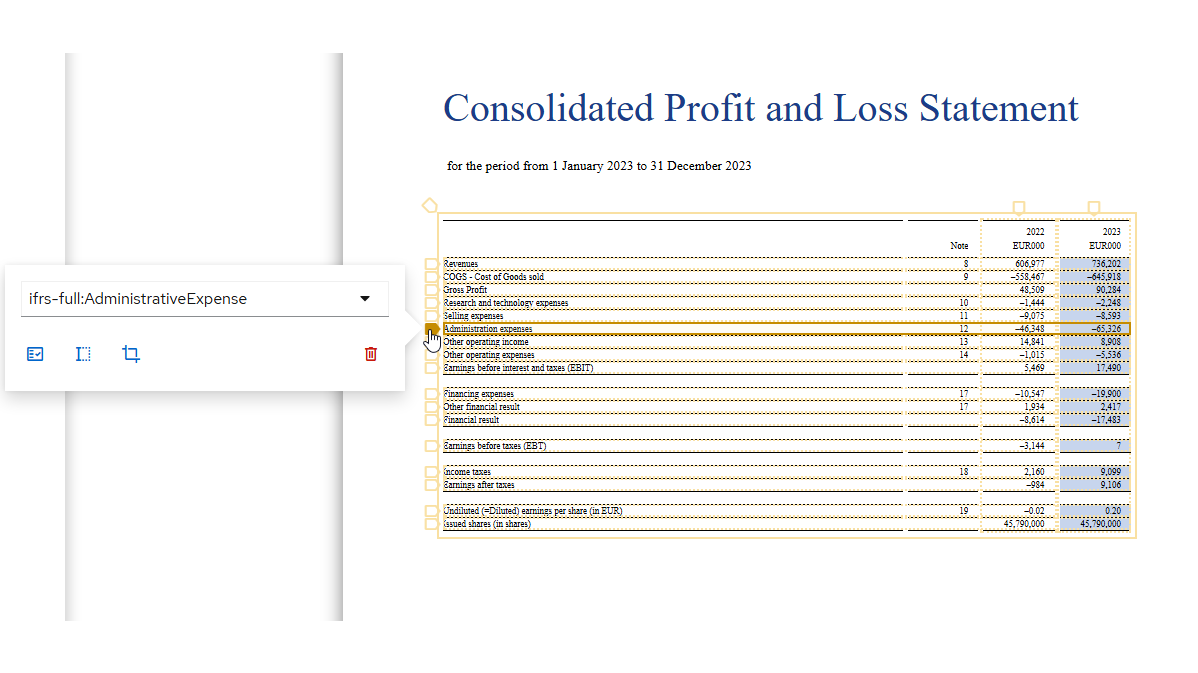
To shield users from the underlying XBRL syntax, the XBRL Tagging solution lets users upload an annual financial statement and then point and click to apply tags to a familiar view of the data. Intelligent tools like automatic table detection and quick footnote tagging make it easy. Altova XBRL Tagging does the rest behind the scenes, allowing users to export a valid XBRL report in a fraction of the time compared to manual coding.
To support customers worldwide, it allows tagging reports to comply with ESEF requirements in the European Union and US GAAP in the United States.
Altova XBRL Tagging is an easy-to-use, cloud-based solution. To get started, simply upload an existing financial statement at xbrl-tagging.com and start tagging. The solution is free, and no account or log in is required.
In addition to tagging existing financial statements that are formated as PDF or HTML pages, it can be useful to tag data stored in Excel. This has two benefits: existing data can be reused, and end users can easily create XBRL in an environment where they’re already comfortable working.
Altova has created several software products that are installed directly in an Excel ribbon to help users build valid XBRL reports quickly and easily.
Similarly, the Altova European Banking Authority (EBA) XBRL Add-in for Excel makes it easy for financial professionals at filing companies to generate XBRL instances. Using this add-in, users can map their data to reports compliant with EBA XBRL Filing Rules without ever leaving Excel.
The Altova EIOPA (Solvency II) XBRL Add-in for Excel helps companies in the EU comply with regulations from EIOPA for submitting Solvency II reports in XBRL format. Users can now generate valid Solvency II XBRL directly in Excel, without being exposed to the complexity of XBRL syntax.
Visit the Altova blog for how-tos and more on XBRL-related topics.