UML Database Modeling ToolAs software applications interact with growing amounts of data, database designs and structures become critical to development of successful projects. UModel® 2012 empowers you to extend software modeling functionality by modeling relational databases along with your Java, C#, and Visual Basic software applications. UModel® 2012 accelerates database modeling with features that permit you to:
UModel Database Diagram Supported DatabasesThe UModel® 2012 database diagram functionality supports multiple databases and automatically adjusts SQL dialects, data types and other specialized features for the following databases:
UModel® 2012 database diagrams support all the following database elements:
Import Existing Database StructuresYou can import an existing relational database via a selection in the UModel® 2012 Project menu.
The Import SQL Database option opens the UModel® 2012 Database Connection dialog, with the Database Connection Wizard and all the additional connection options available in DatabaseSpy and other Altova MissionKit tools that interact with popular relational databases.
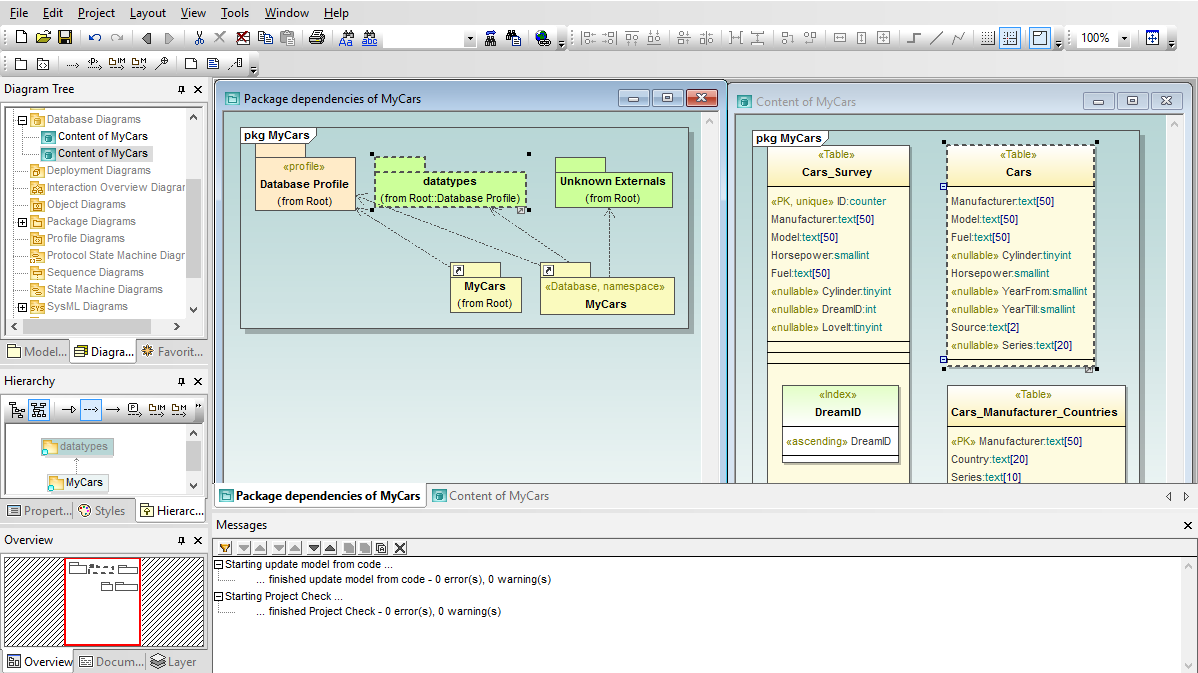
When you import a database, UModel® 2012 also automatically adds a database profile to your project. UModel® 2012 database diagrams are displayed in a special category in the Diagram Tree Helper window.
Modifying Databases in the ModelUModel® 2012 database diagrams use a dedicated toolbar with icons indicating database elements that are shared with DatabaseSpy, easing the learning curve between tools.
As you edit your database diagram in UModel® 2012, the SQL Auto-completion helper window assists with creation of diagrams valid for the SQL database type.
As an alternative to working directly in the diagram, you can also edit database elements in the Properties helper window.
Database Change ScriptsWhen you synchronize program code from the UModel project, changes in your database diagram generate a Database Change Script with SQL commands to implement your revisions. Database Change Scripts created in UModel can be saved as SQL files, executed directly in the database, or opened in a DatabaseSpy SQL Editor window via a convenient button in the UModel Database Change Script dialog.
Conversely, if another team member modifies a table directly in the database, you can update your UML model by merging the database changes.
After synchronization of the UML model with the latest version of the database, the database diagram shows a new column in the Teachers table.
Like all other UModel diagram types, UModel® 2012 lets you save database diagrams as image files and include them in automatically-generated project documentation. Model databases along with system requirements, business rules, and application code for your next development project – click here to download a free 30-day trial of UModel® 2012 today! | ||||||
| Company | Legal | Press | Partners | Careers | Sitemap | Contact Us | Altova Blog | Mobile | Full Site | |||
|