Home. 
.

transparent

transparent

transparent

UML Timing Diagrams

Utilizing the intuitive features of UModel® 2012, you’ll make quick work of UML timing diagrams.

Timing diagrams in UML are based on hardware timing diagrams originally developed by electrical engineers. Software modelers can use a UML timing diagram to precisely document a schedule of interactions or state changes.

Altova UModel Features Overview

Altova UModel® 2012 is an intuitive, affordable, and fully featured tool to create UML use cases, and to enjoy all the additional advantages of UML-based software development. UModel supports these advanced features:

Download Click here to download a fully functional, free 30-day trial of Altova® UModel® 2012!

It’s simple to start constructing a timing diagram in UModel® 2012 by clicking the lifeline icon in the timing diagram toolbar.

UML timing diagram

You’ll find familiar visual tools and intuitive selections in the right-click context menu to resize the lifeline and add new states. Any element can be renamed by typing in the diagram or by editing the properties window.

UML timing diagram

Clicking the lifeline creates a new point to specify a state change, initially displayed in red. Then you can drag and drop the lifeline to snap it to the desired state.

UML timing diagram

The toolbar also offers duration and time constraints, tick marks, and event stimulus elements you’ll use to complete annotation of your diagram.

UML timing diagram

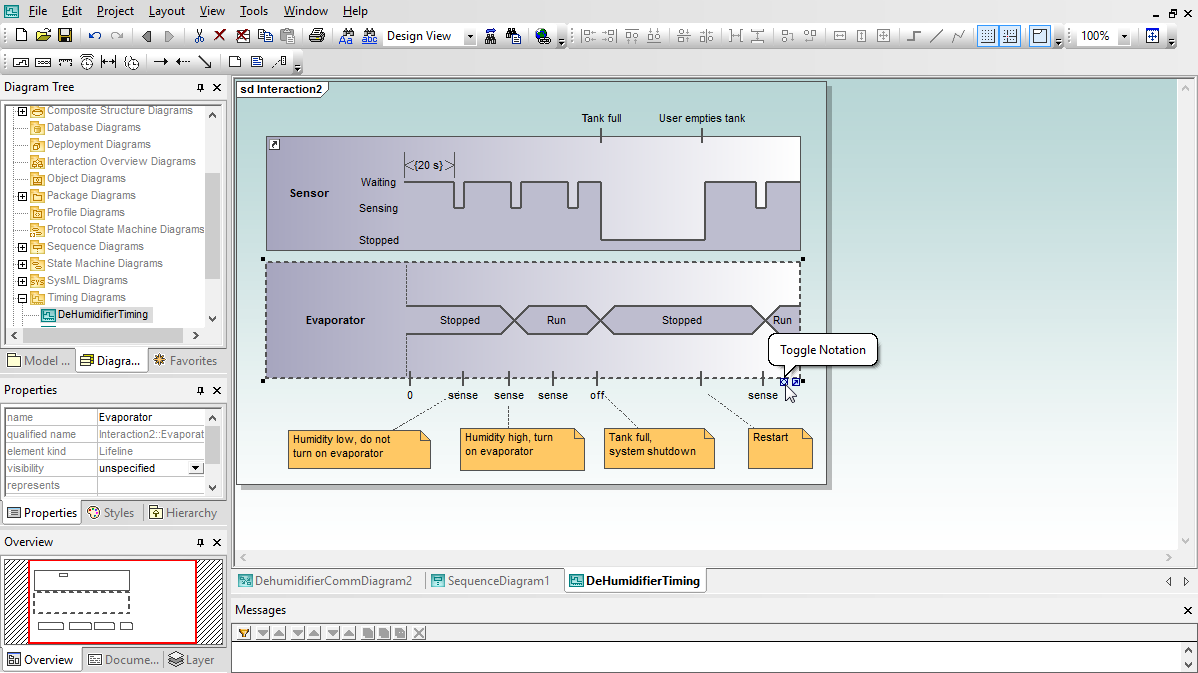
If you begin by creating a line diagram and decide later you’d rather use areas to show state changes, you can click the Toggle Notation quick editing button to switch the timing diagram style.

Of course the area style also offers the Toggle Notation button to convert to line notation, or you can click the Undo button to go back.

Timing diagrams are likely to complement and expand other parts of your model, such as activity diagrams or state machines. You can attach a hyperlink to any element in your timing diagram to quickly open any other diagram in your model.

The user defined name in the Edit Hyperlinks dialog lets you define the text that pops up whenever the cursor rolls over the hyperlink icon in your diagram.

Find for yourself how easy it is to create UML 2 timing diagrams with UModel® 2012! Download a free 30-day evaluation today.


transparent
Download
Pricelist
Buy
Video
Comparison
Datasheet
Print
Mail
Like It
Altova MissionKit 2012
.

Altova MissionKit 2012

.

UModel 2012 is available separately or as part of the specially-priced Altova MissionKit, the integrated suite of XML, database, and UML tools.

.
.

Jolt Product Excellence Award 2009

.

Altova MissionKit wins Jolt Award for “Best Development Environment”

.
.

transparent

transparent