Home. 
.

transparent

transparent

transparent

UML Sequence Diagrams

Altova UModel® 2010 lets you draw UML sequence diagrams that describe the interactions between objects in your application and specify the messages objects send and receive.
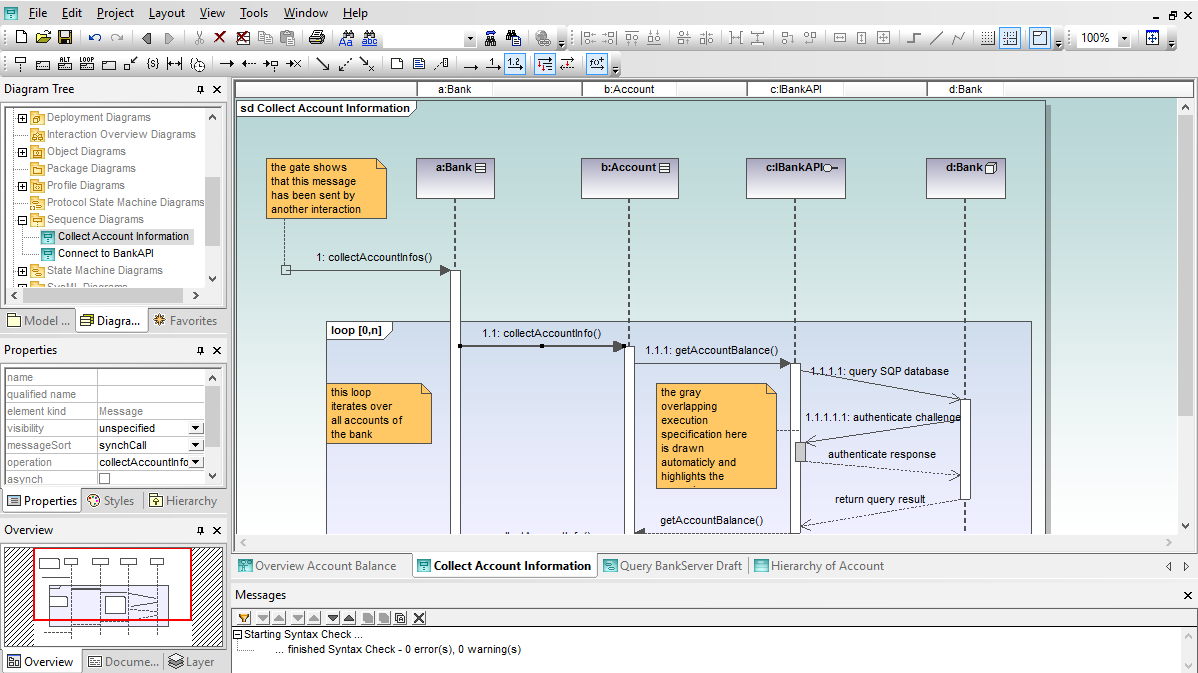
A sequence diagram can map a scenarios described by a use case in step by step detail to define how objects collaborate to achieve your application’s goals.

A lifeline in a sequence diagram represents an object and shows all its points of interaction with other objects in events that are important to it. Lifelines start at the top of a sequence diagram and descend vertically to indicate the passage of time. Interactions between objects – messages and replies – are drawn as horizontal direction arrows connecting lifelines. In addition, boxes known as combine fragments are drawn around sets of arrows to mark alternative actions, loops, and other control structures.

Altova UModel Features Overview

Altova UModel® 2010 is an intuitive, affordable, and fully featured tool to create UML sequence diagrams, and to leverage all the additional advantages of UML-based software development. UModel supports these advanced features:

Download Click here to download a fully functional, free 30-day trial of Altova® UModel® 2010!

Sequence Diagrams in Altova UModel

When you create a new sequence diagram, UModel® 2010 automatically displays the sequence diagram toolbar for quick access to specialized UML elements including lifelines, combine fragments, gates, message call and reply arrows, message arrows that create new lifelines or destroy existing objects, notes, and more.

UML sequence diagram example

Click image to enlarge screenshot

As you create your sequence diagram, entry helpers assist with element size, placement, names, and message text. You can work directly in the main drawing window, or you can edit in the properties helper window.

When you draw elements such as message arrows that define collaborations within your diagram, UModel signals the location of valid connection points. Since a message arrow requires an end point connection to another lifeline, UModel will not let you drop one in the wrong spot.


UML sequence diagram lifelines

Sequence diagram messages

You can revise a work in process without deleting elements and redrawing them. For instance, you can change the interaction operator of a combined fragment through the properties window.


Altova UModel UML sequence diagram tool

This feature lets you experiment with different relationships, particularly when your process requires a loop or more complicated control structure.


UML sequence diagram nested logic loops

Flexible Sequence Diagram Layout

Since sequence diagrams will be a permanent part of your project documentation, you’ll find handy options in the layout menu to align and resize objects to make your finished diagram as unambiguous as possible. As with all UModel diagram types, you can print your UML sequence diagram at any time, copy a selection or the entire diagram as a bitmap to paste into another application, or save it as a .PNG or .EMF image file.

UModel® 2010 offers flexible options for sequence diagrams to support your UML diagramming style. You can choose to:

  • Automatically create a syntactically correct reply whenever a message is added.
  • Select Go To Operation from the right-click context menu to assign a message based on an operation listed in the Model Tree.
  • Select simple consecutive message numbers or nested (decimal) message numbering via the sequence diagram toolbar.
  • Set custom transparent background colors for combined fragments in the Styles helper window.
  • Apply time constraints to sequences, using familiar timing diagram notation.

. . . and much more. UModel lets you easily do it all.

UML sequence diagram tool

Click image to enlarge screenshot

As your sequence diagrams grow to describe complex interactions with many steps, you will probably need to extend lifelines beyond the original drawing pane. UModel® 2010 displays a special lifeline label header bar at the top of the sequence diagram window so you can easily identify lifelines even when the top portion of your diagram has scrolled out of view.


UML sequence diagram lifeline example

Automatic Generation of Sequence Diagrams

UModel® 2010 lets you generate sequence diagrams from source code files that have been reverse engineered into UML classes. These detailed diagrams will greatly enhance traceability and accelerate analysis, reuse, debugging, or enhancement of legacy applications. You can easily generate multiple sequence diagrams in a single step by selecting operations in reverse engineered classes from the model tree.

Generate UML sequence diagrams from the model tree

The resulting sequence diagrams can be an invaluable tool to quickly and easily expose multiple operations for visual examination, facilitating analysis of large, complex applications.

Generated UML sequence diagrams from source code

The UModel overview helper window displays color shading to help you quickly see nested logic in code represented in the sequence diagram. You can drag the red box in the overview window to select your view in the main diagram window.

Generated UML sequence diagrams from source code

Sequence diagrams may be generated from Java, C#, or Visual Basic application code. Click here for more information on UModel reverse engineering capabilities.

The Sequence Diagram Generation dialog offers a choice that will be very useful if you plan to modify an existing application. You can choose to automatically update the sequence diagram each time you modify source code outside UModel and synchronize your UML project with the updated code.

UML sequence diagram overview

The collection of tools in UModel® 2010 combine to help you draw superior sequence diagrams. Find out for yourself how easy it is to design effective applications – download a free 30-day trial of Altova UModel® 2010 today!


transparent
Download
Pricelist
Buy
Video
Comparison
Datasheet
Print
Mail
Digg
delicious
Altova MissionKit 2010
.

Altova MissionKit 2010

.

UModel 2010 is available separately or as part of the specially-priced Altova MissionKit, the integrated suite of XML, database, and UML tools.

.
.

Jolt Product Excellence Award 2009

.

Altova MissionKit wins Jolt Award for “Best Development Environment”

.
.

transparent

transparent