UML Communication Diagrams
UModel utilizes communication diagrams to describe messages transmitted between objects and imply associations between classes.
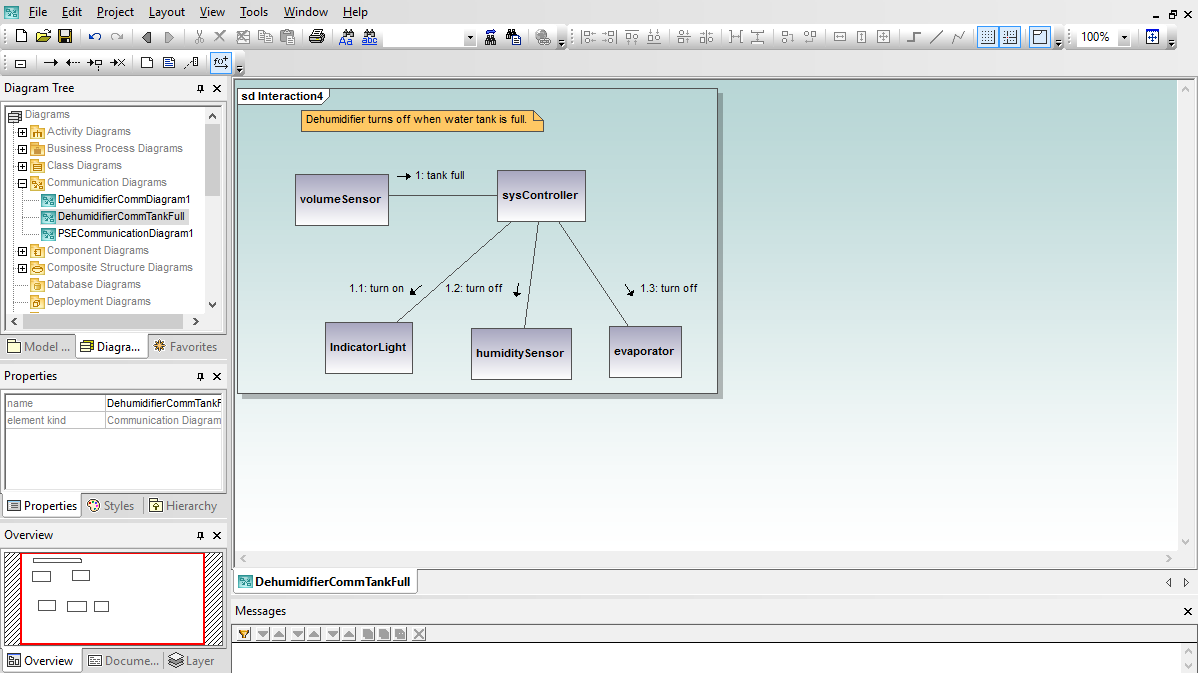
UML communication diagrams are similar to sequence diagrams, but provide an overview of the relationships between objects, rather than focusing on the order of messages between objects, as your software executes.
UModel lets you begin a new communication diagram by creating a new object lifeline in the communication diagram toolbar or in the right-click menu. Alternatively, if you want to create an object from an existing class, you can drag the class from the model tree into your communication diagram.
Communication diagrams have a free-form layout, so you can position objects to emphasize their relationships. You might want to create all the objects involved in the interaction and position them logically before creating any messages. Communication diagrams typically describe one instance, or a single path, of program execution.
As you add message lines between objects, UModel conveniently numbers the messages in the order they are created. You can insert a new message or edit a message sequence number and UModel automatically renumbers all the other messages in order.


