Home. 
.

transparent

transparent

transparent

Create Clear Communication Diagrams

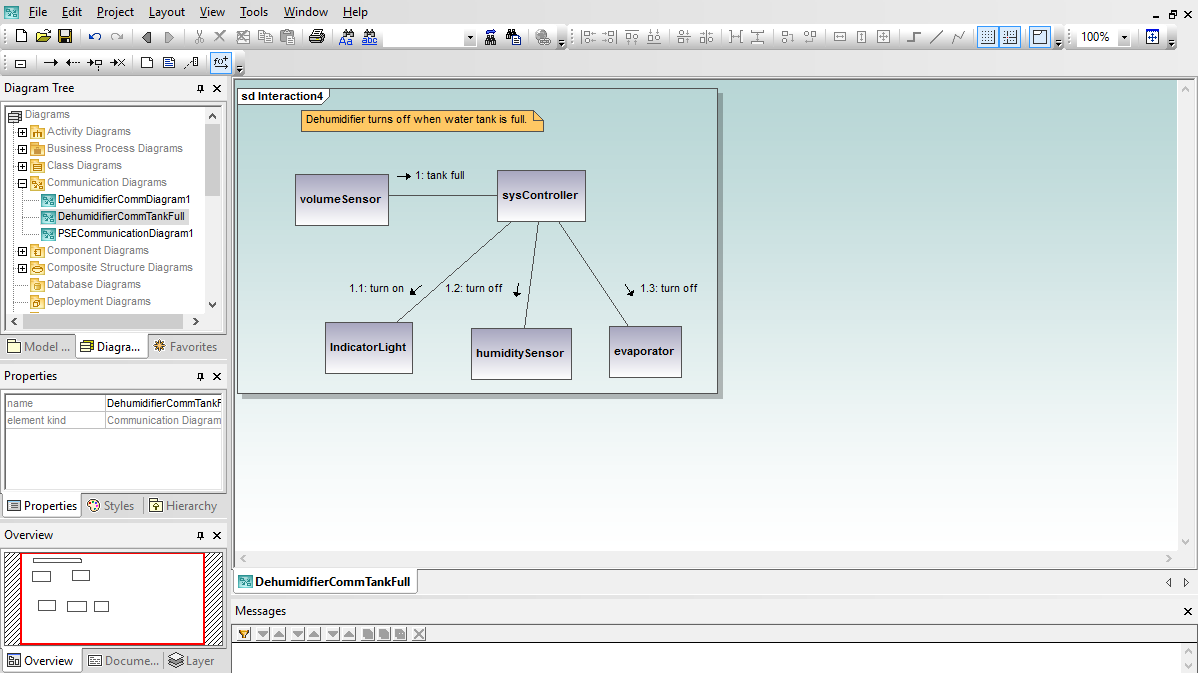
UML communication diagrams describe the messages transmitted between objects and imply associations between classes in your UModel® 2008 project.

Communication diagrams are similar to sequence diagrams, but provide an overview of the relationships between objects, rather than focusing on the order of messages between objects, as your software executes.

Communication diagrams have a free-form layout, so you can position objects to emphasize their relationships. Communication diagrams typically describe one instance, or a single path, of program execution.

UModel® 2008 makes it easy to begin your communication diagram. You can click the object lifeline in the communication diagram toolbar, or use the right-click menu to create a new object.

UML communication diagram

The object name is automatically selected, so you can simply type a new name.

UML communication diagram

Alternatively, if you want to create an object from an existing class, you can drag the class from the model tree into your communication diagram.

UML communication diagram

You might want to create all the objects involved in the interaction and position them logically before creating any messages. As you add message lines between objects, UModel® 2008 conveniently numbers the messages in the order they are created.

UML communication diagram

Buttons in the layout menu let you choose the line style you prefer.

UML communication diagram

Communication diagrams can help identify incomplete or incorrect logic. You can add a new message or edit a message sequence number and UModel® 2008 automatically renumbers all the other messages in order.

UML communication diagram

When your communication diagram is complete, you might want to create a corresponding sequence diagram for a more time-oriented view, rather than a relationship-oriented consideration of the interactions. The UModel® 2008 right-click context menu lets you automatically create a new sequence diagram using the same objects and messages in your communication diagram.

UML communication diagram

The new sequence diagram is fully independent of the communication diagram, so you can edit and enhance it as you like.

UML communication diagram

Download a free 30-day trial to start creating your own UModel® 2008 communication diagrams right away!


transparent
Download
Pricelist
Buy
Video
Datasheet
Feature Comparsion
Print
Mail
Digg
delicious
.
.

OMG logo

.
.

transparent

transparent