Home. 
.

transparent

transparent

transparent

File Diff Tool

Altova DiffDog® 2011 includes powerful capabilities for comparing and merging text files quickly and easily.

The file differencing features of DiffDog® 2011 allow you to compare and merge any type of text-based file, with support for Unicode, ASCII, MBCS, and any other file formats. DiffDog® 2011 also includes additional features for intelligent, XML-aware differencing.

It’s easy to select the files you want to compare. You can drag and drop them from your file explorer window or open them using browse functionally. In addition, DiffDog® 2011 remembers recently compared file and directory pairs, allowing you to re-open a recent comparison with one click.

You can even choose to integrate DiffDog with Windows Explorer. Simply select two folders or files in Explorer, then right-click to conveniently launch a new comparison directly from the Explorer context menu.

DiffDog in the Explorer Context Menu

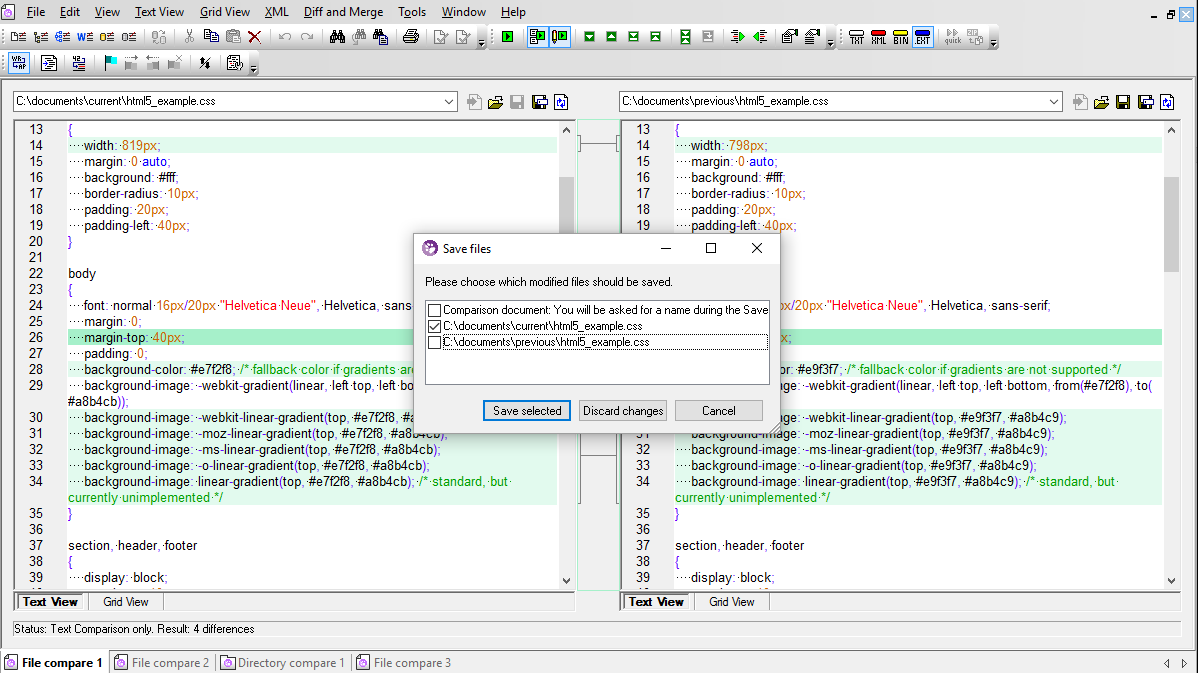
When you select two files to compare, they are opened side-by-side in the intuitive DiffDog® 2011 interface. Differences between the two files are indicated by colored highlighting and connecting lines, so that you can immediately visualize the differences between the two file versions.


File diff tool text view

The DiffDog® 2011 display options are completely customizable, allowing you change the colors used to highlight differences and even specify source code conformant syntax coloring based on file extension. DiffDog® 2011 even includes an option to select XML-conformant syntax coloring, as well.


File diff tool preferences

Advanced navigation features such as synchronized horizontal and vertical scrolling allow you to move through either file without losing track of the corresponding differences in the other file. In addition, tool bar buttons allow you to return to the current difference or select a new current difference so that you never lose your place while reviewing, editing, or merging files.

There are several other options that can help you customize the display of your files depending on their type and the requirements of your project. Some of these configurable options include:

  • Word wrap
  • Line feed (end of line) indicators
  • Whitespace indicators
  • Bookmarks and bookmark margin
  • Text folding and text folding margin
  • Ability to expand/collapse all folding nodes
  • Find / replace with support for regular expressions
  • XML-aware functionality for comparing text as structured XML


File diff tool text menu

Merging and Editing Files

In file comparison mode, DiffDog® 2011 allows bi-directional merging as well as direct editing of both compared files. DiffDog® 2011 automatically creates a back up of each file, allowing you to re-load the original file from the server or disk at anytime should you need to start over. DiffDog® 2011 also supports unlimited undo, so you can backtrack to any point in the editing and merging process. In addition, as you’re working with a file, DiffDog® 2011 constantly monitors the server where the file is stored, and, if it’s modified externally, reloads the most current version into the DiffDog® 2011 comparison window.

As you merge changes and edit your files, DiffDog® 2011 automatically re-compares the files to indicate the current differences.


File diff tool merge menu

In addition to these file differencing and merging capabilities, DiffDog® 2011 also provides impressive support for comparing and merging directories, and additional features for comparing and merging XML files in an intelligent, XML-aware manner.

Additionally, DiffDog® 2011 includes support for command line operations, allowing you to call its functionality from the command line to perform file and directory comparisons.


Find out how DiffDog® 2011 takes the pain out of managing multiple file versions. Download a free trial today!


transparent
Download
Pricelist
Buy
Comparison
Datasheet
Print
Mail
Digg
delicious
DiffDog Available
in German
.

Altova DiffDog is now available in English and German versions from our download page.

.
.

Read the Altova Blog
Read the Altova Blog!

.

NEW Get the latest Altova announcements, learn about new product features, read tech tips and industry info at the Altova Blog. Subscribe now!

.
.

transparent

transparent