![]() |
![]() | ![]() | ![]() | Superior Sequence DiagramsAltova UModel® 2009 lets you draw UML sequence diagrams that describe the interactions between objects in your application and specify the messages objects send and receive. A sequence diagram can map a scenarios described by a use case in step by step detail to define how objects collaborate to achieve your application’s goals. Altova UModel Features OverviewAltova UModel® 2009 is an intuitive, affordable, and fully featured tool to create UML sequence diagrams, and to leverage all the additional advantages of UML-based software development. UModel supports these advanced features:
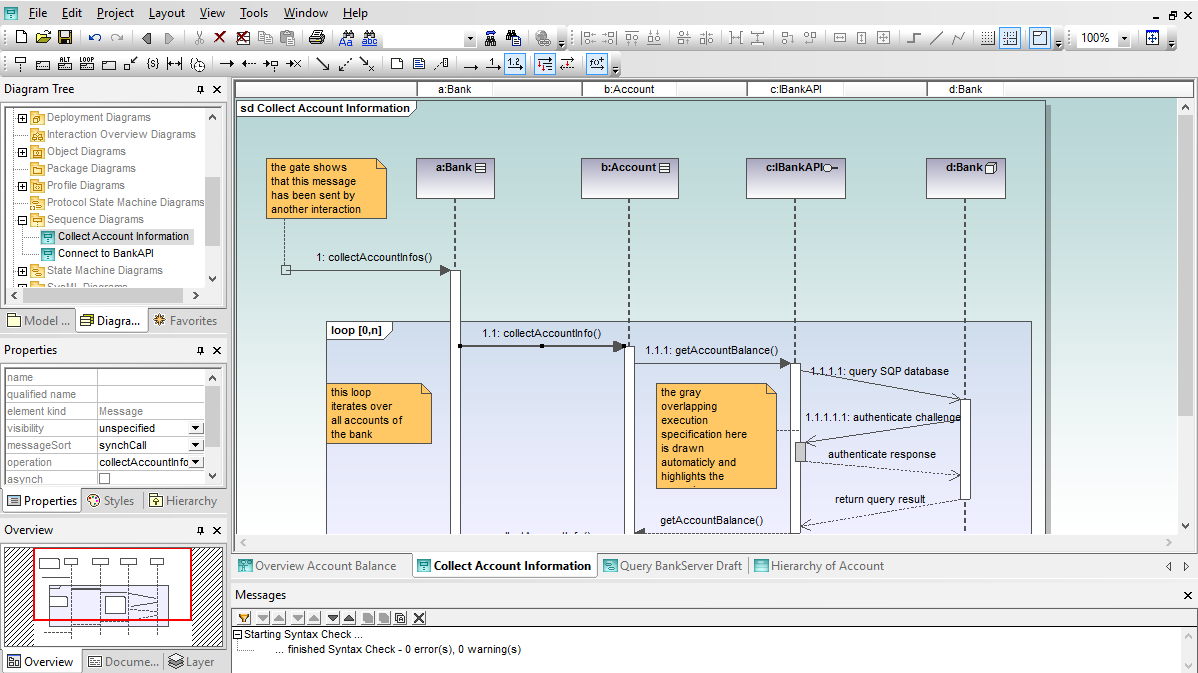
Sequence Diagrams in Altova UModelWhen you create a new sequence diagram, UModel® 2009 automatically displays the sequence diagram toolbar for quick access to specialized UML elements including lifelines, combine fragments, gates, message call and reply arrows, message arrows that create new lifelines or destroy existing objects, notes, and more. Click image to enlarge screenshot As you create your sequence diagram, entry helpers assist with element size, placement, names, and message text. You can work directly in the main drawing window, or you can edit in the properties helper window.
You can revise a work in process without deleting elements and redrawing them. For instance, you can change the interaction operator of a combined fragment through the properties window.
This feature lets you experiment with different relationships, particularly when your process requires a loop or more complicated control structure.
Flexible Sequence Diagram LayoutSince sequence diagrams will be a permanent part of your project documentation, you’ll find handy options in the layout menu to align and resize objects to make your finished diagram as unambiguous as possible. As with all UModel diagram types, you can print your UML sequence diagram at any time, copy a selection or the entire diagram as a bitmap to paste into another application, or save it as a .PNG or .EMF image file.
. . . and much more. UModel lets you easily do it all. Click image to enlarge screenshot As your sequence diagrams grow to describe complex interactions with many steps, you will probably need to extend lifelines beyond the original drawing pane. UModel® 2009 displays a special lifeline label header bar at the top of the sequence diagram window so you can easily identify lifelines even when the top portion of your diagram has scrolled out of view.
Automatic Generation of Sequence DiagramsUModel® 2009 lets you generate sequence diagrams from source code files that have been reverse engineered into UML classes. These detailed diagrams will greatly enhance traceability and accelerate analysis, reuse, debugging, or enhancement of legacy applications. To generate a sequence diagram from reverse engineered code, you simply select any operation in any reverse-engineered class, or directly from the operation icon in the Model Tree, then choose Generate Sequence Diagram from the right-click menu.
Sequence diagrams may be generated from Java, C#, or Visual Basic application code. Click here for more information on UModel reverse engineering capabilities. The following image is a small portion of the sequence diagram generated by the menu selection shown above. Click image to enlarge screenshot This UModel overview window displays a navigation view of the entire diagram. The red outline in the navigation view corresponds to the portion of the sequence diagram shown above.
The Sequence Diagram Generation dialog offers a choice that will be very useful if you plan to modify an existing application. You can choose to automatically update the sequence diagram each time you modify source code outside UModel and synchronize your UML project with the updated code.
The collection of tools in UModel® 2009 combine to help you draw superior sequence diagrams. Find out for yourself how easy it is to design effective applications – download a free 30-day trial of Altova UModel® 2009 today! | ![]() |
![]() | ![]() | ||||||||||||||||||
| Company | Legal | Press | Partners | Careers | Sitemap | Contact Us | Altova Blog | |||
|
